Server Version#: 1.18.1.1973
Player Version#: Apple TV 4K - 2.9 (13474), Shield TV 2017 (7.23.0.13123)
Logs attached for the issue (server direct to Apple TV 4K
All of this is with the same file, a HDR MP4. It happens with all files, no matter the type or size, I’m just using the same file in my examples below.
The setup is a local server (running Server 2018), an Apple TV 4K, and a Shield TV 2017 - all on a Gigabit wired network. All 3 are on the same switch.
There is then a local PC (running Windows 10), also Gigabit wired to the same switch, with it’s own Plex Media Server, the same version. All the libraries on this are just mapped drives on the same Windows 2018 server as above, the exact same files in the same locations.
Everything is set up to Direct Play.
If I play Server > Shield TV - I get the below:
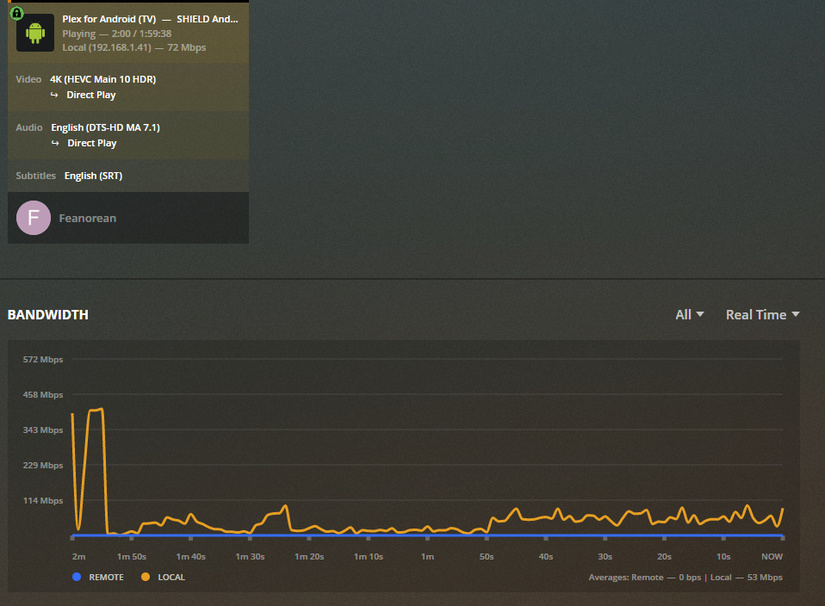
Everything plays perfectly
If I play Server > PC > Apple TV 4K, I get the below:
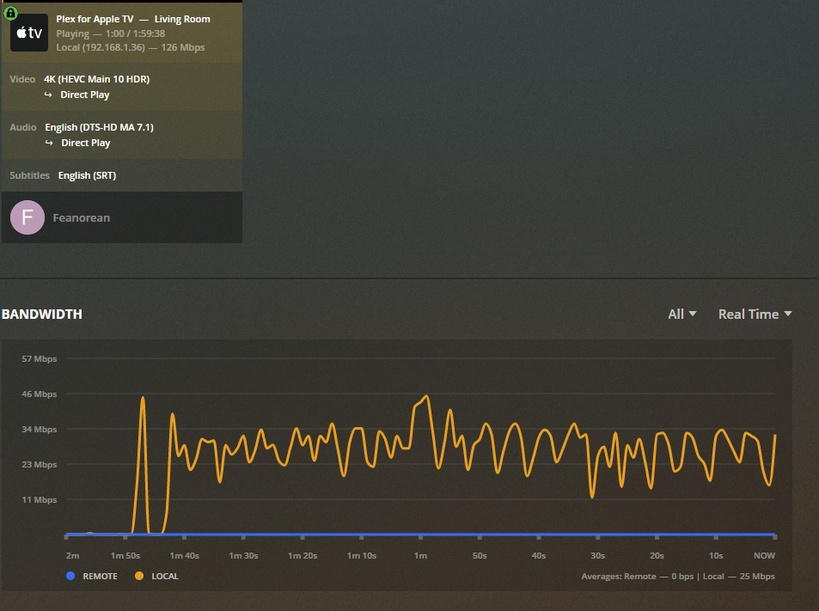
Everything plays perfectly.
If I play Server > Apple TV 4K, after an initial burst, it drops to 2Mbps, rendering almost everything unplayable, as below:

Any ideas what I’m doing wrong here? Why does it play perfectly PC > Apple TV 4K, when it’s simply using mapped drives on the server, and perfectly direct from the server to the Shield, but won’t play at all direct from the server to Apple TV 4K?
I have tried multiple cables and network cards/switches; that’s not it.
I’m baffled…but thank you for any advice!
logging (1).zip (506.3 KB)
