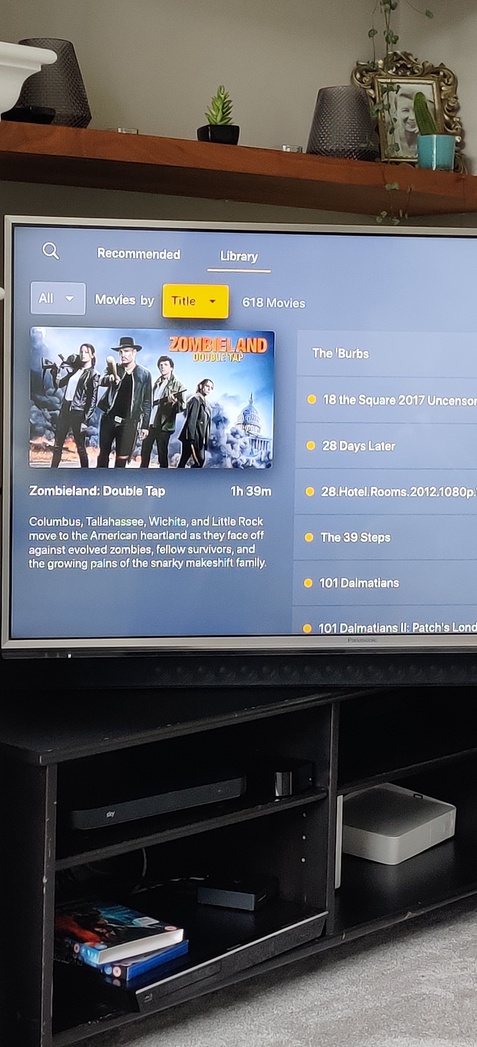
Server Version#: 1.19.2.2737-b69929dab
Player Version#: 4.22.3
Hi,
Since one of the latest updates, If I navigate to my ‘Other Videos’ Tab in Apple TV App, the and go to ‘Library’ It always resets back to Grid View, and I have to change it to Folder View. Then when I relaunch the App it always goes back to Grid View, It used to save on Folder View even if I turned the Apple TV off and back on or closed the Plex App.
Today I only have grid view and list view. Folder view is gone. FFS why would anyone want grid video, you can’t read the title you have to wait for it to scroll. Any why is there n update every few days with stupid minor changes like this. I don’t mind if you giving us new features but taking them away and making changes all the time is annoying.
I came here looking to report this same exact issue. I use the folder view for certain video collections, and it’s now gone in my ATV plex interface. Are you guys removing this as a feature?
Folder view is not being removed.
That being said… if your solely using it to group movie collections – you really should look into using actual collections. Using the folder view is a poor replacement (some exceptions apply for super specific use cases).
If your folders are no longer showing…
which PMS version do you have installed?
which version of the Plex client for Apple TV do you have installed?
where exactly have you been looking for it? – the folders view is grouped under the type of media you’re going to display (e.g. movies/folders, shows/seasons/episodes/folders, artists/albums/tracks/folders …)
atv 4k plex v: 2.16.1 (15619)
server v: win plex pass latest of this post date
I came here to report the exact same thing as OP. I’ve been using Plex for about 10 years and this is a bug that recently appeared and only affects Apple TV app.
I only use folder view for one specific library that contains Howard stern videos (I don’t use it for movies nor TV shows, i’m not a bad person Plex please believe me, I really do only use folder view on a single library).
as of about two or three weeks ago one night I did a Plex server update (plex pass chain) and since then folder view is fine but if I navigate one or more folders deep into a folder view- then only that sub folder is reverted to AND STUCK at Grid view and there are zero options at that point to change view (see picts). The only options you then have are a play button and a shuffle button.
I have deleted the Plex app on both my Apple TVs 4k reinstalled it which had me re-sign in/authenticate with the link code, but the issue persists.
I had remember tabs enabled, I did try turning this off and then turning it back on to no effect. Settings > User Experience > `Remember SELECTED Tab’ (in atv app)
pls fix this asap (or lmk what to do or provide pls) , The server change log mentioned no changes related to this as i read every line of every server change log (but i do have atv set to auto update apps so maybe it’s on atv app side?)
Why would you remove folder view. Bring it back. If I wanted to tag all my media I would. Now I have everything in folders on my plex server harddrive. Bring back folder view!
Curb it down a notch. If you’re looking at the wrong place, that doesn’t make me a liar.
As stated in the posts back in May (which you apparently didn’t bother reading, before calling others out):
„Folder view“ is no „view“. It’s part of the control letting you pick what perspective / kind of media your library should display…
Movies or Folders for movie type libraries
Shows, Seasons, Episodes or Folders for tc-Show type libraries
Artists, Albums, Tracks or Folders for music type libraries
First off, lighten up. Before you decide to continue your condescending style of customer service tone understand that comment was all in good fun. Secondly, Folder View - yes “Folder View” in its entirety was an option on that exact screen I sent a picture of. The option to simply click on “Folder View” is no longer there in your Apple TV app.
And, on top of that - I’m obviously not the only user with this issue - otherwise there wouldn’t be a forum post with multiple people.
Either you removed the option to sort on Folder View on Apple TV or you didn’t. If you didn’t - where is it? Having to make collections and libraries and tags is just not user friendly.
For your info: VLC for Apple TV allows you to browse your storage folders in Folder view mode, by default. No other configuration required. Connect through the Local Network option, enter the password you set when you created the SMB share for your Plex server and off you go.
“VLC for mobile” - free to download via the Apple TV App store.
Folder view has not been removed. Where you click to access it may have changed, but that doesn’t mean it’s gone. In a library, it can be found by clicking:
Movies -> Folders
TV Shows/Seasons/Episodes -> Folders
Artists/Albums/Tracks -> Folders
Hi, i have lost the folder view too. Having been through this thread i dont see a fix. The last advice above doesnt make sense to me as i am in library view and just see options for ‘all’ movies by title and then in view options only grid or list.
Settimgs i have remember selected tab on. Version of plex im using is 7.2.1(16013). Apple tv os 13.4.6(17L570)
Has anyone found a way to resolve?
Thanks
Nope doesnt let me. There is a drop down All menu with text Movies by which is not selectable and then a drop down list that shows Title amongst a range of other options
Appreciate the follow up Dave!
Im running it on a Version 1.16.6.1592
Qnap wasnt showing any updates
So I installed the manual one of 1.19/2.2935…and its now working
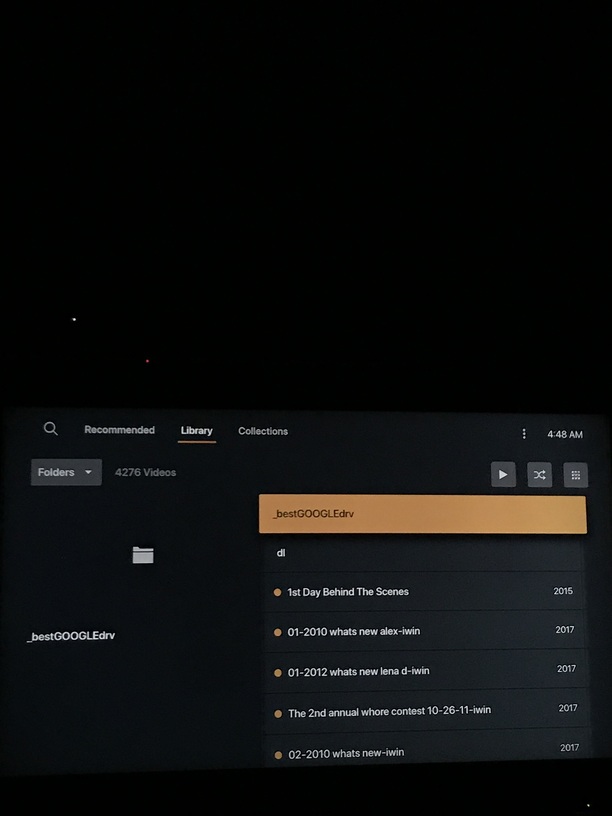
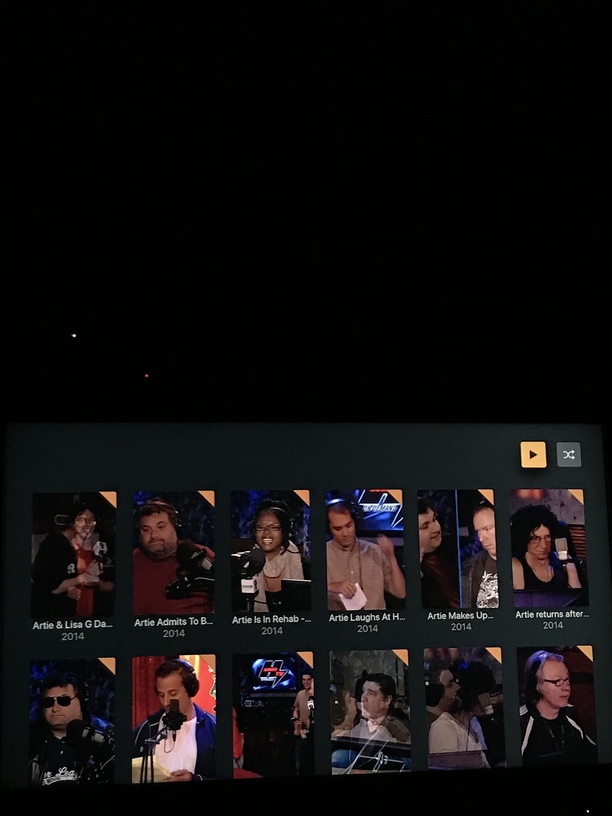
 - folder view is no longer in the options.
 Got it, your Ninjutsu is strong. my apologies.