I love the feature where Plex will get subtitles from the internet. That works on my Xbox, on my ancient Roku, in my Safari Browser, in my Chrome Browser, in my friend’s PS5, on another friend’s smart tv. But NOT my AppleTV 4.
![2020-12-02 15.45.53|690x517]
Then a screenshot from hitting settings then hitting subtitles.
(upload://cTXoBzhWfr5ZYJMpqTt04gx2Ocm.jpeg) ![2020-12-02 15.44.16|690x517]
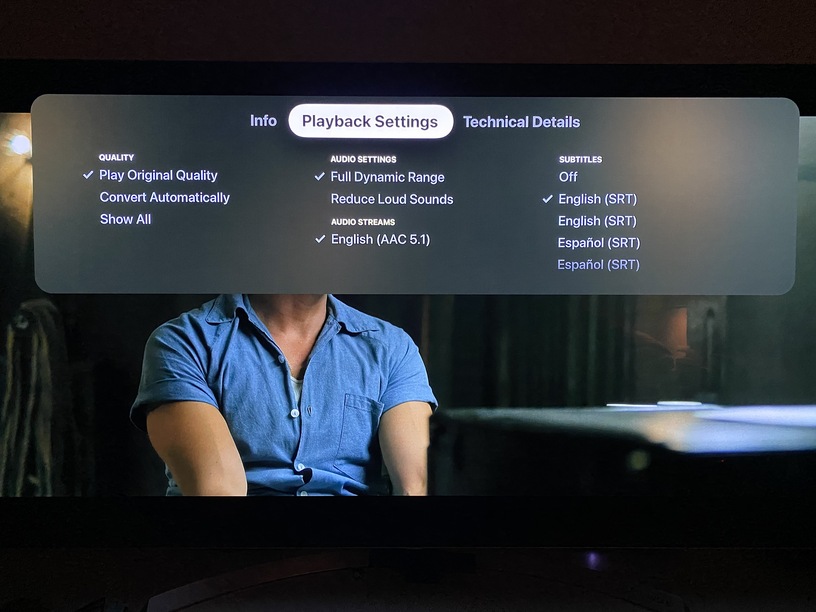
Then a screenshot from hitting play and then pulling down and selecting subtitles.(upload://bRY1E2s0nZE4i0cMTguqMnsOfWt.jpeg)
As you can see the words ‘preview’ and ‘more’ don’t appear, and there is no download option in the subtitles part.
Here’s what my pulldown menu looks like. I’m guessing that’s only the case for local files - for online streaming it looks different. So what kind of content do you play?
Yeah, I can play a subtitle contained in the video file. I don’t know if I can play all types, but I’ve never had a complaint about that. But like I explained, it is getting a subtitle track on the fly from the internet that all the other players can do, and which the help page says the AppleTV can do, which I can’t do.