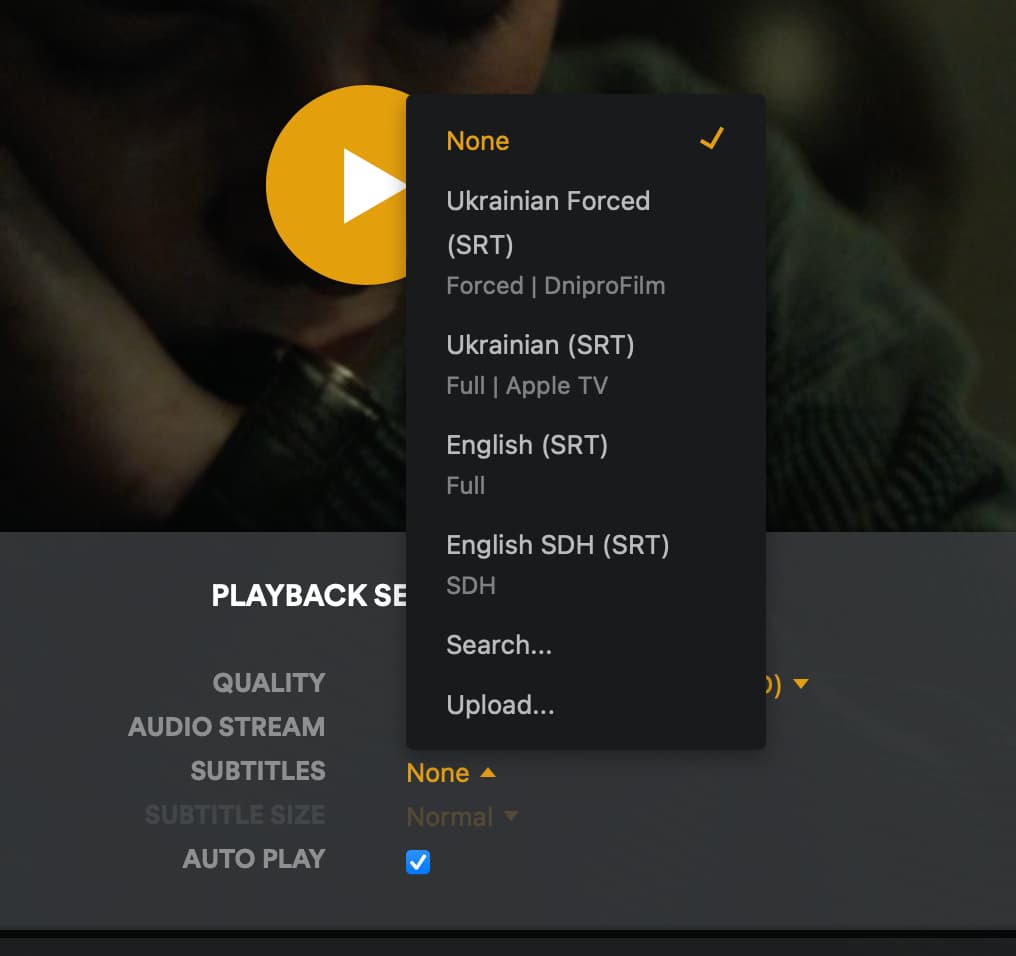
I have recently updated my Plex server on NAS WD-PR4100 to Version 1.32.0.6918 to have Auto-select subtitle mode for TV Show option
It is present now, but it doesn’t work for some reason.
Each episode starts with subtitles switched off. I have to manually enable them as I used to do before.
My settings:
Account:
Specific TV Show:
Do I understand correctly that the TVShow settings should override the account ones?
Server Version#: 1.32.0.6918
Player Version#: Version 4.104.2
Please post the contents of the Plex media info XML of one such episode.
(it must be an episode where you personally never did touch the manual track selections)
Thank you! This is looking just fine so far.
Could you
-
activate debug logging (not ‘verbose’!)
- quit Plex Server
- wait 1 minute
- start Plex Server
- wait 2 minutes
- start playback of this episode
- wait 3 minutes
-
fetch log files and attach them here
Your screenshot shows you have it set to manually select. This means PMS will not pick the subtitle for you.
Oops. Sorry. Didn’t see the show specific settings at the bottom. Checking your logs now.
Hi @anon18523487! Any luck investigating my logs?
Hi!
Any updates on this?
The only “fix” I came up with is to forcefully apply subtitles for all movies of account level…
Oh sorry. Lost track. I rechecked your logs and they show that PMS did not detect any subtitles. Can you try again with new logs and also provide the xml for the video you played.
Done! There are definitely subtitles in my file and the web player detects them correctly.
Plex Media Server Logs_2023-05-30_21-25-46.zip (4.8 MB)
silo.xml.zip (3.6 KB)
It looks like you previously chose a subtitle and then changed it to “none”. Once a subtitle is selected manually, PMS no longer does an automatic selection.
To confirm this we would need to look into your database. Or are you familiar with SQL? I can provide a command you can run to check. And if that is the case, we can remove this info so PMS will auto select again.
I can provide the database file or run the SQL query.
Please provide the steps on what to do.
select * from media_part_settings where media_part_id = “12691”;
If you get a result, then the subtitle has been set. You need to delete that entry to reset it. Or you can delete every entry in that table.
What is the location to the database on my NAS WD-PR4100 and how can I access it? Do I need a user/password for that?
Should be in /mnt/HD/HD_a2/plex_conf/Plex Media Server/. You can use the instructions in https://support.plex.tv/articles/repair-a-corrupted-database/ as a guide on how to run SQL commands. If that guide doesn’t make sense, then I would avoid doing this. You can mess up your database really badly if done incorrectly.
How can I access this path if it contains spaces in the name?
root@MyCloudPR4100 binaries # pwd
/mnt/HD/HD_a2/Nas_Prog/plexmediaserver/binaries
root@MyCloudPR4100 binaries # ls -la
drwxr-xr-x    4 5556     5556          4096 Apr 11 13:58 .
drwxr-xr-x    4 5556     5556          4096 Apr 12 09:54 ..
-rwxr-xr-x    1 5556     5556       1477072 Apr  6 19:35 CrashUploader
-rwxr-xr-x    1 5556     5556        274712 Apr  6 19:15 Plex Commercial Skipper
-rwxr-xr-x    1 5556     5556       3376312 Apr  6 19:32 Plex DLNA Server
-rwxr-xr-x    1 5556     5556        115824 Apr  6 19:15 Plex Media Fingerprinter
-rwxr-xr-x    1 5556     5556       4890904 Apr  6 19:36 Plex Media Scanner
-rwxr-xr-x    1 5556     5556      19137360 Apr  6 19:41 Plex Media Server
-rwxr-xr-x    1 5556     5556       3408944 Apr  6 19:15 Plex Relay
-rwxr-xr-x    1 5556     5556         10864 Apr  6 19:15 Plex SQLite
-rwxr-xr-x    1 5556     5556         10904 Apr  6 19:15 Plex Script Host
-rwxr-xr-x    1 5556     5556        324496 Apr  6 19:15 Plex Transcoder
-rwxr-xr-x    1 5556     5556       3088792 Apr  6 19:15 Plex Tuner Service
drwxr-xr-x   10 5556     5556          4096 Apr 11 13:58 Resources
drwxr-xr-x    3 5556     5556          4096 Apr 11 13:58 lib
root@MyCloudPR4100 binaries # cd "Plex Media Server"
-sh: cd: can't cd to Plex Media Server: Not a directory
root@MyCloudPR4100 binaries # cd "Plex\ Media\ Server"
-sh: cd: can't cd to Plex\ Media\ Server: No such file or directory
That is no folder. That is the Plex Media server executable.
You need to find the Plex data folder, not the Plex program folder.
Oh, sorry. My bad.
I didn’t get the result:
sqlite> select * from media_part_settings where media_part_id = "12691";
sqlite>
Although the table is not empty:
sqlite> select count(*) from media_part_settings;
count(*)
--------
179
I have deleted all entries from that table, started the Plex server, refreshed the Metadata for this library and tried again with a new TV show. Didn’t help.