Server: 1.23.0.4438
Roku: 6.7.24
iOS: 7.17
Plex for Mac: 1.31.1.2262
Plex Web: 4.56.4
The Automatic setting for subtitles in all players says: “(Default) Burn in subtitles when the subtitle is an image-based format (e.g. VOBSUB, PGS, SUB/IDX, etc.) as well as for complex ASS/SSA subtitles.”
I have noticed that Plex for iOS doesn’t handle the complex ASS/SSA subtitles the same as other players.
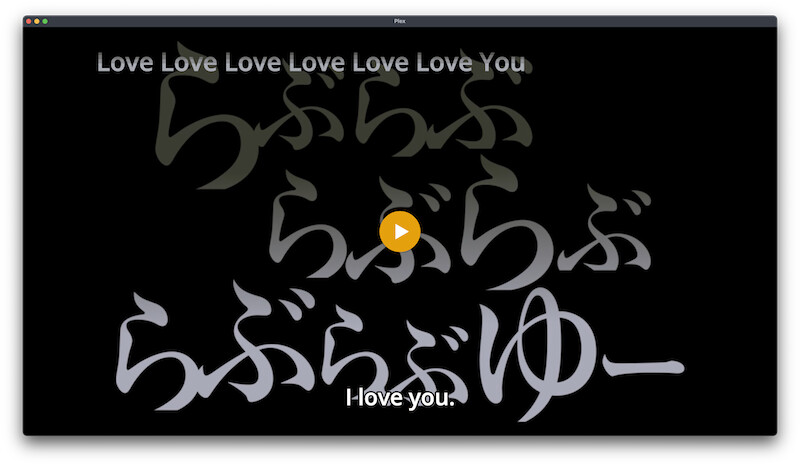
Example from Plex for Mac, Plex Web (app.plex.tv) and Roku:
The same subtitles on Plex for iOS using default video player:

On Plex for Mac it renders the subtitles natively (no burn-in), and on Roku\Plex Web it is kicking in the burn-in for the subtitles. On iOS there’s no burn-in triggered for the subtitles but it is also not handled correctly natively either.
If I switch the Plex for iOS player to “Use Old Video Player” in advanced settings then it burns the subtitles in and they are displayed correctly, the same as the other players.
Is there a setting I can adjust - besides “always” for burn-in - so iOS devices will render the ASS/SSA subtitles in the default Plex for iOS player similar to the other players either natively or by triggering a burn-in? I have “Override Subtitles Styles” off.
What features\functions am I missing using the old player? I thought I was prompted by a setting saying the new player had to be enabled but couldn’t recall which setting.

