Server Version#: 1.32.4.7195
Player Version#: 1.73.1.3905-c1a43e18
Tuner Make/Model: HDHomeRun Connect
Guide/Lineup name: Freeview
Using XMLTV?: not that I know of
Channel number/Name: ITV3
I’m recording Inspector Morse. IMDB and Wikipedia say it has eight seasons, while TVDB and The MovieDB both say it’s seven and place all five episodes of season 8 into the Specials section.
I would prefer to see these episodes as season 8, so have not changed the filenames or folder structure that the DVR has used: the episodes are named this way:
\TV_Shows\Inspector Morse (1987)\Season 08\Inspector Morse (1989) - S08E01 - The Way Through the Woods
This means that Plex is displaying these episodes as season 8 rather than as specials, nor have the agents retrieved any metadata. I also note the inconsistency between the folder’s year (1987) and the episode’s year (1989) - I suspect this doesn’t really matter, as all of the episodes from seasons 1-7 have been correctly identifed and tagged. I did correct the dates and “fix” the match to refresh the metadata, but that made no difference.
If I were to rename the files to be specials (i.e. S00E01, etc.) and allow Plex to show the “Specials” season (and therefore make the agents fill in the metadata), it doesn’t appear to be possible to edit the season to make it appear as Season 8, unless I’m missing a trick.
Assuming that there’s no way to make the agents use the IMDB data to populate the metadata, is there any way to fix it other than by manually editing the season and episodes? Thanks in advance.
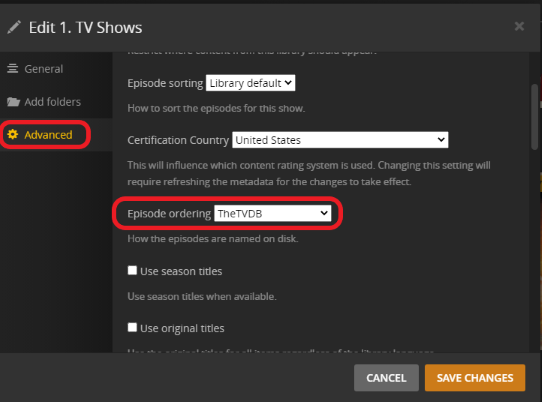
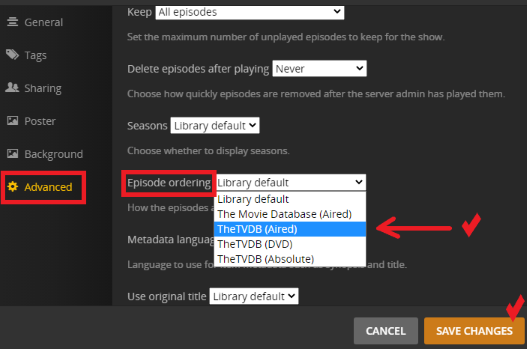
You can change the show order for everything in your library
3 dots next to the library → Manage Library → Edit → Advanced
Or for one show at a time as needed
**Click the pencil on the show poster and go to advanced **
The specials will be in a specials folder but they will populate your continue watching by the aired date making sure you don’t skip over them if they should come at the beginning or mid-season
You can always look at the DVD order but that doesn’t always mean the DVD you have will match exactly
Thanks for the reply, but that’s not what I was asking. I’m aware of how to work with Specials and change the ordering, which I do with some of the shows I watch.
What I was asking was how, if it’s possible, I can get Plex to show the content as a season, not as specials.
I am now a little more confused. Another episode was recorded overnight and while it’s still been named as Season 8 and stored in the Season 08 folder, Plex has managed to add the correct metadata automatically. I don’t understand how it failed to do that for the earlier episode but succeeded this time.
Also, can anyone explain why the episodes are being named as season 8 when the agents Plex is using (the library uses “Plex TV Series” for both scanner and agent, and TMDB is the default for the episode ordering) show the episodes as specials, not season 8? The filenames consistently show the wrong year while both TMDB and TVDB show the correct one. Where does the DVR get its data from?