Yes, Norwegian matching is a bit terrible. The whole bokmål/nynorsk thing has made everything so complicated for so long.
I just wish that Plex (@drzoidberg33) would fix the TVDB agent with Norwegian, right now it’s impossible to use. This issue have been raised multiple times the last years but it seems that all efforts have gone into this new Plex TV agent.
The new agent is great and fast for English spoken material but for everything else its spotty. If Norwegian would work for TVDB it wouldn’t be a problem to just fix those matches but no. Drives me mad every time. So many hours put into Norwegian tv series on TVDB and we’re not able to use it.
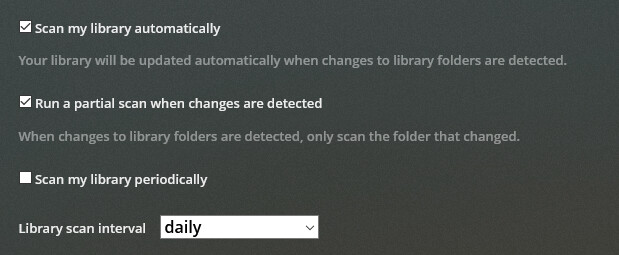
I wouldn’t run Periodic Scanning AND Auto.
If Auto Works - you don’t need periodic - but you may need to fix Auto.
A periodic scan, as you have discovered - puts your entire Plexiverse through the grinder for what could be an eternity - grinding away at your storage lifespan in an unnecessary complete library scan.
(6500+ Movies - in folders <–that matters)
(600+/12,500+ TV Shows/Episodes)
At my house that’s just something to avoid, if possible. It’s possible, so I do.
A partial auto scan only works the areas that need working on.
That’s what we do.
PMS Version 1.22.1.4228
I’ve found a bug. When creating a new library and choosing library language “Norsk” (Norwegian) and going through the rest of the steps, choosing directory and then adding it with the new Plex agent it still loads everything in “English (United States)”. I have to stop the scan and go back into settings and change it. Only, now the list to select library languages from is much longer and the Norwegian option is now “Norsk bokmål”.
Also, maybe it’s been covered in this thread already but I couldn’t find it when I was searching, will the TVDB and TMDB agents be added back in the “Fix match” menu?
Many non-english spoken TV shows have quite bad metadata with this new agent and it would be much easier to just fix the match direct with either TVDB or TMDB instead of having to track down where the PTVA have fetched that “bad” data from and edit that and hope it gets changed.
It won’t be added back as it being there was a bug in the first place. It had limited usefulness for searching for things but all the match data would still come from the Plex agent. You can still match using TVDB and TMDB ids though as mentioned in the first post:
The new agents already combine metadata from multiple sources so there is no mixing of agents anymore, it will always match just with the Plex agent.
The TV agent is still in beta and improvements for translations are being worked on currently. I’ll update this thread when that’s ready to test.
(Library) Unmatched episodes in matched seasons wouldn’t respect local metadata preference in the beta TV agent.
But it is still not reading my local Metadata.
Found another Bug. I know that if you have local metadata, it doesn’t pick up Airdate. But what it is doing is, if you have custom data, it will pick whatever the airdate is for episode one of that season, etc.
So if I’m doing custom meta data because a season was aired out of production order, it still pulling in the airdates for episode 1, etc, even though that episode is not episode in thetvdb or themoviedb.
It seems to filling in the data from the media agent sources.
Is there any reason why Plex can’t read a custom airdate/release date for tv shows?
Will it be possible to select which show level cast data to use? Currently it seems to combine data from all sources and therefore I get some results without the (voice) for animated shows or even English voice actors that I don’t want to show up:
Ok, how is series titles going to be handled in regards to translations?
On TVDB, if the series has never been given an official English title the series should be given a literary translated title by the user. (This was just recently settled on)
While on TMDB, if the series has never been given a English title there should not be any translation added.
Will this create conflict and what title will PTVA choose? I’ve checked the box “Use original title” in the library advanced settings but can’t really test it since TVDB’s translations hasn’t been added yet.




 I did fix this, but then I introduced a dumb bug that broke it. I’ll get this fixed asap.
