Server Version#: Version 1.22.3.4392
Player Version#: Plex Web - General Version 4.54.5
Hi everyone,
I’ve got a problem with a blank “?” library showing up in error in the client views for one of my Windows 10 Plex Media Servers. If I log in to the web app client for my “LEET Reference” Plex server using Firefox or Chrome, the ‘front-end, user-facing’ list of libraries will show my four existing libraries (Films; Internet; Music and TV Shows), a link to my Playlists, and a link to a mystery blank library labelled “?” which has no content and cannot be interacted with. When I click the ‘3-dots’ mini-menu button to the right of the “?” icon, the only option available is to Pin/Unpin the blank “?” library to the Home screen. See screenshot below:
For info, this blank “?” library is visible in the web app (Plex Web - General Version 4.54.5) on Firefox/Chrome browsers, and also the official Plex For Windows app (Version 1.30.1.2115-81e1fc3f).
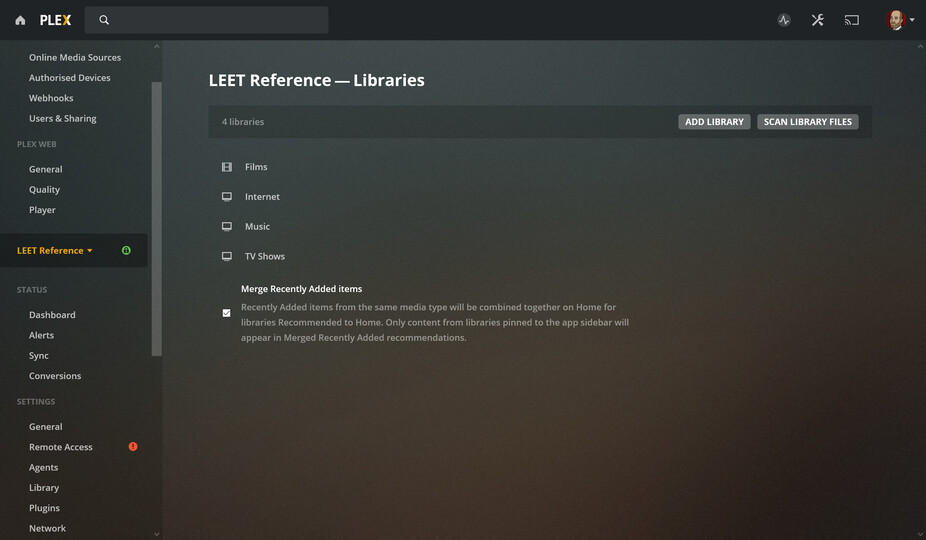
However, if I go to my server Settings for the “LEET Reference” Plex server via the web app and navigate to Manage Libraries, I can only see listings for my four known/intended libraries (Films, Internet, Music and TV Shows) - the blank “?” library is not listed and therefore cannot be deleted/removed to clean up the erroneous blank line for the non-existent library on the front-end client views. See screenshot below:
There haven’t been any user responses suggesting a potential fix for my issue above, so I’m guessing this might be a genuine bug in my Plex server rather than a setting that I’m missing or have set to the wrong value in error etc.
I think my problem may need investigation by a Plex employee with knowledge of back-end functions and bugs, so tagging in @BigWheel to flag my topic: please could you flag my blank “?” library issue above with whichever of the team would be best placed to help me solve this problem?
Thanks BigWheel. I’ve tried doing a Restore Defaults via the Debug menu in Settings for my server, and after doing that (which seemed to have taken place as I had to reselect my preferred server and which elements I wanted to Pin to my Home Screen), sadly my blank “?” library is still present.
Please can you let me know what logs I should be pulling to help investigate?
Thanks again BigWheel. I’ve found what I’m sure is my authentication token (browsed to a movie in my Films library; selected Get Info from the ‘3 dots’ menu, selected View XML, and then copied the token in X-Plex-Token=… format from the end of the URL address in the tab showing the XML).
I then pasted the token value into your example http://<localhostIP>:32400/library/sections&X-Plex-Token=<YOURTOKENVALUEHERE> URL with the “localhostIP” being the address that I can see in the URL bar of the web app of my Plex server (the numbers prior to the “:32400”), but using my own “localhostIP” numbers and my own Plex token, I only got to a blank “401 Unauthorized” page.
Great, that change worked, thanks, I can now see the XML. It’s hard to tell because I know virtually nothing about XML and so I’m not certain I’m looking at the right thing, but I think I maybe can see a reference to the blank “?” library in there: I can see a number of <Directory> sections that seem to correspond with my four ‘proper’ libraries, containing parts of XML code like type="movie" title="Films" agent="com.plexapp.agents.themoviedb" scanner="Plex Movie Scanner" language="en"
And then towards the bottom of the code there is an entry which has the following equivalent to the Films example above: type="unknown" title="" agent="" scanner="" language=""
Maybe that last section might be my erroneous blank library?
I think it is a database issue. Can you please manually optimize the database (from troubleshooting section of server settings) and if it still has that empty library would you mind sharing a copy of database so I can have someone more knowledgeable than me have a look. ( click on my username to message DB) it can be gotten from same troubleshooting page
Thanks BigWheel. I tried manually optimising the database in Troubleshooting, and the empty library is still present. I’ll send you a PM with a copy of the database downloaded from the Troubleshooting menu as requested.
I don’t quite know what the actual solution was at a database level, but the Plex team members in my post above were kind enough to take a look at my database (sent by PM), perform whatever XML editing malarkey was necessary, and send it back to me to replace my existing (and corrupted) database.
If you’re experiencing a similar problem, it’s probably best to contact one of the Plex team members above directly.