Server Version#: 1.20.1.3252
Player Version#: ALL
I am getting blank thumbnails whenever I change out my movie posters. They show up in the pop-up window, but changing them out results in PMS refreshing the poster with a blank.
Server Version#: 1.20.1.3252
Player Version#: ALL
I am getting blank thumbnails whenever I change out my movie posters. They show up in the pop-up window, but changing them out results in PMS refreshing the poster with a blank.
Something has caused the image index and what PMS thinks it has to be unusable.
The quickest solution is to clean out all the cache areas.
Stop Plex in Package Center
Open FileStation - Plex - Library - Application Support - Plex Media Server - Cache - Photo Transcoder
Highlight all the files on the right pane (as shown here) and delete
Next, Highlight Plug-in Support / Caches
Again, select all the files in the right pane and delete them (Agent caches)
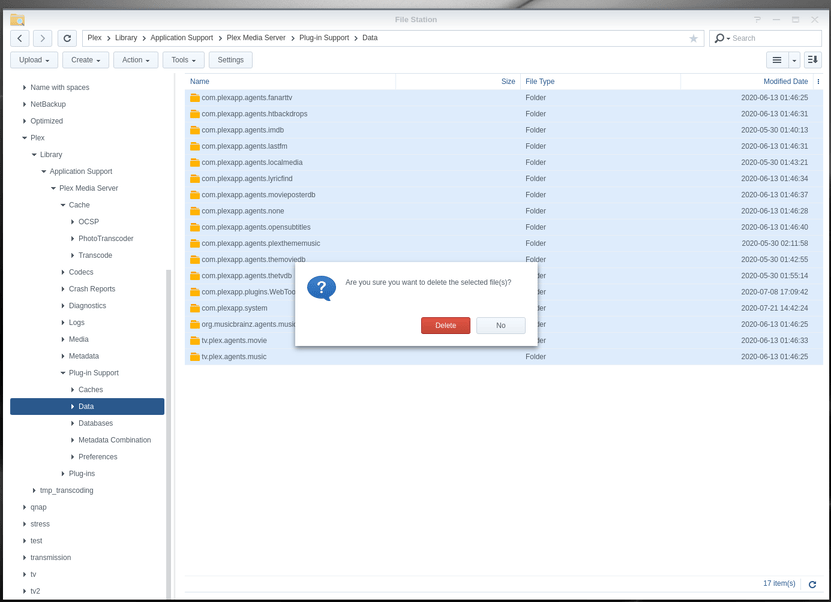
For the final step, we will reset the Plug-in Support / Data (not Databases). Again, select all the files in the right pane and delete them (Agent data)
With all three areas cleared, PMS no longer has any bad images or information about your files.
Start Plex
Go to each library section and “Refresh All Metadata”.
It may take time to redownload everything. You will see the posters “Flip/Flop”
I also notice that under my main movie section that the movie agent was somehow out of date and it gave me a choice to upgrade to the newer version, which I did, I then refreshed metadata for my movies and now it’s all good again. Thank you so much for your help! I really appreciate it!
This topic was automatically closed 90 days after the last reply. New replies are no longer allowed.