I am using the latest app (Roku) and Plex Media Server (at time of this posting) and only recently noticed anything played through the Plex app on Roku is much quieter than other apps on the Roku. I have adjusted the Roku to “volume leveling”. Am I missing something? Has a recent PMS update caused this? Any suggestions?
When you enable that Roku Feature in Plex - it forces a transcode of the audio. If you don’t need an audio transcode don’t enable it. It’s not really designed for local playback and it’s behavior is erratic - not to mention it forces an audio transcode.
It is handy for Prime or Netphlax when dealing with an audio situation, but other than that is probably best to be avoided.
Disable the feature - then restart the stream - to regain Direct Play of audio in Plex.
I dont think you understand me…the Volume Leveling feature is done through the Roku settings by pressing * from any application running and applies to the Roku’s audio output.
Oh yes, I do understand fully.
When engaged it forces Plex to transcode your audio and Plex’s ability to downmix fine audio is… uh… less than stellar.
Turn the feature on - check the dashboard.
Turn the feature off - check the dashboard.
If you have low audio - that probably won’t help - but it will trigger a transcode of your audio stream.
A hard fix is to transcode the file in a third party app with a increased audio Gain.
Tell me about it.
Every single file that enters the Plexiverse gets a pass through Xmedia Recode to create fully compatible audio - and normalize the levels. Problem solved, but not without a little labor.
I was able to watch S3 of Unforgotten on Prime the other day by using that Roku Feature. I couldn’t get it turned off fast enough when I got back to Plex. It is simply awful.
IF the Roku App still had ‘Volume Boost’ and you triggered a transcode with that Roku Setting - that could be useful 'cause Boost ONLY worked on transcoded audio. Of course, we don’t have Volume Boost in the Roku App these days, do we? ← the reason probably something like when the Roku App is Levelling and Plex is Boosting - your PMS explodes.
Probably a bad thing.
The dreaded low Volume syndrome, I experienced it with those old and horrible avi files. They just had to go, replaced them with lovely Hevc, no more problem…
I just Direct Played an item with an AC3 5.1 stream - then turned on Levelling.
Plex leapt to action and transcoded an AAC 2.0 audio stream - and I gotta tell ya, that did squat for levelling - but it did effectively destroy the audio.
I’ll have to recommend NOT turning that on if you expect something wonderful to happen.
A dud setting then…
I’m glad all my clients play AC3 5.1 channel without issue.
After reading what you wrote below, it seems you are referring to the Plex settings within the app for audio. My Plex app doesn’t have any settings for audio. Im referring to the Roku remote where you press * to access a submenu with Roku that give you only 1 of 3 options: Off, Night, Volume Leveling.
I have the Roku setting “Volume leveling” on all the time and i never see any excessive transcoding. I “think” it only triggers transcoding if it is toggled on during playback.
In fact I don’t really see how Plex would know as “volume leveling” is part of Roku’s post processing and in most cases once an app tells Roku to “Play this” and points to the stream to be played, Roku is in control of both the audio and video and only communicates back to the app if there is an error.
I know exactly what the * reveals - and that is exactly what I’m referring to
Levelling Off:

Levelling On:
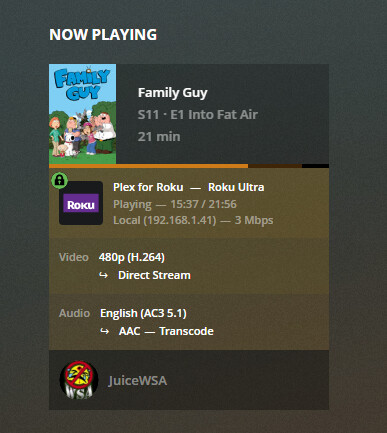
I don’t run AAC Audio normally but here’s some AAC 2.0"
Levelling off:
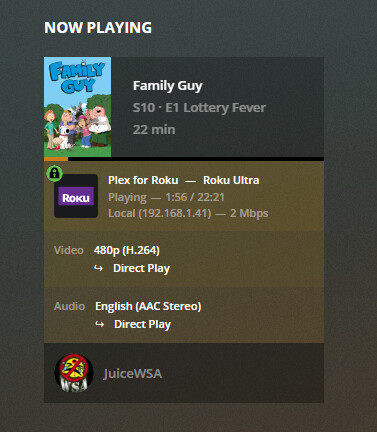
Levelling On:

So - AAC 2.0 Direct Plays either way, but Levelling does nothing in the way of Levelling - that I can hear.
I can tell you this: I have been using Plex for over 7 years now, so I know my way around how PMS works and how to tune videos so transcoding isn’t needed. None of my videos transcode, ever. If you know the proper way to use an application like Handbrake, your PMS will never transcode because it won’t ever have to. To put it simple: transcoding is for videos that aren’t tuned to perform as they are on PMS.
I create ALL the material on my PMS. With Handbrake.
My PMS doesn’t transcode - unless I turn on Roku Levelling.
As I’ve clearly shown above.
I did find AAC 2.0 doesn’t transcode when Levelling is activated, but there is no levelling that I can tell - so I wonder why I’d ever turn it on.
As other notable forum members have said, in a perfect world Transcoding would be a ideal solution. That is so true…
At present the best solution is to collect files that do not transcode on your devices, use a third party app to transcode prior to adding to your Libraries if required.
Source your devices file limitations and eliminate transcoding on the fly. Also remember there are a few caveats, Audio, Video and subtitles all need to be considered with some Plex clients. Avoid HEVC transcoding in third party apps, very CPU intensive and it’s worth is debatable.
So do you homework, once you have, Plex will be your Oyster or almost. Lol 
