I don’t think my drives sleep but I’d have to double-check. My PMS and drives are in a single Debian 10 box. Do the logs show that specific behavior? I was just wondering why only this movie got affected. I’ve been using these drives for a few years now and it’s the first time the Shield acted this way for a specific movie.
I hadn’t looked at your logs before. It was a guess based on your description.
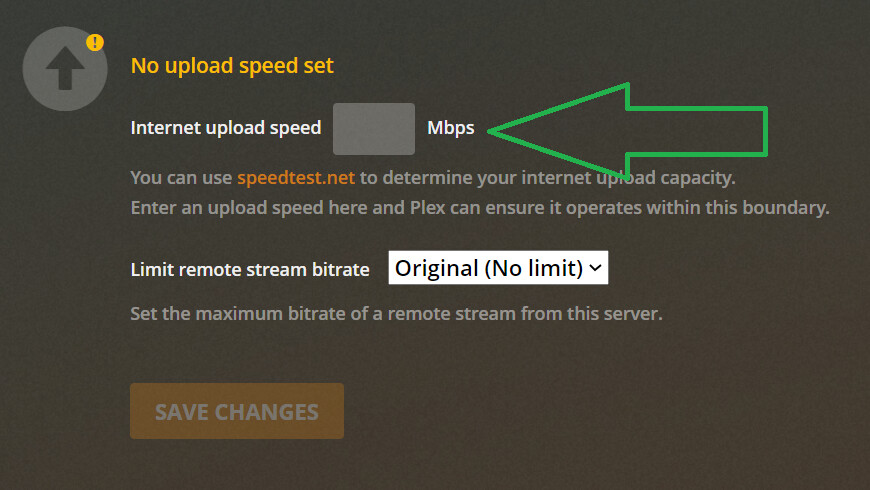
I looked at your logs now and they are showing a 80 Mbps limit being applied. Your file is >90 Mbps. I’ll need to check if this is something that is specific to the Fire TV devices. Nothing else would apply an 80 Mbps limit.
The Fire TV devices have trouble when the bitrates get really high like this. Huge bitrate files like these really stress out devices, especially little ones like the TV sticks.
If I remember correctly, you did ask me the same thing in the past about the disks sleeping and I know I confirmed that they were not, so there’s that.
The latest logs were from a Shield, not from a Fire TV device but I also see that 80Mbps limit error from when I try to play with the Shield OR from the Firestick. When I was testing the Firesticks in the past, I did try to play a 150Mbps 4K HDR Star Wars file and it played it just fine as long as it’s direct play of course.
EDIT: Here’s the link to the same question you had about drive sleep before:
I didn’t think the devices have a limit. I’ve also DP high bitrate files.
I have no idea what that limit could be coming from.
The only other thing is somehow the device thinks it’s on a remote connection and you have this setting enabled. You said you were playing from a local server so this shouldn’t be the reason.
What do you mean by DP?
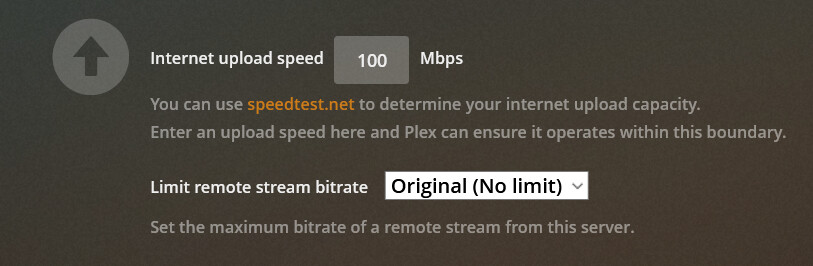
I do have that setting enabled but it’s set to 100Mbps, not 80Mbps:
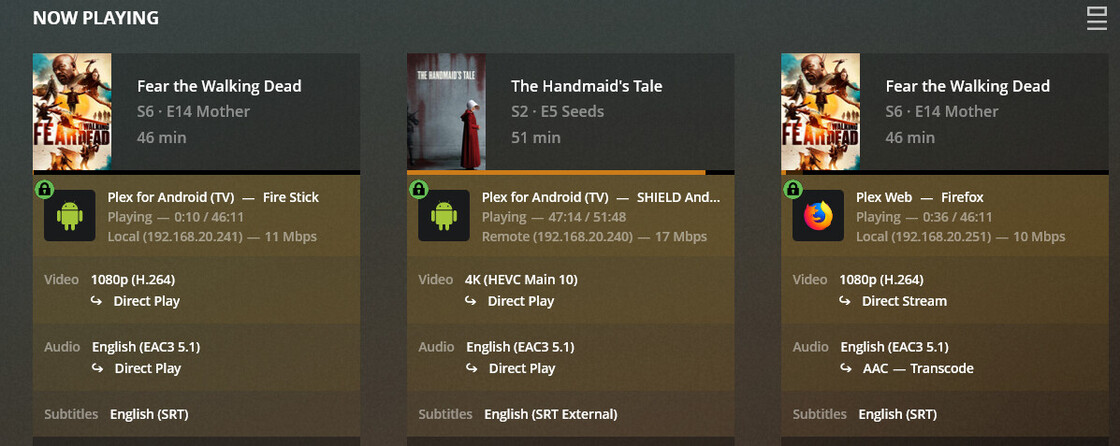
But, I tried playing from my Shield now and checked the PMS Dashboard and noticed that it treats it as a remote stream for some reason! Why is this? I tried playing from my Firestick and it’s treating it as a local stream. Everything is in the same subnet (192.168.20.0/24).
Any other ideas? I’m thinking Plex “sometimes” treats my Shield as a remote device and sometimes as a local device which explains why playing Pitch Perfect 3 did not work the first time while it worked when I tried after a few hours. However, I have a 100Mbps limit which does not explain the 80Mbps limit being mentioned in the logs?
EDIT: Also, even though my Firestick is detected correctly by PMS as local, it cannot play this file. For what it’s worth, what I did to fix this was to remove the Internet upload limit. I then put back the 100Mbps limit and it still worked. There’s got to be some logic bug with how this upload limit is being implemented.
DP - Direct play (i.e no transcode)
Ok that is it. Plex will use 80% of that limit when streaming remotely. So your setting of 100 Mbps explains the limit used by the server of 80 Mbps.
From your log above.
Request: [192.168.20.240:42914 (WAN)
So, your server is seeing that device as being remote even though it’s on the same subnet. Are you using a WiFi repeater or other device to extend your Wifi coverage? These devices can create their own local network reusing the same network subnet so it will appear to be on the same network, but not.
Ahh, for some reason I was thinking DisplayPort, lol
Ok, got it. No, I’m not using a WiFi repeater. I’m pretty well-versed in networking and in this location I only use one ASUS RT-AC66U as a switch/AP and one pfsense router. There’s only one VLAN/subnet which is 192.168.20.0/24. The Shield is connected wired to the switch, the Firestick is connected wireless to the AP, and the PMS is installed natively in a Debian 10 box connected wired to the same switch.
In the other location (where my other users in the family are), the network there is more complex. Lots of Ubiquiti AP’s and switches and one pfsense router responsible for routing between 5 VLANs/subnets and I don’t recall having seen this issue there.
I’m not familiar enough with pfsense or setting up vlan’s to know if there is a problem in there. But as long as PMS sees the client as being remote, there is going to be lot of extra network traffic which is likely contributing to your issues.
For devices that are on the same subnet, they won’t be even using their gateway (pfsense) at all. The traffic from the client to the server and back will all be layer 2 (MAC addresses).
I have to ask though, what criteria does PMS use to consider a client as local or remote? I was assuming that it only uses the subnet as basis but I guess I’m wrong.
Unfortunately, I don’t know that level of detail on how the network stacks work. That’s above my head.
That’s fine. Is there someone from the Plex team we can reach out to? I’ll troubleshoot this myself but I need to know what criteria PMS uses for tagging these client as local or remote.
I saw some threads having the same issue and their fix was to re-enable remote access. I did that and restarted both PMS and the Shield and it’s now being detected as local. Weird issue but it’s working now.
My only pending issue now is that Firestick playback issue when subtitles are turned on before playback even though Auto Adjust is disabled.
Provide me a new log from the fire tv app after reproducing and I’ll look.
Sure thing. Here you go:
Plex Media Server.log (3.2 MB)
FireStick.log (1.3 MB)
I played Fear The Walking Dead S06E14 around 5/24/2021 10:14AM. Actually it does play the file but here is what happens:
- After you hit play, it will spin the wheel for about a minute before it plays.
- During playback, it buffers for a few seconds every 5 seconds or so, making the playback unbearable to watch.
This does not happen if you turn off the subs before playing and turning them on during playback. This only happens in the Firestick for ALL media and does not happen in the Shield.
So the video first starts to try and direct play, but fails. PMS then decides to transcode the file. This all appears to be working as expected. The only thing I see is that there is another client connected to your server during that same time from IP 172.17.0.12. That client is pinging your server requesting information at a very fast rate. I don’t know why it’s requesting that much info, but it is keeping your server busy. Or possibly just your network. This appears to be slowing down your Fire TV from receiving the data from the server.
I could be wrong and this is a false alarm, but that is the only thing I am seeing. Your server is transcoding the file quickly. There does appear to be a delay before the fire stick tells the server it failed to direct play the file. I can’t tell if this is a device delay or your network. I also don’t know why it’s failing to direct play. Your file looks fine.
172.17.0.12 is the IP of my Overseerr docker container. I’m not sure if you’re familiar with this program though. It scans the “Recently Added” section of Plex every 5 minutes. I’m sure this is not the cause of the issue because I just recently (less than 1 month) used this program but this subtitle/buffering issue is present since last year when we started discussing it in this thread.
- The DP works fine if I enable the subs after playback.
- If it transcodes it fast enough during the issue, then it should not be buffering every 5 seconds making the show unbearable to watch.
I don’t think this is a PMS issue too because the problem is isolated to all 4 of my Firesticks only when using subtitles. That’s why my workaround is to disable auto selection of subs in my account and just turn the subs on after playing a file. It’s very annoying to do this but I can’t find any other workaround. Can this be considered a bug?
I’m not familiar with that program but it is calling for the metadata for each item individually instead of calling the entire hub. It’s an inefficient way to request that information. Just thought it may be slowing something down, not sure.
The logs don’t say why it fails to direct play when subtitles are selected first. Can you provide me a log from the fire tv playing without the subtitles then turning it on after about 30s. I’d like to see if the app is doing something different.
I’m not an expert on how it works too but according to the devs in their Discord support channel, they retrieve all recently added items at once but since they need to match all items to TMDb, they fetch the metadata for each item (which is what you see). Do you have any documentation for an API that returns all of these required info?
As for the logs you require, here you go:
FireStick.log (1.2 MB)
Start at around 1:23AM 5/25 for the same media file playback. The events after this timestamp is what we want to analyze.
Disregard the first playback I did at 1:19AM because it did not work for some reason. When I say it did not work, it direct played fine without the subs at first but when I enabled them after 30 secs. it decided to do the transcoding issue again. This is the first time that this happened because enabling the subs after playback almost always solves my issue with these Firesticks.
Can you provide me the XML for that episode Investigate Media Information and Formats | Plex Support? Something doesn’t look right. When the app is analyzing your file, it shows 2 subtitle tracks, but it picks a 3rd track. When it tries to pick the first track (what happened in the earlier attempt) and in your previous logs, that causes it to fail and not direct play.
