Server Version#: 1.29.2.6334-7000
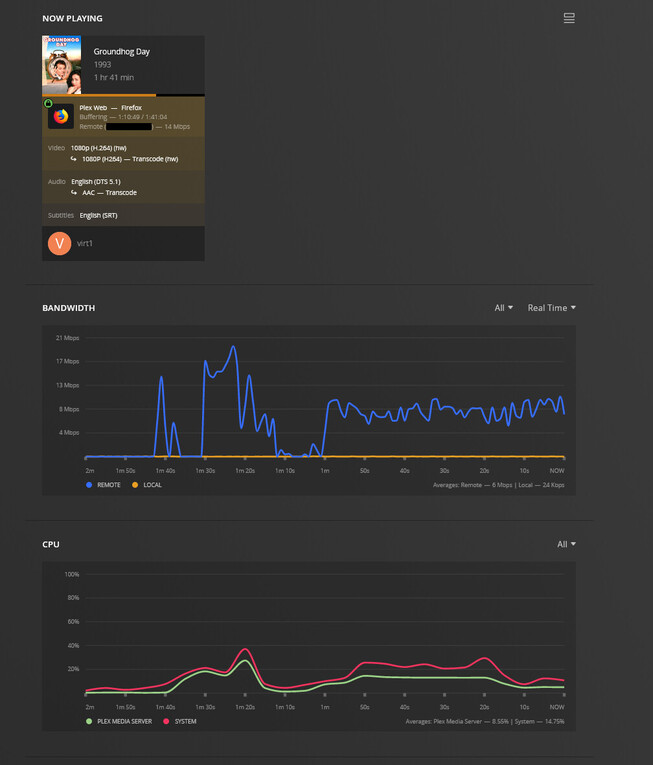
I have been having an issue with my only family member who streams from my Library, specifically, that over the last few weeks, maybe a couple months, he keeps having buffering problems. I thought it was their internet as they have been having issues - but after they were resolved it continued.
Essentially, it will play, buffer, play, buffer etc.
I have now tested on my own login from my Work PC, which has a 100mbit connection (download), and it is doing he same thing. I switched between an Android TV, Shield TV, two different remote internet connections and they all have the same problem suggesting its my end somehow.
I installed speedtesting docker on my NAS and have been running it several times, including before and after testing, its reporting my upload speed at close to 50mbit which is my maximum, however, if the remote stream is set to anything higher than 8mbit - and sometimes even then - it has issues.

I set it to 10mbit this evening, still problems buffering. The graph of outgoing in Plex showed it never went higher than about 15mbit, which should be well within the margin. I checked resource monitor - Synology not having issues transcoding, logs say its throttling the transcode, which as I understand it means its going fast enough to stay ahead.
I tried looking through logs, and the only thing standing out (but I don’t know what I am looking for) is (my IP removed in case), but I am honestly at the point I don’t know what else to check. Only that it “seems” that Plex specifically to be thinking my internet upload is significantly slower than it is. I did check my settings for upload bandwith, they are set at 40mbit at the moment.
Does anyone have a suggestion for me to check?
Oct 31, 2022 21:41:44.520 [0x7f1b99801b38] DEBUG - Completed: [<MY IP>:47639] 200 GET /video/:/transcode/universal/session/pwzu8s24ihk79yuj58l77ntz/1/840.m4s (18 live) TLS GZIP 302ms 324184 bytes (pipelined: 15)
Oct 31, 2022 21:41:45.079 [0x7f1b95dadb38] DEBUG - [Req#283da/Transcode/pwzu8s24ihk79yuj58l77ntz/086cb4d6-1026-4be4-8d78-72501ec90956] Transcoder segment range: 838 - 841 (841)
Oct 31, 2022 21:41:45.709 [0x7f1b90d6fb38] DEBUG - [Req#283e4/Transcode/pwzu8s24ihk79yuj58l77ntz/086cb4d6-1026-4be4-8d78-72501ec90956] Transcoder segment range: 838 - 842 (842)
Oct 31, 2022 21:41:46.263 [0x7f1b90d6fb38] DEBUG - [Req#283fd/Transcode/pwzu8s24ihk79yuj58l77ntz/086cb4d6-1026-4be4-8d78-72501ec90956] Transcoder segment range: 838 - 843 (843)
Oct 31, 2022 21:41:46.806 [0x7f1b92ba2b38] DEBUG - [Req#28414/Transcode/pwzu8s24ihk79yuj58l77ntz/086cb4d6-1026-4be4-8d78-72501ec90956] Transcoder segment range: 838 - 844 (844)
Oct 31, 2022 21:41:47.406 [0x7f1b93566b38] DEBUG - [Req#28423/Transcode/pwzu8s24ihk79yuj58l77ntz/086cb4d6-1026-4be4-8d78-72501ec90956] Transcoder segment range: 838 - 845 (845)
Oct 31, 2022 21:41:48.022 [0x7f1b92904b38] DEBUG - [Req#2842e/Transcode/pwzu8s24ihk79yuj58l77ntz/086cb4d6-1026-4be4-8d78-72501ec90956] Transcoder segment range: 838 - 846 (846)
Oct 31, 2022 21:41:48.689 [0x7f1b92904b38] DEBUG - [Req#2843e/Transcode/pwzu8s24ihk79yuj58l77ntz/086cb4d6-1026-4be4-8d78-72501ec90956] Transcoder segment range: 838 - 847 (847)
Oct 31, 2022 21:41:48.855 [0x7f1b90394b38] DEBUG - [Req#2843c/Transcode/pwzu8s24ihk79yuj58l77ntz/086cb4d6-1026-4be4-8d78-72501ec90956] Session pwzu8s24ihk79yuj58l77ntz (4) is throttling
Oct 31, 2022 21:41:48.856 [0x7f1b93911b38] DEBUG - [Req#28447/Transcode/pwzu8s24ihk79yuj58l77ntz/086cb4d6-1026-4be4-8d78-72501ec90956] Throttle - Going into sloth mode.
Oct 31, 2022 21:41:52.198 [0x7f1b995feb38] DEBUG - Failed to stream media, client probably disconnected after 17613611 bytes: 32 - Broken pipe
Oct 31, 2022 21:41:52.198 [0x7f1b995feb38] DEBUG - Completed after connection close: [<MY IP>:47687] 200 GET /video/:/transcode/universal/session/pwzu8s24ihk79yuj58l77ntz/0/838.m4s (14 live) TLS GZIP 10018ms 17613611 bytes (pipelined: 7)
Oct 31, 2022 21:41:53.437 [0x7f1b92ba2b38] DEBUG - Request: [<MY IP>:47639 (WAN)] GET /video/:/transcode/universal/session/pwzu8s24ihk79yuj58l77ntz/0/838.m4s (13 live) #283ce TLS GZIP Signed-in
Oct 31, 2022 21:41:53.437 [0x7f1b92ba2b38] DEBUG - [Req#283ce/Transcode/pwzu8s24ihk79yuj58l77ntz] Asked for segment 838 from session.
Oct 31, 2022 21:41:53.437 [0x7f1b92ba2b38] DEBUG - [Req#283ce/Transcode/pwzu8s24ihk79yuj58l77ntz] Returning segment 838 from session
Oct 31, 2022 21:41:53.438 [0x7f1b8fa90b38] DEBUG - [Req#283ce/Transcode/pwzu8s24ihk79yuj58l77ntz] Cleaning directory for session pwzu8s24ihk79yuj58l77ntz (/var/packages/PlexMediaServer/shares/PlexMediaServer/AppData/Plex Media Server/Cache/Transcode/Sessions/plex-transcode-pwzu8s24ihk79yuj58l77ntz-9e85f409-950a-4283-a57a-9c0f566cf4ae)
Oct 31, 2022 21:41:53.438 [0x7f1b92ba2b38] DEBUG - Content-Length of /var/packages/PlexMediaServer/shares/PlexMediaServer/AppData/Plex Media Server/Cache/Transcode/Sessions/plex-transcode-pwzu8s24ihk79yuj58l77ntz-086cb4d6-1026-4be4-8d78-72501ec90956/init-stream0.m4s,/var/packages/PlexMediaServer/shares/PlexMediaServer/AppData/Plex Media Server/Cache/Transcode/Sessions/plex-transcode-pwzu8s24ihk79yuj58l77ntz-086cb4d6-1026-4be4-8d78-72501ec90956/chunk-stream0-00839.m4s is 20157537 (of total: 20157537).
Oct 31, 2022 21:41:58.737 [0x7f1b9456db38] DEBUG - NetworkServiceBrowser: Parsing SSDP schema for http://10.0.0.74:9080
Oct 31, 2022 21:41:58.737 [0x7f1b9456db38] DEBUG - [HCl#205b] HTTP requesting GET http://10.0.0.74:9080
Oct 31, 2022 21:41:58.740 [0x7f1b95fb5b38] DEBUG - [HttpClient/HCl#205b] HTTP/1.1 (0.0s) 200 response from GET http://10.0.0.74:9080
Oct 31, 2022 21:41:58.741 [0x7f1b9456db38] ERROR - XML: Entity: line 1:
Oct 31, 2022 21:41:58.741 [0x7f1b9456db38] ERROR - XML: parser
Oct 31, 2022 21:41:58.741 [0x7f1b9456db38] ERROR - XML: error :
Oct 31, 2022 21:41:58.741 [0x7f1b9456db38] ERROR - XML: Start tag expected, '<' not found
Oct 31, 2022 21:41:58.741 [0x7f1b9456db38] ERROR - XML: status=ok
Oct 31, 2022 21:41:58.741 [0x7f1b9456db38] ERROR - XML: ^
Oct 31, 2022 21:41:58.741 [0x7f1b9456db38] ERROR - Error parsing content.
Oct 31, 2022 21:41:58.741 [0x7f1b9456db38] ERROR - Error parsing XML: Error parsing file.
Oct 31, 2022 21:41:58.741 [0x7f1b9456db38] ERROR - SSDP: Error parsing device schema for http://10.0.0.74:9080
Oct 31, 2022 21:42:03.444 [0x7f1b995feb38] DEBUG - Failed to stream media, client probably disconnected after 18629419 bytes: 32 - Broken pipe
Oct 31, 2022 21:42:03.444 [0x7f1b995feb38] DEBUG - Completed after connection close: [<MY IP>:47639] 200 GET /video/:/transcode/universal/session/pwzu8s24ihk79yuj58l77ntz/0/838.m4s (8 live) TLS GZIP 10006ms 18629419 bytes (pipelined: 16)
Oct 31, 2022 21:42:04.627 [0x7f1b92904b38] DEBUG - Request: [<MY IP>:47751 (WAN)] GET /video/:/transcode/universal/session/pwzu8s24ihk79yuj58l77ntz/0/838.m4s (8 live) #28444 TLS GZIP Signed-in
Oct 31, 2022 21:42:04.627 [0x7f1b92904b38] DEBUG - [Req#28444/Transcode/pwzu8s24ihk79yuj58l77ntz] Asked for segment 838 from session.
Oct 31, 2022 21:42:04.627 [0x7f1b92904b38] DEBUG - [Req#28444/Transcode/pwzu8s24ihk79yuj58l77ntz] Returning segment 838 from session
Oct 31, 2022 21:42:04.627 [0x7f1b92904b38] DEBUG - Content-Length of /var/packages/PlexMediaServer/shares/PlexMediaServer/AppData/Plex Media Server/Cache/Transcode/Sessions/plex-transcode-pwzu8s24ihk79yuj58l77ntz-086cb4d6-1026-4be4-8d78-72501ec90956/init-stream0.m4s,/var/packages/PlexMediaServer/shares/PlexMediaServer/AppData/Plex Media Server/Cache/Transcode/Sessions/plex-transcode-pwzu8s24ihk79yuj58l77ntz-086cb4d6-1026-4be4-8d78-72501ec90956/chunk-stream0-00839.m4s is 20157537 (of total: 20157537).
Oct 31, 2022 21:42:10.881 [0x7f1b8e0b2b38] DEBUG - Request: [10.0.0.9:49038 (Subnet)] GET /web/static/e8c14a7b2f07aaa06fc6.svg (9 live) #28480 GZIP Signed-in