Server Version#:1.41.2
Player Version#:varied
<If providing server logs please do NOT turn on verbose logging, only debug logging should be enabled>
I can’t figure this out. I have a 1 Gb fiber connection and plex running in docker on an N100 running ubuntu server 24 LTS.
Remotely, I can stream a 25 Mb 4k HDR file with direct play/direct stream on cellular or different (100 Mb/s+) wifi, mostly testing with the latest iphone app (2025.17), but also various TV apps. No problem.
If change to 12 Mb 1080p transcode, it reports hardware transcoding at 3-4x with ~20% CPU use, then throttles after maybe 15 seconds, but I’m getting buffering every 5 seconds or so the whole time and forever.
I clearly have the network configured appropriately and the bandwidth otherwise a much higher bitrate direct stream wouldn’t work. The N100 is reported to handle this and by all accounts is given the speed of transcoding and subsequent throttling.
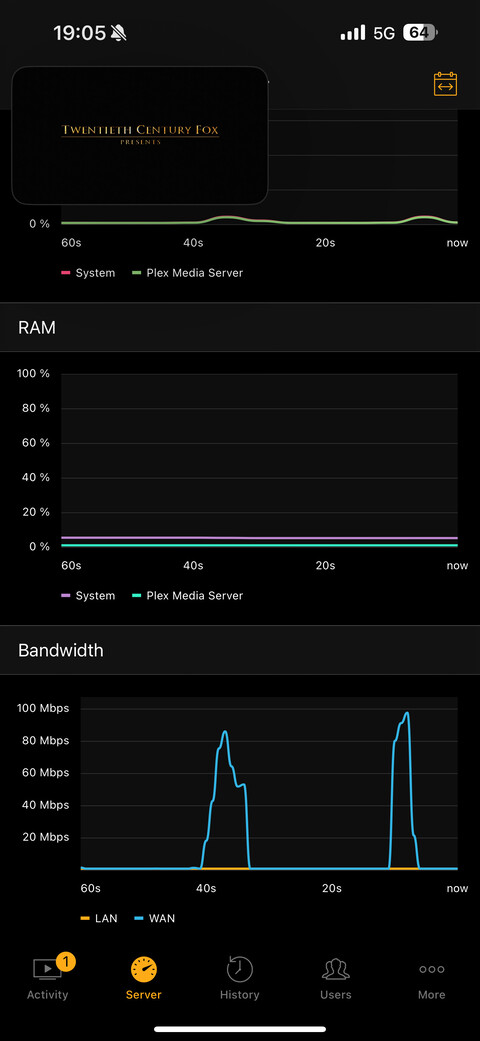
For reasons that are unclear it looks like the server just isn’t sending the transcoded data to the client. When direct streaming, can see spikes of network activity of 2-300 Mb/s, but when transcoding same file to 12 Mb with the server buffer full and the transcoder throttled, I see brief spikes of 6-10 Mb/sec activity followed by numerous second pauses which clearly doesn’t average to 12 Mb/sec as it should. Sometimes if I stop and restart that same stream, the network activity will look more like when direct streaming and it works fine without buffering. No difference if tone mapping enabled or not.
Unfortunately I don’t know when this started, and I’m not sure if my current setup has ever worked since migrating from a NAS in December 2024.
I think I’m going to try to install bare metal or in a VM, but am just shooting in the dark. Other thought I’ve had would be to upgrade my kernel from default 6.8, but it seems like the previous issues with alder lake and the 6.8 kernel were resolved.
Server versions 1.41.2-1.41.8 in docker on linux
Also fresh ubuntu server 24.04 hwe with 6.11 kernel bare metal 1.41.8
Unfortunately client limited to ios 2025.18 on LAN, remote wifi (500 mb/s dl), and LTE
Windows client and webos client on LAN only
All server versions tested behave similarly.
All clients work as expected on LAN
What I thought was related to transcoding when remote was not related to transcoding. It is just apparent when changing quality settings. There seems to be an artificial bandwidth limit on the stream when switching quality settings which causes buffering every few seconds. This can be fixed by scrolling the stream to the start and restarting it as others have noted.
Although I have not tested on remote TV clients, I suspect the same is happening with them as well as my few users are seeing buffering. This appears to be a bug. I assume with the server as it seems to be affecting numerous different clients.
Thanks for the reply. I set up iperf on the machine running plex and connecting to it remotely from both LTE and outside wifi, I’m able to saturate the available downlink as expected - 100+ Mb/sec on both.
What is the significance of that log snippet? I do see similar. For example, just now trying to stream a 10 Mb 1080p file over LTE. Speedtest on phone 75-200. Iperf3 from phone to server same. Transcoding to 4 Mb 720p based on ios app preferences for cellular, get buffering every 3 seconds.
Jun 16, 2025 13:00:39.782 [134708054317880] DEBUG - [Req#5898f/Transcode] Streaming Resource: Adding session 0x7a84340e21c8:18FC2447-082D-486F-A90E-1A503E54F144 which is using 3815kbps of WAN bandwidth. Used is now 3815kbps
Again, thank you for replying. I appreciate the help.
Iperf3 tests from my phone (off my LAN) to an iperf server on the plex machine (on my LAN) consistently saturate the available downlink to my phone, whether that is LTE at somewhere 50-100 Mb/s or wifi at a remote location with a separate ISP than my fiber at ~100-300 Mb/s. In all cases, Iperf from my phone to the plex machine are within 10% of from my phone (on the remote network) to the ookla speedtest server. I don’t have access to a remote Gb connection to see how close to it I can get.
Iperf tests from within my LAN achieve either the full Gb link if hardwired or somewhere ~500 Mb/s on wifi due to my suboptimal AP placement.
I interpret these results as demonstrating expected bandwidth and acceptable peering.
The exact same issue occurs: [buffering every 3 seconds when starting a stream that fixes itself if you manually scroll the stream to the beginning and restart it] whether hardware transcoding, software transcoding, or direct streaming. I incorrectly attributed the problem as related to transcoding originally.
Logs show no errors or failures but many state changes between buffer, play, pause. Simultaneous view of bandwidth is notably different when buffering vs after scrolling to the beginning but whether that is merely another symptom or part problem I don’t know.
Example:
1080p 10 Mb/s movie
Started over LTE direct playing
Buffers so much it barely advances 10 second in 1 min. Network use looks like this:
Plex relay is disabled. I enabled and re-disabled in the interface, then checked Preferences.xml to be sure. Media always plays with a green lock on the dashboard.
I wish this was so simple.
It sure does look like it’s bandwidth limited for some reason, though, right? I don’t understand how rewinding to time zero changes it.
Going to bump my own post here. I’ve tried everything to remedy this and I believe it is a software bug at this point. Would love if Chuck or somebody could chime in.
To summarize:
Server:1.41.8 linux (both bare metal and docker tried)
Client: iOS (2025.18.0) and latest Samsung TV client
Lifetime plex pass
When starting a stream remotely from one of these clients, the stream appears bandwidth limited and buffers constantly (see screenshots above). Doesn’t matter if direct play, hardware transcode, software transcode. Rewinding to time zero frequently, but not always, will resolve this and allow it to play as it should. All clients, including same ios client, have no problems on my LAN (where everything direct plays, but no issues when testing transcoding).
Troubleshooting tried:
-iperf tests from the remote locations and client devices continually demonstrate ability of my host upload 1Gbps fiber to saturate the available remote download bandwidth
-host is fully available remotely with a specified port which is open in my firewall and is not using relay
-removed pihole from network (plex domains were whitelisted)
-changed dns servers(1.1.1.1, 8.8.8.8,9.9.9.9)
-changed network switches
-migrated from docker host to a dedicated bare metal machine
-fresh reinstall on bare metal without migrating library/settings
-i have not changed out my firewall but have no reason to think it is the problem
I have looked through the logs when this happens and see no errors or failures, but don’t really know what I’m looking for otherwise. Here is an example using the same file as the screen shots above over 5G hw transcoding to 4 Mbps 720p to my iphone.
-0237 start, buffers every few seconds, network activity looks limited to less than 4 mbps as above.
-0239 rewind to time zero, keeps buffering, rewind a few more times
-0240 after rewinding to zero network activity spikes like second screenshot above and plays smooth with no buffering until i stop at 0242
Log Snippet: yakfod_plex_examplelog.txt (560.3 KB)
Having the same exact problems. Relay is disabled but bandwidth seems capped at 2 mbps. I thought maybe the ISP was throttling but changing ports, even to 443, had no effect.
Sorry, I resolved this in other posts and never came back here to close the loop.
For me, this turned out to 100% be a hardware problem. My router/firewall was dying in a very sneaky only-affects-external-plex-streaming fashion. I’m guessing this was from lightning damage months earlier but am not sure.
Replaced with backup hardware of same brand/model and restored my configs and it worked fine. Since then I’ve upgraded the firewall (which I didn’t realize was 10+ years old) to new overpowered hardware and couldn’t be happier, though I’m quite a bit poorer.
I have a similar problem. I’m from France but in vacation in the Caraïbes and i’m capped to 2mbps as if relay was enabled…
Thing is that everyone else can play my stuff just fine. I even have a friend that live where i am right now and he can play my heaviest remux just fine while i’m struggling with even 720p stuff…
It was working perfectly fine for me remotely before i left. I didn’t change anything in the setting either, i just don’t get it