[BUG] 2 Bugs when transcoding HEVC 10bit 4k video down to h264 1080p on iGPU

Server Version#: 1.32.6.7468
Player Version#: Any (Roku, Chromecast, LG TV)

i5-8500 with 48GB of RAM - Capable of both decoding and encoding HEVC

BUG #1: Hardware transcoding is not being used even though the dashboard has “hw” symbol. When looking at transcoder process -hwaccel: 0


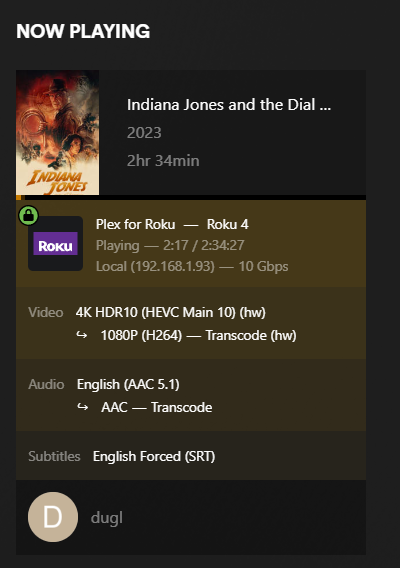
[BUG #2]: Transcode bandwidth is insane, quickly saturates 100 Megabit ethernet port on the streaming devices.

Relevant log:
[Plex Transcoder Statistics.log|attachment]
Plex Transcoder Statistics.log (3.4 KB)

Media info:

Video
ID                          : 1
Format                      : HEVC
Format/Info                 : High Efficiency Video Coding
Format profile              : Main 10@L5@Main
HDR format                  : SMPTE ST 2086, HDR10 compatible
Codec ID                    : V_MPEGH/ISO/HEVC
Duration                    : 1 h 55 min
Bit rate                    : 9 611 kb/s
Width                       : 3 840 pixels
Height                      : 1 632 pixels
Display aspect ratio        : 2.35:1
Frame rate mode             : Constant
Frame rate                  : 23.976 (24000/1001) FPS
Color space                 : YUV
Chroma subsampling          : 4:2:0 (Type 1)
Bit depth                   : 10 bits
Bits/(Pixel*Frame)          : 0.064
Stream size                 : 7.74 GiB (90%)
Writing library             : x265 3.5+1-f0c1022b6:[Windows][GCC 10.2.0][64 bit] 10bit
Encoding settings           : cpuid=1111039 / frame-threads=4 / numa-pools=24 / wpp / no-pmode / no-pme / no-psnr / no-ssim / log-level=2 / input-csp=1 / input-res=3840x1632 / interlace=0 / total-frames=0 / level-idc=0 / high-tier=1 / uhd-bd=0 / ref=3 / no-allow-non-conformance / repeat-headers / annexb / no-aud / no-eob / no-eos / no-hrd / info / hash=0 / no-temporal-layers / open-gop / min-keyint=24 / keyint=240 / gop-lookahead=0 / bframes=4 / b-adapt=0 / b-pyramid / bframe-bias=0 / rc-lookahead=15 / lookahead-slices=8 / scenecut=40 / no-hist-scenecut / radl=0 / no-splice / no-intra-refresh / ctu=64 / min-cu-size=8 / no-rect / no-amp / max-tu-size=32 / tu-inter-depth=1 / tu-intra-depth=1 / limit-tu=0 / rdoq-level=0 / dynamic-rd=0.00 / no-ssim-rd / signhide / no-tskip / nr-intra=0 / nr-inter=0 / no-constrained-intra / strong-intra-smoothing / max-merge=2 / limit-refs=3 / no-limit-modes / me=1 / subme=2 / merange=57 / temporal-mvp / no-frame-dup / no-hme / weightp / no-weightb / no-analyze-src-pics / deblock=0:0 / sao / no-sao-non-deblock / rd=2 / selective-sao=4 / no-early-skip / rskip / fast-intra / no-tskip-fast / no-cu-lossless / no-b-intra / no-splitrd-skip / rdpenalty=0 / psy-rd=2.00 / psy-rdoq=0.00 / no-rd-refine / no-lossless / cbqpoffs=0 / crqpoffs=0 / rc=crf / crf=22.0 / qcomp=0.60 / qpstep=4 / stats-write=0 / stats-read=0 / ipratio=1.40 / pbratio=1.30 / aq-mode=2 / aq-strength=1.00 / cutree / zone-count=0 / no-strict-cbr / qg-size=32 / no-rc-grain / qpmax=69 / qpmin=0 / no-const-vbv / sar=1 / overscan=0 / videoformat=5 / range=0 / colorprim=9 / transfer=16 / colormatrix=9 / chromaloc=1 / chromaloc-top=1 / chromaloc-bottom=1 / display-window=0 / master-display=G(13250,34500)B(7500,3000)R(34000,16000)WP(15635,16450)L(40000000,50) / cll=1000,551 / min-luma=0 / max-luma=1023 / log2-max-poc-lsb=8 / vui-timing-info / vui-hrd-info / slices=1 / no-opt-qp-pps / no-opt-ref-list-length-pps / no-multi-pass-opt-rps / scenecut-bias=0.05 / no-opt-cu-delta-qp / no-aq-motion / no-sbrc / hdr10 / hdr10-opt / no-dhdr10-opt / no-idr-recovery-sei / analysis-reuse-level=0 / analysis-save-reuse-level=0 / analysis-load-reuse-level=0 / scale-factor=0 / refine-intra=0 / refine-inter=0 / refine-mv=1 / refine-ctu-distortion=0 / no-limit-sao / ctu-info=0 / no-lowpass-dct / refine-analysis-type=0 / copy-pic=1 / max-ausize-factor=1.0 / no-dynamic-refine / no-single-sei / no-hevc-aq / no-svt / no-field / qp-adaptation-range=1.00 / scenecut-aware-qp=0conformance-window-offsets / right=0 / bottom=0 / decoder-max-rate=0 / no-vbv-live-multi-pass / no-mcstf
Default                     : Yes
Forced                      : No
Color range                 : Limited
Color primaries             : BT.2020
Transfer characteristics    : PQ
Matrix coefficients         : BT.2020 non-constant
Mastering display color pri : Display P3
Mastering display luminance : min: 0.0050 cd/m2, max: 4000 cd/m2
Maximum Content Light Level : 1000
MaxCLL_Original             : 1000 cd/m2
Maximum Frame-Average Light : 551
MaxFALL_Original            : 551 cd/m2

On what are you basing your statement that hardware accelerated transcoding is not being utilized in this case? The FFMPEG command-line option -hwaccel:0 in this case means that it is to operate on stream zero, not that it is disabled. It would be better to install the “intel-gpu-tools” package (on Ubuntu, at least, other distributions may name it differently). Then intel_gpu_top will show you your iGPU’s utilization for various functions.

Oh, thanks for clarification. I thought that meant its not being used. (actually was googling documentation on this when you replied).

The reason I even started investigating this is because my CPU usage goes through the roof:

using multiple cores with often maxing out 1 of them to 100%. While (as seen below) other content where hw acceleration seems to work correctly it uses like 3% of a single core.

image

as opposed to for example another movie that also transcodes:


This is what inte-gpu-top reports during playback:

image

Ah, gotcha. Yeah, understandable, that zero could make it seem like it was disabling it. In case you’d like it, here’s a link to the FFMPEG docs; for this parameter search for “hwaccel” and it’ll show what the various specifiers mean.

https://ffmpeg.org/ffmpeg.html

Regarding the specific examples you provided, I’m not sure they’re apples-to-apples. One is a 4K HEVC stream being transcoded to 1080P H.264; the other is a 1080P HEVC stream being transcoded to SD H.264. They may seem similar, but the bitrates are likely vastly different (hard to tell since PMS is miscalculating the bandwidth for your first example). But the media info details suggest it’s around 10 Mbps.

But you’re also burning subtitles in that first example (PGS) but not in the second. That 20% bump in processor utilization is likely normal in that scenario. Try the first example again without subtitles maybe.

This looks good; it means that VAAPI is being used for HW acceleration.

Well, the issue is that I cannot watch anything like this either local or remote. After a few seconds it goes to buffering and then errors out. I think the CPU cant keep up. How can subtitles be needing so much CPU?

How can I make sure my video driver is up to date and that my hw acceleration is set up correctly?

The intel_gpu_top utility already showed it was being used, as did the Plex dashboard. I don’t think there’s much doubt. Plex bundles all the drivers it requires in its Linux package. There is no system-level installation of drivers required.

Burning subtitles is a separate, generally single-threaded process which can consume fairly significant resources. That was just an assumption on my part based on the provided information. Did you test without subtitles to see if it performed better?

Yes it performs better but thats because without subtitles it does Direct Stream.

That itself is an indication of what the root of the problem is. With subtitles transcoding is required. Without it, the streams only need to be re-muxed.

Try disabling Direct Streaming on the client (generally available in the client’s Plex settings). See if it transcodes then, and what the performance is.

However, based on the information you provided already, I don’t see anything out of the ordinary.

Ok… maybe there is a problem. Without subtitles it does not use HW to transcode, uses CPU:

its same exact content I showed above with subs:

That is weird. You didn’t turn on HDR tone mapping, did you?

It is turned on. Is that a CPU only function? The page doesnt say…

just says this: Additional driver components may be needed to support hardware transcoding with this feature enabled; see our support articles for further details.

EDIT: Yup tone mapping off its using HW.

how do I make it work with HW?

EDIT2: WOW, ok with tone mapping off, even using subtitles CPU is now down below 5% and its using HW/GPU…

So I guess next step is to figure out if I can get tone mapping using HW?

image

There’s a regression recent 1.32.6.x releases.

I’d recommend posting in that thread with the requested information.

1 Like

Thanks. Based on the description of tone mapping… it seems like the film should be all dark… but I dont know that there is any difference? is it very subtle?

If you turn off HDR Tone mapping , does it work normally ?

I have a thread already started

On some clients it will appear washed-out. I believe others will handle the tone mapping locally.

Yes, with tone mapping off its all good. I posted requested info in that thread.

ALL:

From this point forward, please refer to the following thread as we recover from the problem.

1 Like

This topic was automatically closed 90 days after the last reply. New replies are no longer allowed.