[Edit]: Looks like the Plex web forums is having difficulty rendering the artist’s name because it uses some non-standard emojis. For readability, I’ve simplified the name to use the normal eye emoji rather than the speech bubble eye. The actual name can be seen in the included screenshots.
Hi all,
I recently added a music artist named 
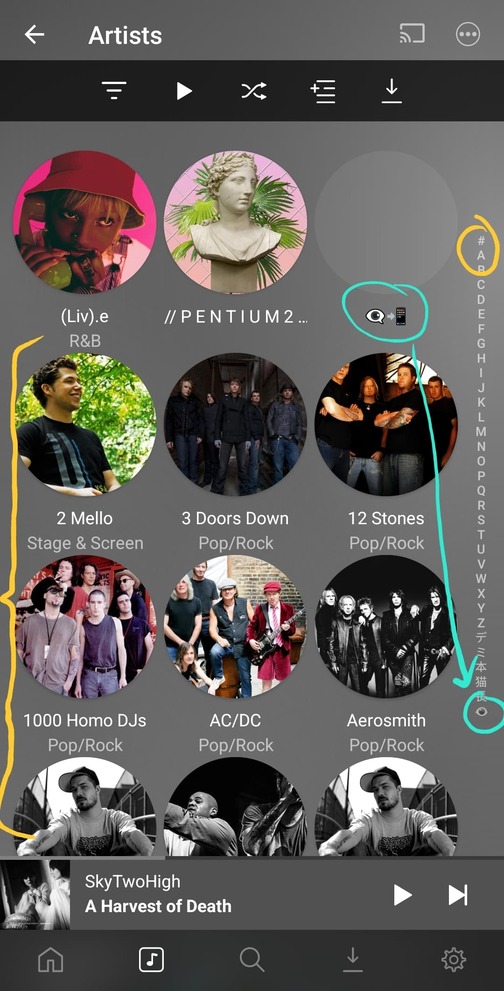
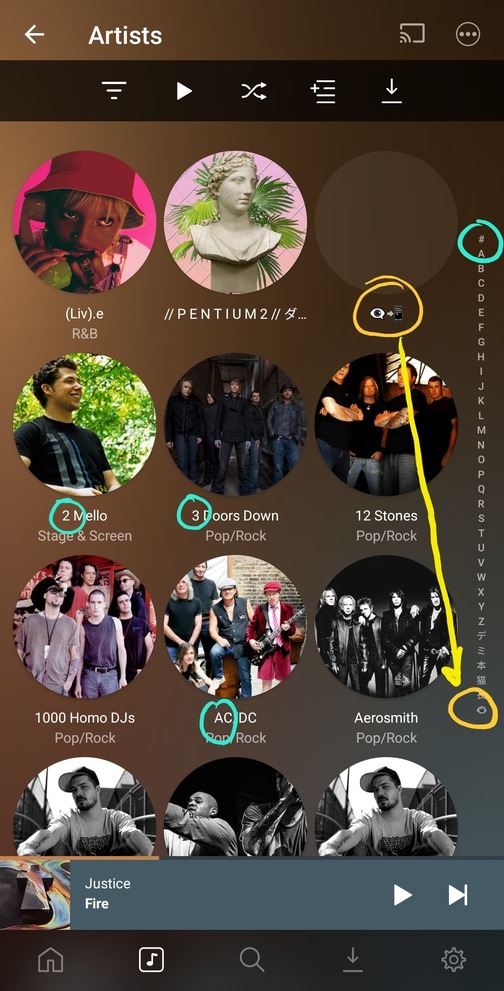
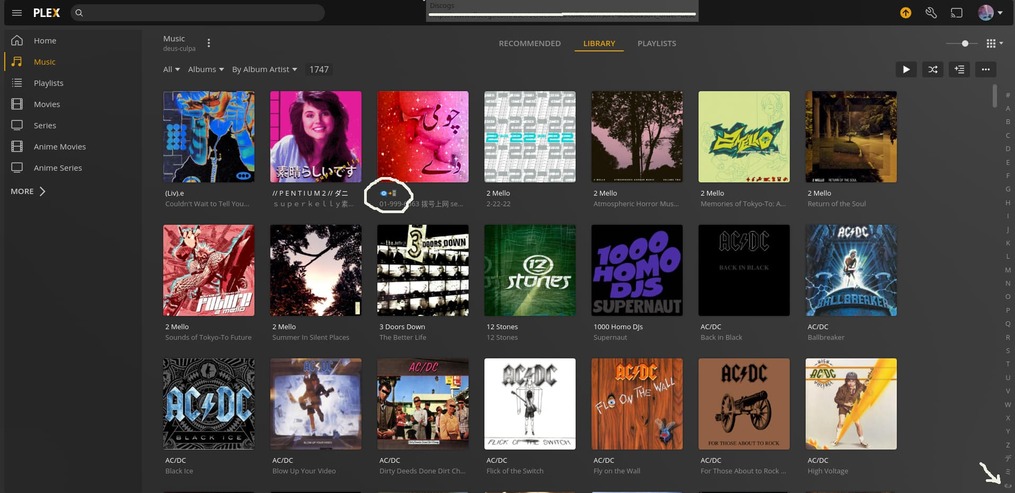
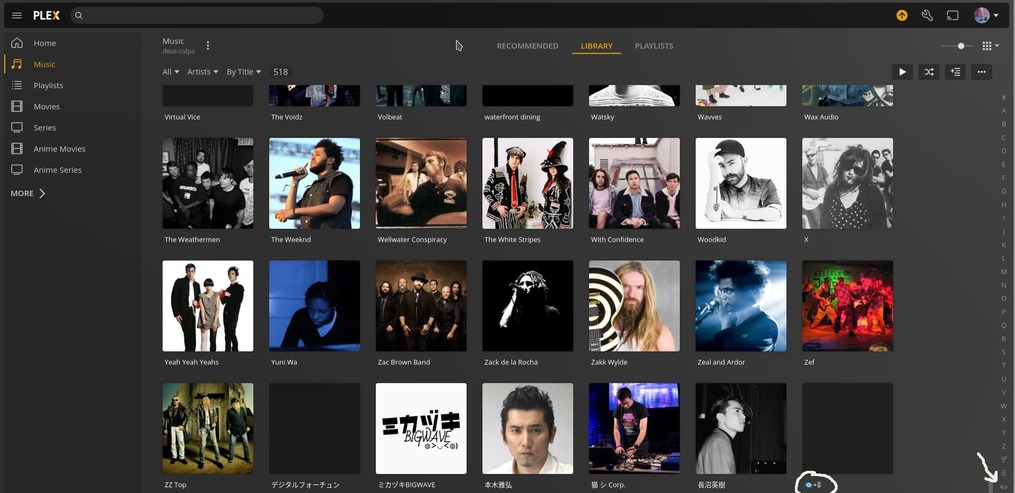
 to my Plex music library. As you can see, the artist name is entirely emojis. I’ve noticed that this has caused Plex some issues when sorting this artist in the library. In particular, the actual sorting of this artist in the library differs than what the alphabetical listing that appears near the right scrollbar indicates.
In the alphabetical sidebar list (#ABC…XYZ…猫:eye:), the eye emoji is usually sorted at the bottom, after the non-latin characters. However, more often than not, the artist is sorted in the library immediately before artists whose name begins with numeric characters.
This is fairly consistent across platforms: Plexamp sorts like this in all cases, whereas Plex’s web interface sorts in this way only when sorting by Album > Album artist; sorting by Artist actually results in being sorted at the end of the list where the scrollbar indicates it should be.
I’ve included some screenshots below that hopefully help illustrate what I mean, but if you need any more information, please don’t hesitate to reach out!
Screenshots
Plexamp: Sort by Album > Album Artist (incorrect)
Plexamp: Sort by Artist (incorrect)
Plex Web: Sort by Album > Album Artist (incorrect)
Plex Web: Sort by Artist (correct)
Device Details
Technical Details
PLEX SERVER
Version: 1.25.9.5721
PLEXAMP
Version: 4.2.1
ANDROID
Device type: Samsung Galaxy Note20 Ultra
Android version: 12
OneUI version: 4.1
Kernel version: 4.19.113-23719630
Wondering, if you edit the Artist in Plex, is there anything in the “Sort Artist” field?
What is the album title? I’d like to look this up in MusicBrainz or Discogs and see how they handle it, if they have it.
How is the file named on disk?
Here’s the info you requested:
Plex UI artist details
Artist folder on disk

…and in context with the other artist folders…
In both cases, I use the emoji values as the folder name and the sort name value. And for what it’s worth, Linux sorts this artist immediately before the numerical artists, just like the Plex library is doing in most cases.
And here’s the artist profile on MusicBrainz. You’ll notice that the “artist sort” value is listed as “eye click”, so theoretically I could sidestep the problem by using a more “normalized” sort value. However, I dislike using different sort values for most artists and albums in my library, so I have a script to override this value with the default artist name when using MusicBrainz Picard. I also ensure that Picard saves files and folders with Windows-compatible names/characters only, meaning that this emoji representation appears to be valid.
Tangent for anyone interested in why I do this...
I feel like it solves a couple of problems that I often encounter:
-
when looking for 
 or other artists with non-latin names in my library, I’m going to look for them by their visual representation since I’m a visual learner, and not by their spoken translation that in many cases I might not know (especially for independent vaporwave artists); and
-
it allows me finer control over the “The Cure vs Cure, The” and “David Bowie vs Bowie, David” problems, as I prefer to simply sort on the artist’s chosen stage name to avoid confusing inconsistencies (“Bowie, David” makes sense to me but “Rock, Aesop” does not, for example, and mixing the two modes makes finding anything into a chore).
Regardless of my personal preferences on artist name representation though, I think the main issue here is the discrepancy between how the value is sorted in the library vs how the sidebar indicates that the library is sorted, as well as the inconsistency in sorting across platforms. I personally have no strong opinion on where the artist should be sorted, just that it should be represented accurately and consistently by whatever algorithm determines it.
Hope that helps!
My advice would have been to add a custom Artist Sort, like “eye click,” but you’ve already addressed that. Hopefully one of the ninjas will either have other advice, or will report the issue to the developers.