Server Version#: Multiple / All
Player Version#: Multiple / All
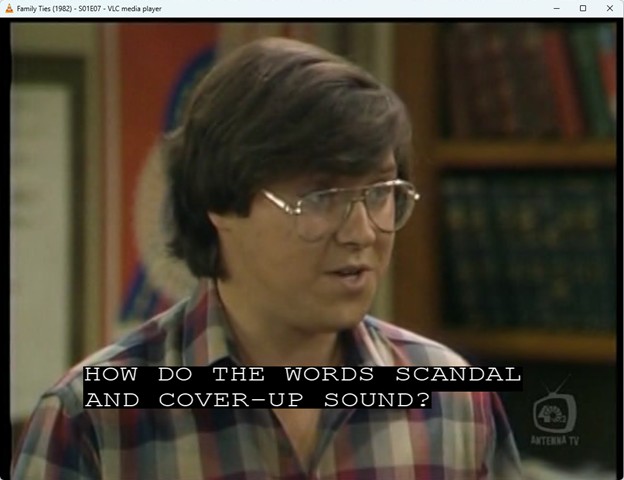
Caption display is corrupt as shown in attached pictures (letters appear multiple times making them unreadable). The picture with the captions displayed correctly is the exact same file playing in VLC displaying the same caption.
I’ve duplicated this across multiple player and server versions, and multiple platforms including Windows Plex App, Windows Web using Edge Browser, and FireTV App. The files have EIA-608 Closed Captions according to VLC. I record the files with Plex DVR (plex pass) via cable card. That being said, since the files themselves display captions correctly in other players, and the Plex player corruption is there across plex players on multiple platforms, I believe it is a player issue (not a DVR issue).
Any ideas on how to get these to display correctly? This is the last thing keeping from moving completely to Plex for TV. Thanks in advance for any help you can provide.
If anyone is willing to troubleshoot, here is a 10-second excerpt of the file the pictures are from. This happens with multiple files (not just this one).
You’ll also notice that the built-in player on Edge for Windows that opens the link also displays the captions correctly. If you download the file and put it in Plex, the Plex player will display the captions with the corruption shown in the pictures. Thanks!
After a bit more research in forums, I’m convinced Plex player just doesn’t work well with embedded subtitles and their varying formats.
I needed a way to extract separate .srt files from the recordings, without markup in them that Plex players won’t display properly. Downloading the .srt files won’t work for TV recordings because the commercials are always different lengths, so any downloaded files will always display the captions at the wrong time in the video.
I found CCExtractor and wrote a PowerShell script to process my library. First run took about 24-hours for ~7K files, but it runs in a couple of minutes now keeping up with daily recordings and deleted recordings. I run it using Windows task scheduler twice a day.
I’ve attached it as a text file for anyone it might help. The comments in the script are self-explanatory. Start with a small part of your library or a test folder first and use it at your own risk.
Edit 2/16/2025: attached updated version
Plex DVR Extract CC from TS Files v2.ps1.txt (6.6 KB)
Since I am on Linux, I couldn’t use your script. But, I was able to install ccextractor on PMS. and use it. I installed it as a post-processing script on PMS to run after every recording is written.
Now, my problem is that with the embedded CC in stream1 it doesn’t recognize the external SRT file and let me choose that rather than the CC. The only subtitle options are “None”, “Unknown” and “Other”. And, “Unknown” is the embedded CC. There is no option to select an external subtitle. I use external SRT files all the time for movies and other mp4 video. Did you experience this? How do you select the SRT instead of the embedded CC?
First thing to double check is that the file name is the exact same as the .ts file name except with the extension changed to .en.srt Plex doesn’t seem to like it if the .en part (for english) is missing.
After that, a library scan on the server was needed for some of them for me. I set that to run every hour in the Plex settings. I had a couple of really stubborn ones (only two that I recall across thousands of episodes) that only got picked up when I did a “refresh all metadata”. I only did that on the specific series I had trouble with (not my whole library). I had some more obscure shows that I had manually chosen the metadata source for before, and I didn’t want to have to redo those.