File name
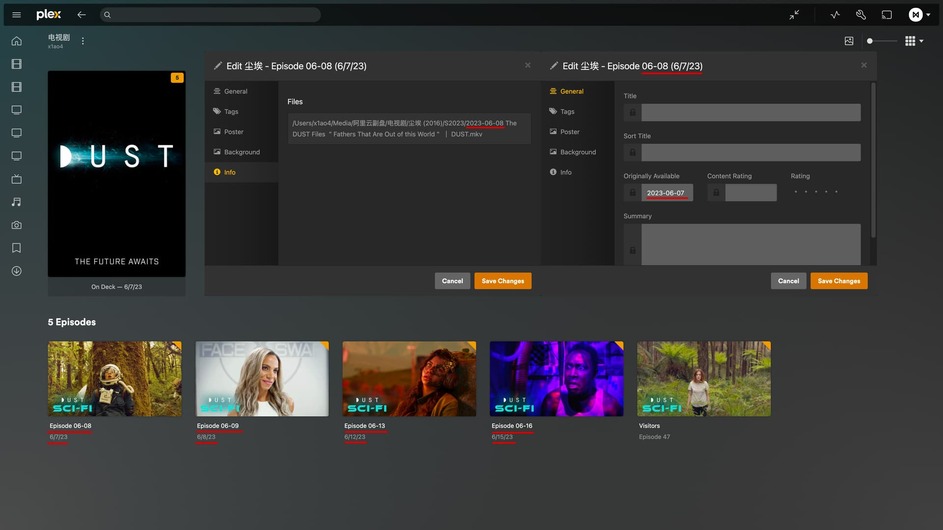
2023-06-08 The DUST Files "Fathers That Are Out of this World" | DUST.mkv

Auto-identified title
Episode 06-08

Auto-identified air date/Originally Available
2023-06-07
The title and file name are matched, but the identified Originally Available date is one day earlier.
Most of the files named with date have this problem, few of them can be identified correctly. For example, episode 47, the file name is “2023-06-14 Sci-Fi Short Film “Visitors” | DUST.mkv”, and Originally Available is also identified as 2023-06-14, then the metadata can be matched correctly.
As you can see, there are 5 episodes above, all with the same naming scheme, 4 episodes have the wrong date identified, only one is correct, I hope you can check what is the cause.
Is there a way to unbind the plex agent to the scanner? The third party agent and third party scanner can be used in any combination, but the official agent can only be used with the official scanner, the official agent cannot use the third party scanner, but the official scanner currently has many problems, I want to use the official agent with the third party scanner for metadata management, is there a way?
You are not following the correct naming. It is a short film with no metadata on TMDB, TVDB, IMDB so you are almost better off using library type OTHER if you want to keep all the source info in the file name.
This series has complete data on TVDB, those 5 episodes have complete metadata, and there is no problem with the way I named them, because plex supports date-based naming and metadata identification methods, this problem is purely because the plex agent identifies the date wrongly, and correcting the date will get the correct metadata.
Correction, it’s true that those 4 episodes with wrong dates don’t have data on TVDB, but the Plex date identification error problem still exists because other episodes have the same problem that wrong dates just cause wrong matches.
The problem I am posing here is not a matching problem, but a date matching error problem.
I have now complete the data on TVDB for the episodes mentioned in the article, but once again, the issue I am raising here is not that the metadata doesn’t match, but that the plex agent causes the date error.
As I wrote in my original post, the date identified by the plex does not match the date in the file name.
File name
2023-06-08 The DUST Files "Fathers That Are Out of this World" | DUST.mkv

Auto-identified title
Episode 06-08

Auto-identified air date/Originally Available
2023-06-07
And this is not a problem for me alone, other users also have the same problem.
Plex TV Series Scanner + Plex TV Series Agent (TVDB Episode ordering)
Wrong date identification, If there is data on TVDB, it can match and correct the date automatically, because the other four episodes did not have data on TVDB at that time, so the matching could not be done and the wrong date was shown.
Plex TV Series Scanner + Plex TV Series Agent
Wrong date identification, If the match is successful, it will be refreshed to the correct date, I guess the match is made by title or file name, if the date of the obtained title and file name is consistent with TMDB or TVDB, the match will be successful.
Plex TV Series Scanner + The Movie Database Agent
The date can be correctly identified.
Absolute Series Scanner + Douban Agent
The date can be correctly identified.
Absolute Series Scanner + YouTubeSeries Agent
The date can be correctly identified (before matching), The YouTubeSeries Agent is matched by video ID, so the date is irrelevant, but the date after a successful match is again misaligned.
The date error may have a little bit to do with the time zone, I guess the wrong date identification will not affect the metadata scraping, because the matching work is searched and matched by the date obtained from the file name, so even if the date match is wrong, it can be automatically corrected to the correct date if the data can be obtained from TMDB, TVDB.
But the content that cannot be matched using Plex TV Series Agent shows the wrong date, and this problem should be solved, No other agent has this problem (before matching).
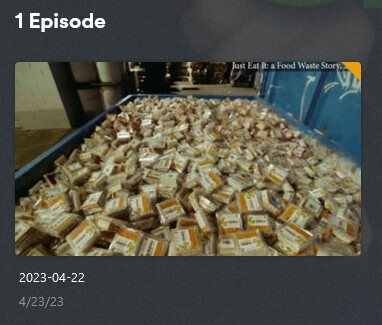
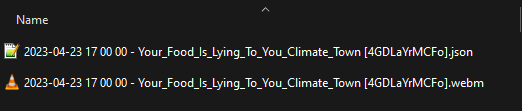
I also just tried it with the YouTubeSeries agent and Plex Series Scanner. I used your naming scheme with the time included. And again the agent pulled the correct metadata (I can see it in plex’s metadata folder) but the data is not matched to the video because Plex is trying to key off of 2023-04-22 which is the wrong day.
My test result is that if your item has data on TMDB, TVDB, IMDB, then the plex recognizes the wrong date has no effect, as long as you use the correct date for your filename, you can scrape the correct metadata and the date will be corrected after getting the metadata.
If the item has no metadata on TMDB, TVDB, IMDB and can’t be matched to get the metadata, then it will show the correct title and wrong date.
The case of getting the wrong date before metadata only occurs when using Plex TV Series Agent.
One exception here is that YouTubeSeries Agent shows the wrong date instead after a successful match.
I use “XBMCnfoTVImporter agent”. The local nfo file read. The date of the Originally Available is one day earlier than the date in the nfo. It should be a problem in the urban area, but I don’t know how to solve it?