Server Version#: 1.41.0.8992
Player Version#: 4.138.0 on app.plex.tv, 4.136.1 on 127.0.0.1
Unsure where exactly this topic fits, because it’s definitely a Plex system bug rather than a server bug, and it manifests in all players.
For some reason, the non-English alphabetical sorting has gone haywire. I am unsure exactly when it happened, but it manifests equally on the server PC as it does on the Apple TV and Android devices. It was working fine the last time I browsed by title, but that was weeks or longer ago, so I have no idea how old the bug is.
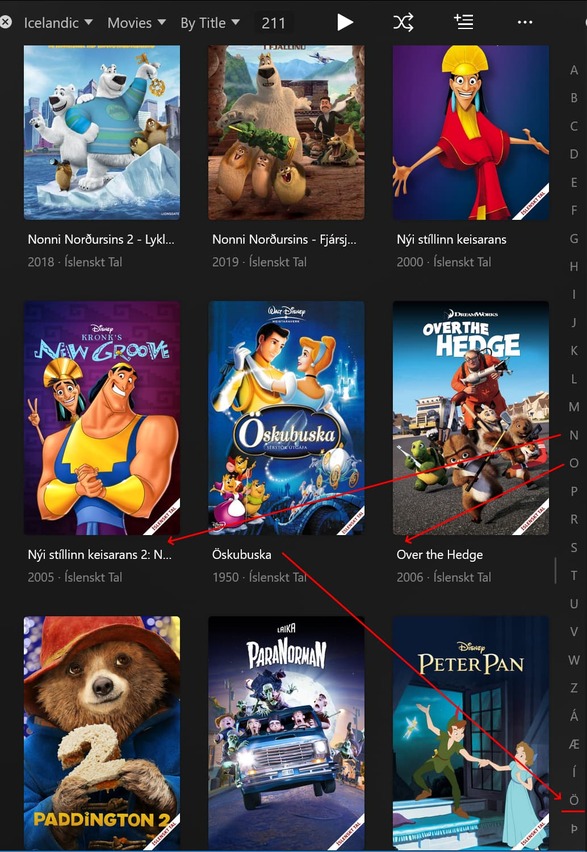
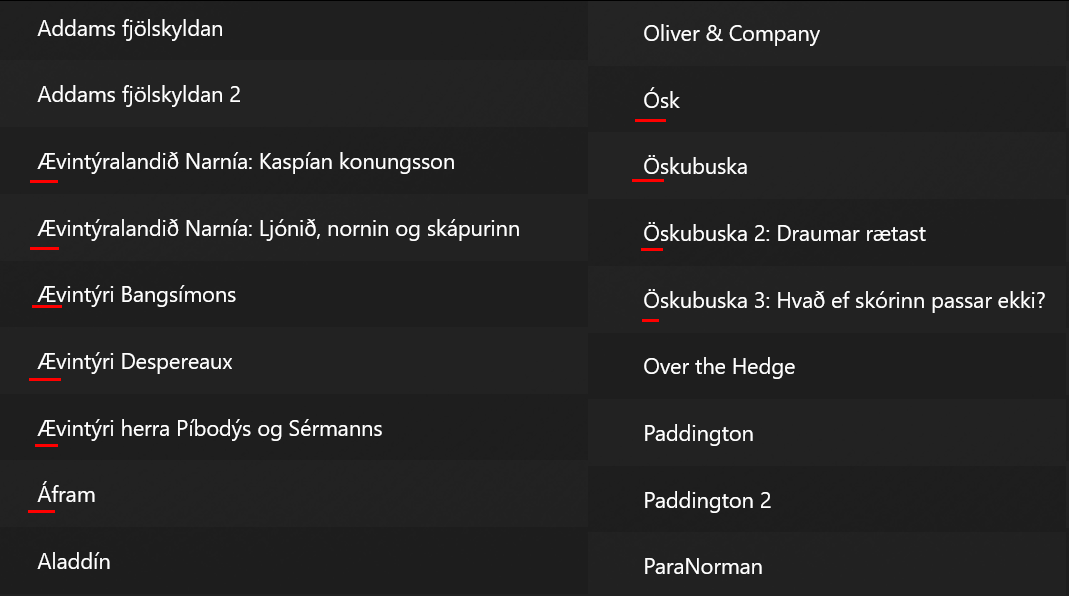
The actual alphabetical order is (somewhat) correct on the right-hand side, but the movies no longer sort like that. This is very annoying, since I’m clicking/tapping the Ö, which brings me to the bottom, but the movies aren’t there. Instead they’re way up there in the O’s. And worse still, they don’t even go in order together. They’re simply interspersed, since Plex now just ignores the ’ bits entirely and treats them as English letters. This. Is. Wrong.
O, Ó and Ö are not the same letter, any more than A, Á, D and Ð or any of the weird “foreign” letters from the countless non-English alphabets.
This of course applies equally to all the other ’ letters there at the bottom. Clicking them brings me right to the bottom to the Z’s, but all the actual movies are up in the A’s, I’s et cetera.
What do you mean by refreshing the client?
In a browser window every page load is a refresh, and on the Apple TV every time you turn it on you’re refreshing everything.
I can only chime in with a different sorting “issue”, but iirc if anything changes in the sorting logic, Plex won’t update items accordingly if they have been added before the sorting logic changed. Neither after a web app refresh, nor after a metadata refresh and it affects only future media, not media that has already been added prior.
This happens to me every time I set up a new PMS and forget to adjust the ArticleStrings in the Plex config file before adding media.
Let’s say, I forgot to add the German “ein/eine” as an article before I add a bunch of media, all movies/shows starting with ein/eine would never refresh its sorting. Neither upon refreshing their metadata, nor on refreshing or restarting anything. I’d always need to manually edit all affected media items. And it’s been like that ever since.
Maybe that “helps” @ArniVidar, at least in a way of explaining why it does not update the sorting titles right now
Cheers
EDIT: I think you could actually test and reproduce this by adding some delimiter as an article string of any title that a media item contains, restart PMS and then see that no item starting with some delimiter will update its sorting, regardless of what you refresh or update. Might be related to this
If that were the case, all the previously correctly sorted movies would not have unsorted themselves when Plex changed something. And yet they did.
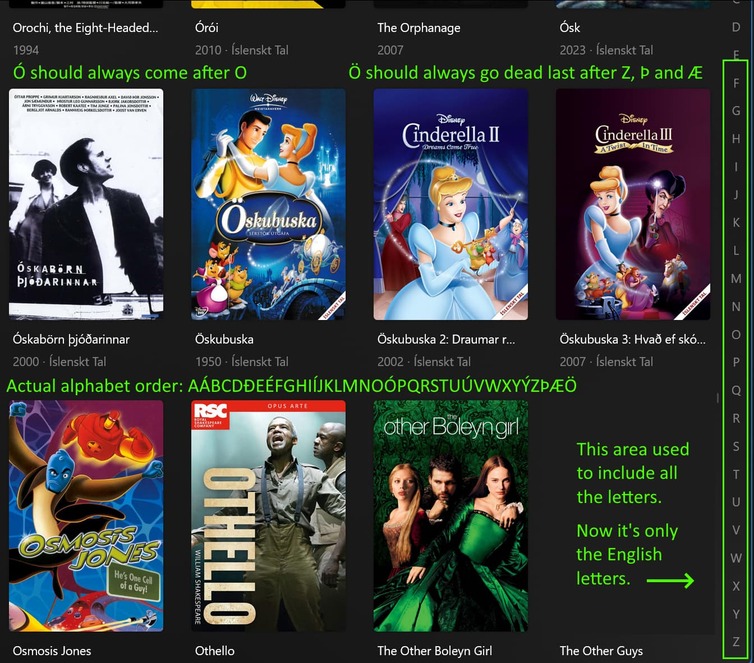
Regardless, I can’t really change anything about the sorting. The title’s sorting name is (for example) Órói. Órói begins with an Ó, not an O, and should not appear with the Or… movies between the Op… and the Os… movies.
Worse still, Öskubuska begins with an Ö, not an O, and should appear at the very bottom of the library, not in the Os…'s
As for the testing, I added aa in front of the name. Moves to the front of the library.
Uh, you’re contradicting yourself here. You say that refreshing doesn’t do anything because it’s a web page, then you tell me to refresh the web page. I have refreshed it a thousand times in the week since the release was installed, and even rebooted the computer/server a couple times too. That makes no difference.
Like I’ve said, I am also using an Apple TV, and an Android Phone app, and neither of those display a proper alphabetical order either.
This is not a browser refresh problem. The update just hasn’t fixed anything (in this issue, at least) at all, apparently.
The fix in the release was to resolve the inconsistency of the sort and character jump list. These Non-English/accented/diacritic characters should no longer be seen in the character jump list. But it sounds like there is still the issue of sorting.
Can you please provide some more details on your setup so I can mirror it and work through the sorting issue you’re seeing? What is the Library’s selected Language? The screenshots show Icelandic but I’m not seeing an available Library Language to match that. Having some more titles that fall into this issue would be nice too.
Thanks again for reporting and your patience while you continue to iterate through the reported issue.
Thanks for the response Atomatth, but… what do you mean?! They were showing before this recent change, and worked just fine. They’re part of our alphabet, and their respective titles should go there and nowhere else.
How do you suppose those of us of the non-English alphabet find our non-English titles, if there are no non-English letters in the jump list?
Are you intentionally moving away from / giving the middle finger to international users?
As for details:
All my library languages are English, regardless of whether the media hails from the US, Korea, Japan, Iceland, or wherever. I have precisely zero interest in splitting non-English titles away from the English ones. Movies is Movies, TV is TV.
As for titles that experience this issue, that’s literally every single title that uses the Icelandic alphabet. Here are a few examples:
Incidentally, the only Icelandic letter that sorts correctly, although it doesn’t show up in the jump list, is the Thorn, “Þ”.
That shows up last, after Z. Too bad it’s brethren Æ and Ö don’t follow it.
And just to clarify, this is the actual alphabetical order. Any other order is quite simply wrong:
AÁBCDÐEÉFGHIÍJKLMNOÓPQRSTUÚVWXYÝZÞÆÖ
Thanks for all the additional details. This makes complete sense. I’ve filed a follow up issue to see what we can do to improve the experience.
I was simply informing you what the change was and what it did. For now can we leave the speculations of the intent here? Let’s continue to make the experience better through iteration and feedback.