4802 definitely fixes my issue. Working perfectly now.
Thanks for testing!
Is onconnect fixed in build 4803?
My issue still exists with 4803. I refresh the guide and it stops before 1%.
https://forums.plex.tv/post/question/dvr-live-tv
Comcast Digital and 60115, logs are attached(Verbose), but it runs for a few seconds and fails. error.log is the media server log file, just during the refresh event.
Wrote a script you can cron to work around my issue, run it every day at 1am. This will move the epg files to *.old, and restart plexmediaserver on a unix based machine. I run Fedora, so this is tested on that version of Plex. I am happy to test any version put out.
1.11.3.4803 fixed the issue for me. So far so good. Thanks to the Plex team for investigating this one quickly.
4803 build didnt fix it for me - 11746 FIOS. Would sending logs help?
Click refresh guide, goes to 0% then goes back. Nothing downloaded.
From 14 posts above
@kinoCharlino said:
Thanks everyone for your reports. Engineering is working on the empty EPG. It has to be fixed for each provider that gets us data across all the different regions: eyeq, onconnect, xmltv. I’m hearing EPG for eyeq has already been fixed today (and will be in another build), with the rest will follow.
My take on the statement is there should be another beta version or two to fix the issue if using onconnect or xmltv as provider.
Not sure why I’m using onconnect but no longer have the issue.
How do you know what you have? Can you change?
EDIT: Looks like there is an easier way
support.plex.tv/articles/115001324354-how-to-tell-if-dvr-epg-is-onconnect-or-eyeq/
Look for lines like this in your Plex Media Server log
Feb 18, 2018 08:57:31.120 [0x7ff6a8511700] DEBUG - EPG[onconnect]: Purging 1 airings which completed in the past.
Feb 18, 2018 09:00:01.853 [0x7ff6a7911700] DEBUG - EPG[onconnect]: Next thing to start/end is at 2018-02-18 17:05:00 (in 300 seconds)
Feb 18, 2018 09:00:04.542 [0x7ff6a6bff700] DEBUG - EPG[onconnect]: Matched channel 052 () with grabber channel, adding.
Plex selects the provider based on where you are unless you provide an xmltv listing yourself (don’t ask me how to do that, I’ll stick with onconnect/gracenote for now).
I am onconnect…
So I guess I wait for onconnect to be fixed, until then my script is working.
I’m not the OP of this thread and it’s been marked as answered, but we’re all wondering what the status is for EPG providers onconnect and xmltv. Any updates? Will there be upcoming new PMS release versions to fix the issues with these EPG providers?
My EPG:[onconnect] is currently working, but there are still others out there with issues.
I imagine if I enabled all (531) of my subscribed channels on my HDHR Prime (have 124/531 enabled) I would be getting EPG:[onconnect] errors again as I did in the past.
Just an FYI for those waiting…
Alternatives I know something about (since the WAF has forced me to look at) are Channels DVR and HDHomeRun DVR, do your homework. TiVo was also once an option before they became RiVo (according to WAF).
@Plexer223 said:
@kinoCharlino
@timwojI’m not the OP of this thread and it’s been marked as answered, but we’re all wondering what the status is for EPG providers onconnect and xmltv. Any updates? Will there be upcoming new PMS release versions to fix the issues with these EPG providers?
My EPG:[onconnect] is currently working, but there are still others out there with issues.
I imagine if I enabled all (531) of my subscribed channels on my HDHR Prime (have 124/531 enabled) I would be getting EPG:[onconnect] errors again as I did in the past.
I am curious to know how you narrowed your channels down to 124 of 531. I have not touched the channels enabled as it seems like a daunting task to go through and figure out every single channel I want vs. the ones I do not. I mean did you actually spend the time to go through each channel, disable say like the SD channels, and remap the HD channels to the SD numbers? I hate that Comcast is not like DirecTV on how it numbers it’s channels. Channel 2 is SD, but Channel 189 is HD. I know I can disable channel 2, and then remap channel 189 to channel 2, but there is no quick way to do this, and it seems like an aweful lot of work, and I just have not had the amount of time needed to do it in a single sitting, not without making mistakes.
Wonder if there is a file on the Plex that you can just modify to do this without having to use the UI. Then we could easily create files that would allow for the remapping of channels by region, and provider, that would be really nice.
I didn’t have to remap any channels.
I started with my subscribed channels list on my HDHomeRunPrime at http://ip_address_of_Prime/lineup.html

I then disabled channels (by clicking to make a red X) I don’t watch including SD channels if I also get it in HD on another channel.
I also disabled music channels and channels in the 1000+ range since they’re all dupes.
I then looked at my enabled channels at http://ip_address_of_Prime/lineup.html?show
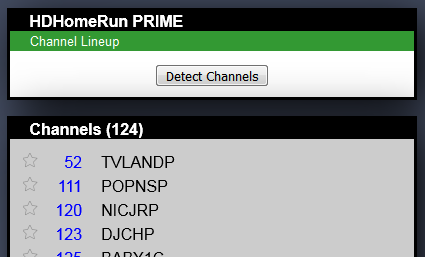
Then I created the DVR in Plex and it only loaded the 124 channels that were enabled and they were already mapped correctly.
By the way, I discovered the following about an HDHR Tuner;
http://ip_address_of_Prime/lineup.html?show=all
lists all channels available in your zipcode by your provider whether subscribed or not.
The ones struck out cannot be tuned by the HDHR, so means not in your lineup.
Don’t click on the “Detect Channels” button while watching LiveTV or while DVR is recording becaue it causes the HDHR tuner to use all tuners to scan through your channels.

You can also get an xml http://ip_address_of_Prime/lineup.xml?show=all or json http://ip_address_of_Prime/lineup.json?show=all listing that you can save to disk.
http://ip_address_of_Prime/lineup.html
lists only channels the HDHR can tune (should be your subscribed channels).
http://ip_address_of_Prime/lineup.html?show
lists only channels you enabled.
Thank you Plexer223! I have been struggling with mapping device channels to program channels for weeks. I see now that my problem was the creation of the DVR was trying to match up with the best EPG. Unfortunately, that was Centurylink, with over a thousand channels, most not OTA. And of the 20 channels I watch, many did not include a match for digital channels. Editing the HDHR lineup allowed Plex to pick the “Local Over The Aiir Broadcast”, and as you mentioned, I didn’t have to remap any channels!
Since not everyone having an issue with the EPG Program Guide blank/not refreshing/JSON parse errors/etc. will be looking in the Windows PMS Forum, figured I’d add a link to that discussion there where it states Gracenote data is to blame and Plex is trying to come up with a workaround. forums.plex.tv/discussion/293287/plex-is-telling-me-my-program-guide-is-empty/p5
Not like anyone would look in this thread either, I guess.
Thanks for the other post which I suppose has more info but still no answer 
Anyone have a decent workaround?
My EPG data I delete the files, and wrote a script to delete them, and restart plex nightly, which re-downloads the EPG fresh, and it seems to work fine. Others have removed MANY channels and that seems to fix the problem. No great work arounds though.
