Server Version#: 1.32.6.7557 (Synology)
Player Version#: 5.70.0 (Samsung QN95B 2022 TV)
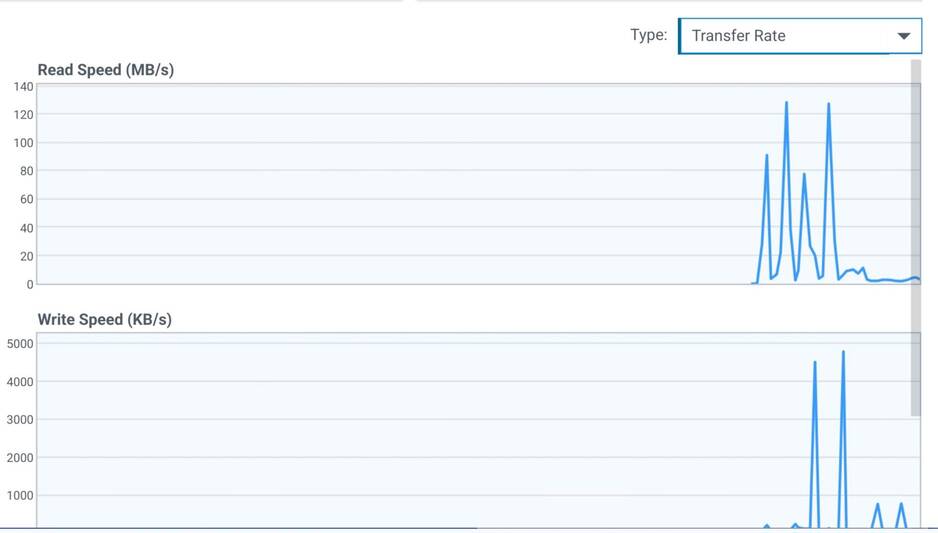
Short version - Extremely high disk usage on my server when a file is played with text based Internal subtitles enabled. This happens with files that are Direct Play compatible. 120-150MB/s reads which depending on the server load and the file’s bitrate can and has resulted in buffering and playback failure.
Long version…
I’ve noticed that when playing any MKV file with internal subs enabled there is extremely high disk usage on my server.
My server has multiple drives but they’re all setup as separate basic volumes, so only 1 drive is being used to playback a file. In my testing I’ve ensured no one else was using the server, so the drive activity charts I’ve included below show the activity PLEX is generating on a single drive.
I first discovered this when I had buffering issues which resulted in failed playback with a 4K 20GB file. I found it odd as I’d watched numerous similar size files before with no issue, and I always make sure my files are direct play as I don’t allow video transcoding and try to avoid audio transcodes. After a lot of testing I found the difference was the forced internal subtitles.
Once I disabled those, the file played normally with very low disk usage. I then extracted the subtitles and used them as an External SRT and again, perfectly normal playback.
I’ve also found that if a transcode is taking place, or if you force Direct Stream, then disk activity is normal. So this seems to be a Direct Play issue.
In my testing I’ve since found this happens with ALL MKV files with internal subs. But the severity of the problem varies based on the file size and bitrate of the opening minutes.
What seems to happen is there is an intense period of disk reads when you start playing a file with internal subs enabled. A 3GB file will fall to normal disk reads after around 30 seconds, a 10GB file in 90 seconds, and a 20GB file in around 3-minutes. It’s almost like Plex is extracting the subtitles from the MKV while also playing the video - a process that is of course completed faster on smaller files. A process that - even on larger files - may pass unnoticed if the first few minutes are low bitrate and your system can handle the load. But on larger files with high bitrate openings the disk drive may struggle to keep up. Network usage during this period is completely normal. CPU usage is high.
The behaviour I’m seeing occurs on both my Samsung TV (2022 model) and Xbox using the latest player versions. Probably not surprising when comparing the release notes as they seem to be very similar.
PC and Amazon Fire Stick Plex players do not have this issue in my testing.
I’ve used 4 files for testing purposes to create the supplied logs with my Samsung TV - testing them over standard DLNA and through PLEX…
4K Source 20GB 115min (HEVC, EAC3, with forced internal SRT subtitles)
The first few mins have high constant bitrate of 20-40Mb/s
DLNA: Plays as you would expect. Normal Disk usage.
PLEX: Plays via Direct Play as expected. HIGH hard drive usage for just under 3-minutes, 120MB/s average, spiking to 150MB/s. After 3-minutes it settles down to normal usage.

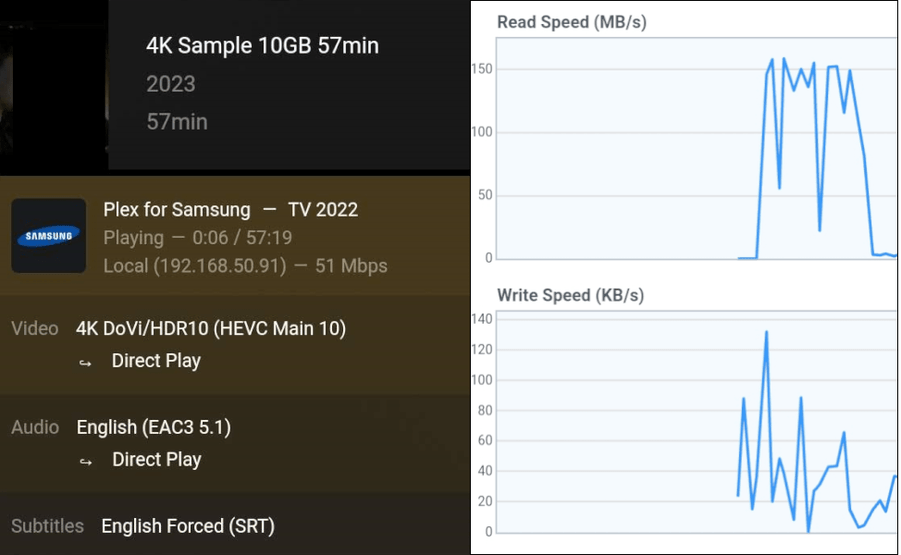
4K Sample 10GB 57min with forced internal subtitles
I split the 20GB file in two.
DLNA: Normal.
PLEX: Direct Play. High disk usage, 120-150MB/s but this time the drive usage settles down after around 1min 20secs.
1080p Source 9.5GB 115min (x264, AC3 with internal subs)
The first few mins have high constant bitrate of 20-30Mb/s
DLNA: Normal.
PLEX: Direct Play. High disk usage, 120-150MB/s with a similar 1min 25sec time for the drive usage to settle.

1080P Source 2.8GB 46min (x264, EAC3 with internal subs)
Your standard good quality 1080P WEB-DL TV episode. 10-20Mb/s spikes but usually around 8-10Mb/s.
DLNA: Normal.
PLEX: Direct Play. High disk usage, 120-150MB/s but just 30secs or so for drive usage to settle.

Both the 4K 20GB Source and 1080P 9.5GB source files have buffered and failed playback on me. However - when I was testing to generate the supplied logs - playback was uninterrupted.
Disabling internal subs results in normal disk usage.
Using external subs also results in normal disk usage.
In the supplied logs I do the following in order:
Play “4K Source 20GB 115min” with internal subs for a little over 3mins (when the drive activity calms down).
Play “4K Source 20GB 115min” with external subs for about 1min 30secs.
Play “4K Sample 10GB 57min” with internal subs for a couple of mins.
Play “1080P Source 9.5GB 115min” with internal subs for a couple of mins.
Play “1080P Source 2.8GB 46mins” with internal subs for about 1min.
I’ve edited some identifying info out of the logs.
Plex Media Server Logs_2023-10-19_23-44-06.zip (222.0 KB)
XML for test files.zip (6.5 KB)