Platform Version#:5.1.1
Client Version#:5.5.1
LG CX
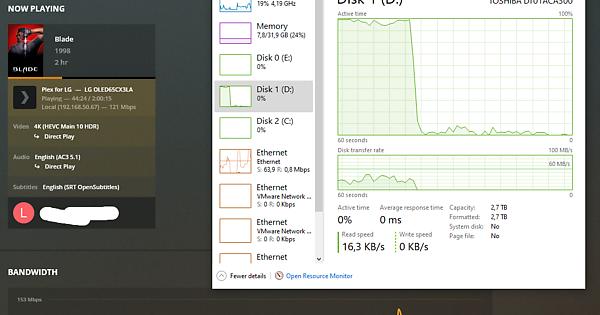
The video and audio can be direct played, since both can be decoded by the TV (4k hvec 10 bit with HDR and ac3). If the played .mkv container has internal subs, and the internal subs are selected, it triggers the transcoder to kick in and it uses 100% of the HDD, causing buffering. The subtitles are SRT. The funny thing is that the player still says the movie is direct played, WITHOUT transcoding. Subtitles AREN’T burned, that option is selected only for image based ones. With SRT subtitles downloaded inside the WebOS client app, the HDD remains at normal usage levels aka waaaaaaaaaaaaaaaaaaaaaaay below 100%. Why does Plex handle internal subs from the mkv file vs subs downloaded through the WebOS app differently? Why do internal subs trigger 100% HDD disk usage?
The problem appears for every 4k movie. Playing the same movies through the LG SmartShare app using the DLNA protocol doesn’t trash the HDD AKA everything works fine when using the internal SRT subtitles, therefore it is a Plex problem, and not a PC problem or a TV problem.
Thanks in advance.
