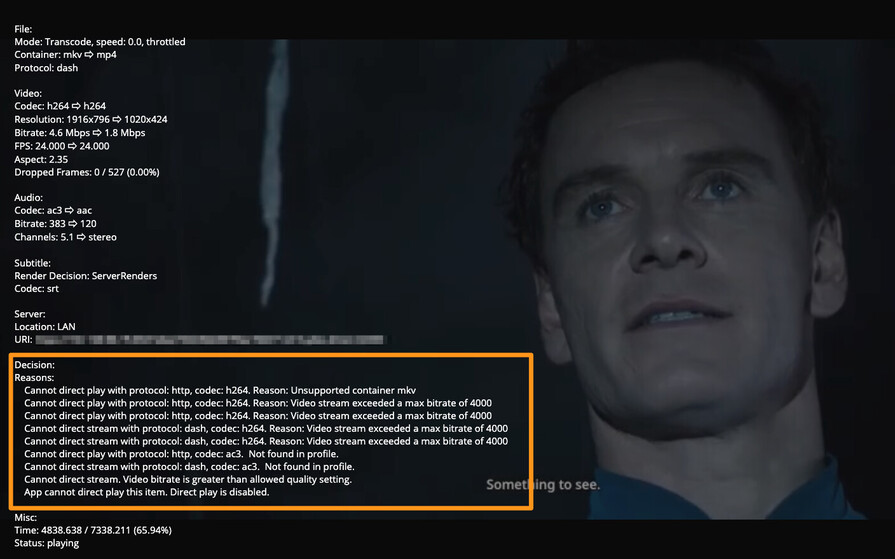
Can anyone at plex please look at this issue and at least TRY to provide a resolution for it, PLEASE? Internal subs produce LARGE subtitles on Samsung TV. If you require any info please let me know. Thank you!!
Without Transcoding : It seems to stay at the setting I choose unless I stop and start playback again at which point it goes back to the default “Normal”.
With Transcoding: afaict it is staying on the size that I chose in settings.
would you mind proving the media xml info for one of your files with subtitles so I can try to find a similar file to test with and the android logs from after playing back that file.
I appreciate your prompt response (now). For my issue, I am doing this on a 2013 Samsung TV, with PMS on a local desktop (both wired). The files I play seem to be trans-coding (for whatever reason they don’t direct play, unsure the specific reason) and they have internal subs. That being said, what exact info do you require from me? Thanks again!
We don’t make the app on 2013 Samsung. That app is made by a third party who does not make it anymore as far as I know. If you have a device with a player that we do make would need the logs from app.
I would need to know what type of subtitles. (SRT. ASS/SSA, etc) and the server logs which cover playback when the subtitles should have changed to whatever you set it at.
I don’t know if it has it in that Samsung SmartHub app but in our apps during playback you can look at playback info to see why it requested the server to transcode
Subtitles are Internal SRT. What are the directions on how to look at playback info to see why it requested a transcode (so I know on newer Samsung TVs…)? Please let me know the name of the log file you need the info from and what info you require from it. Thanks!
Off topic question - why does a non-HW transcoding video play almost instantly versus a HW-transcoded video takes like 60 seconds or so to buffer and then will play? Wouldn’t HW transcoding be faster than software?
Not necessarily. It is for when folks want to not have their CPU taxed, not because it is faster, due to folks often using the machine for more than one thing. It can be less of a quality transcode than a software transcode a well.
If the GPU is being used then that is stuff the CPU does not have to do. And if a person uses their server machine for more than just Plex it can be a benefit to offload that.
As far as quality of transcode. Most folks would not be able to tell any difference from what I have seen. and if you can’t tell then offloading it is the only real reason to.
The Plex Media Server.log would be where to start. the Plex Transcoder Statistics.log from that playbacks as well.
That screenshot I have above is from the player with burned SRT subtitles set on Tiny. So I can’t reproduce issue.
… i changed the size setting in the client and it fixed it but when they are not internal i am sure i will have a size issue again… can you assist with the errors in my logs though, please? if necessary? logs.zip (263.1 KB)
Jan 21, 2022 02:05:44.135 [1068] ERROR - getaddrinfo(192-168-1-2.abcdefghijklmnopqrstuvwxyz012345.plex.direct) failed: 11001
this means it failed a DNS rebinding test. it can effect remote access. if you are not manually port forwarding I would and maybe use a different DNS like Googles instead of what your ISP’s
Jan 21, 2022 00:35:49.633 [6020] INFO - Library section 1 (My TV Shows) will be updated because of a change in "F:\tv\Law.And.Order.SVU.S23E12.720p.WEB.h264-GOSSIP.mkv"
You seem to have your TV files at least “loose” in your F:TV folder, or worse, at the root of the drive in T: . which i think it cause of many errors where it cant seem to figure out what goes to what.
There should be a TV folder and in that a folder for each show with the name of the show and year as name of folder
this is what minimally it should be like below. but you should follow Your Media Naming
F:\tv\Law And Order SVU (1999)\Law.And.Order.SVU.S23E12.720p.WEB.h264-GOSSIP.mkv
but this is getting way off this subtitle topic so if still having issues with those errors please make a new topic.
This large subtitle issue has been going on for well over a month for me. I’m really glad that it is getting some <3 from Plex!
I’ve noticed that this issue seems to be specific to one channel in my area, from what I have been able to determine. Additionally, when we play back some DVR videos recorded on that channel where the large subtitles occur, the video starts to stutter until we disable burning the subtitles.
I have a massively powerful system for my Plex server (AMD Ryzen 5950X + NVidia RTX-3080), so I don’t think my system is getting bogged down with the transcoding.
What can I provide to the Plex Wizards to help diagnose the “large subtitles” issue?