I know I’m just talking to myself here, but some extra random mumblings…
I know it’s different, but I was looking at the Emby forums and saw some talk that backed up my theory of the subtitles being extracted from the MKV.
I’ve installed Emby server and done some basic testing using the same files, and I see the same results.
Emby specifically has an option in their transcoding settings for subtitles:

With that enabled (which is the default setting) I see the exact same behaviour with extremely high disk usage which settles after a varying amount of time (in line with my results in the first post).
Checking the logs you can see the ffmpeg operation they use to extract the subs, and you can even find the extracted file in the cache.
If I change the Emby Samsung app’s Subtitle setting from “Default” to “No subtitle” (the wording is strange, but it seems to translate as changing it from “default based on language/mkv settings” to “let the user choose”) then I see this:
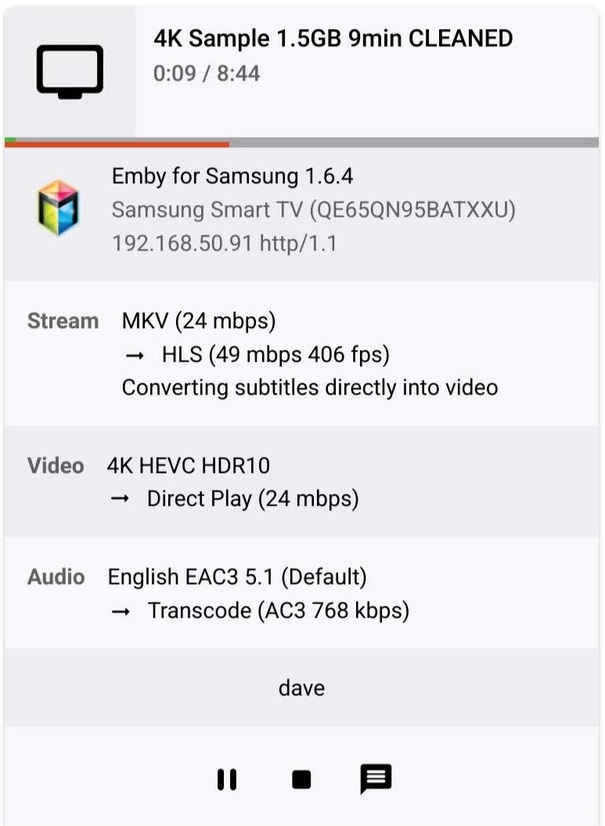
Which seems to be some direct stream/direct play hybrid with normal disk usage.
If I disable the extract setting on the server, then the files simply don’t play (just a constant loading screen).
It’d be nice to get some clarity from someone at Plex over this. Are you extracting subs? Why?
If its a necessity it’d be nice to have an option to optimize the library by doing it when adding files, making it a one-time operation instead of everytime the file is played.
On a different note, unlike Plex, Emby does the following without problem on a Samsung TV:
Direct Plays a file with >30 streams (Plex forces Direct Stream with audio transcode)
Direct Plays when you choose a secondary audio track (Plex transcodes the audio)
Plays subtitles fully (Plex skips the last line → Last line of subtitles is not displayed when using Plex on Samsung TV)
