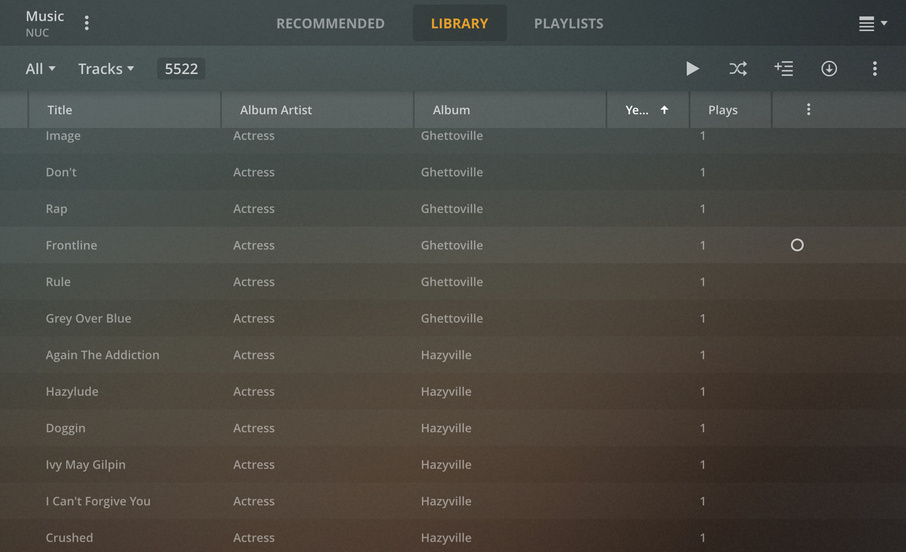
I’m having an issue with the Plex Web App whereby the Years column is not consistently populating for all tracks (probably 30-40% of tracks are missing data in this field). The Album view however does populate correctly based on year, and the year is visible on the Album home page, so I believe this may be a defect. I have attached two screenshots for reference. I’ve tried re-tagging, refreshing metadata and various other things, with no luck. The fact that so many records are affected makes it hard to troubleshoot, so I’m hoping that there is a known solution for this.
This is a Premium Music library and the Use Embedded Tags flag is checked. The ID3 tag has the Year, however it looks like Plex doesn’t use this on a track level anyway. The Album has been matched correctly in Plex.
In the metadata_items table in the database, the tracks have NULL values in the Year field so the scanner didn’t populate them. The year field for the album does get populated.
Just reproduced this bug with a test library with three albums. MP3 files, ID3v2.3 tags, scanner is “Plex Music”, set to read local metadata only.
This is regrettable - the scanner goes through the trouble to parse the individual track metadata (including years), but it doesn’t write them in the db
In the Library tab, select albums from the drop down (Artists / Albums / Tracks / Folders are the options), then List View (top right, under your avatar), then sort by year.