I’ve been using the DVR feature for over a year, and have recorded hundreds of shows.
Lately I decided I wanted to record NCIS: Los Angeles off of ION. (Channel 33 in Seattle.)
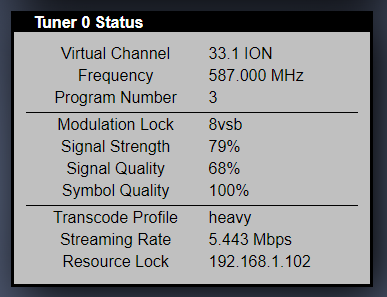
All recordings fail, usually with a Transcoder Failure. The channel has good signal strength as indicated by the HDHomeRun Extend’s status screen.
As a test I downloaded the Channels DVR. It records ION just fine.
Latest public release of PMS.
Plex Media Server Logs_2020-02-02_20-21-34.zip (801.2 KB)
Do you have transcoder directory set? I was getting mysterious failed recordings on occasion and decided to set the transcoder directory, even though I do not use the transcoder–ever. Well it turns out plex always uses it, because I see very many segmented pieces in that directory during records.
No failed recordings since–knocks on wood–
If this setting is so crucial I do not know why plex allows it to be left blank without gigantic in your face warnings if you use the dvr.
Wait…unless you edited your post then I just misread it and what I said probably doesn’t apply.
I only edited to add the logs and screen shot.
I record shows nearly every day, only recordings on ION, channel 33 in Seattle, ALL FAIL.
J
I made another attempt, and this is what I pulled from the logs:
Feb 03, 2020 14:00:03.483 [13116] ERROR - [Transcoder] [mpegts @ 01c1ad80] sample rate not set
Feb 03, 2020 14:00:03.483 [11792] ERROR - [Transcoder] Could not write header for output file #0 (incorrect codec parameters ?): Invalid argument
Feb 03, 2020 14:00:03.483 [4780] ERROR - [Transcoder]
Feb 03, 2020 14:00:03.514 [12236] INFO - Notification: Recording Criminal Minds - E3 - Rule 34 -
Feb 03, 2020 14:00:04.389 [8752] ERROR - Grabber: Failed to inspect file: Could not parse D:\Plex\TV Shows.grab\8a39d271bac537fc04a361c48a1537815a6a3396\Criminal Minds - S14E03 - Rule 34.ts (error=-1094995529): Invalid data found when processing input
@darcilicious Shall I try this with debug turned on? I would really like to be able to record this particular channel.
Edit your library and add a trailing \ , it should be D:\Plex\TV Shows\ .
I don’t think so. If I browse and select a folder using the mouse, the resulting path does not have a trailing slash. ALL of my libraries do not have a trailing slash. Also, why would this only affect recording on one channel?
I wish someone from Plex would chime in here, I’m having no issues recording ION, channel 33 in Seattle with Channels DVR, but the Plex DVR errors out after a minute or two of recording.
In the full logs you submitted there are numerous Slow Query messages. When I filtered your full logs on just the slow query messages it shows 413 entries, some are shown below:
Jan 26, 2020 12:01:38.578 [3316] WARN - SLOW QUERY: It took 250.000000 ms to retrieve 1 items.
Jan 26, 2020 12:01:42.171 [5424] WARN - SLOW QUERY: It took 218.750000 ms to retrieve 1 items.
Jan 26, 2020 12:01:42.296 [5424] WARN - SLOW QUERY: It took 265.625000 ms to retrieve 1 items.
Jan 26, 2020 13:02:09.773 [6344] WARN - SLOW QUERY: It took 390.625000 ms to retrieve 50 items.
Jan 26, 2020 13:02:43.631 [6548] WARN - SLOW QUERY: It took 281.250000 ms to retrieve 50 items.
Jan 26, 2020 13:02:43.647 [6332] WARN - SLOW QUERY: It took 203.125000 ms to retrieve 51 items.
Jan 26, 2020 13:04:08.988 [6348] WARN - SLOW QUERY: It took 437.500000 ms to retrieve 50 items.
Jan 26, 2020 13:04:09.004 [6548] WARN - SLOW QUERY: It took 312.500000 ms to retrieve 51 items.
Jan 26, 2020 13:04:09.082 [8316] WARN - SLOW QUERY: It took 359.375000 ms to retrieve 51 items.
Jan 26, 2020 13:04:09.097 [6332] WARN - SLOW QUERY: It took 359.375000 ms to retrieve 50 items.
Jan 26, 2020 13:04:09.129 [6708] WARN - SLOW QUERY: It took 296.875000 ms to retrieve 0 items.
Jan 26, 2020 13:09:01.432 [6328] WARN - SLOW QUERY: It took 234.375000 ms to retrieve 50 items.
Jan 26, 2020 13:09:16.009 [1300] WARN - SLOW QUERY: It took 296.875000 ms to retrieve 50 items.
Jan 26, 2020 13:09:16.712 [6340] WARN - SLOW QUERY: It took 250.000000 ms to retrieve 16 items.
Jan 26, 2020 13:09:17.291 [9564] WARN - SLOW QUERY: It took 203.125000 ms to retrieve 1 items.
Jan 26, 2020 13:09:46.508 [4776] WARN - SLOW QUERY: It took 203.125000 ms to retrieve 0 items.
Jan 26, 2020 13:09:46.555 [6348] WARN - SLOW QUERY: It took 328.125000 ms to retrieve 50 items.
Jan 26, 2020 13:26:44.900 [6340] WARN - SLOW QUERY: It took 359.375000 ms to retrieve 40 items.
Jan 26, 2020 13:26:44.900 [6348] WARN - SLOW QUERY: It took 203.125000 ms to retrieve 40 items.
Jan 26, 2020 13:30:02.098 [7132] WARN - SLOW QUERY: It took 234.375000 ms to retrieve 51 items.
Jan 26, 2020 14:00:03.212 [9096] WARN - SLOW QUERY: It took 234.375000 ms to retrieve 51 items.
Jan 26, 2020 14:48:33.475 [9576] WARN - SLOW QUERY: It took 390.625000 ms to retrieve 40 items.
Jan 26, 2020 14:48:33.475 [8648] WARN - SLOW QUERY: It took 328.125000 ms to retrieve 40 items.
Jan 26, 2020 14:48:33.835 [9576] WARN - SLOW QUERY: It took 234.375000 ms to retrieve 33 items.
Jan 26, 2020 14:48:34.397 [8792] WARN - SLOW QUERY: It took 234.375000 ms to retrieve 51 items.
You should really optimize the database by going to Settings/Troubleshooting and clicking the Optimize Database button. I would also suggest checking that Optimize database every week is selected under the Schedule Tasks in the Settings as well.
To diagnose any issue with recordings logs with Debug enabled, not Verbose, would be needed. In the logs provided I do not see much as to why it failed. I also do not see the missing \ between TV Shows and the .grab that you posted in a separate post from the logs.
I would also suggest updating to the latest Public release 1.18.6.2368-97add474d to see if there is any improvement.
I’ve updated to the latest release. I have optimized the database.
I’ll retest and if the issue still exists I’ll reproduce with debug enabled and send the logs.
Thank you for the response.
Recording still fails. I’m attaching the logs with debug enabled.
I appreciate the time you are taking to look into this.
Plex Media Server Logs_2020-02-11_13-24-52.zip (1.2 MB)
I took a look at those logs and I didn’t capture the error with debug. I got this:
Feb 11, 2020 13:21:46.780 [12684] INFO - Notification: Recording Criminal Minds - E6 - In the Blood -
Feb 11, 2020 13:21:46.780 [17392] ERROR - [Transcoder] [mpegts @ 017551c0] sample rate not set
Feb 11, 2020 13:21:46.780 [14908] ERROR - [Transcoder] Could not write header for output file #0 (incorrect codec parameters ?): Invalid argument
Feb 11, 2020 13:21:46.780 [11656] ERROR - [Transcoder]
Feb 11, 2020 13:21:47.030 [2292] ERROR - Grabber: Failed to inspect file: Could not parse D:\Plex\TV Shows.grab\665ee53bfeedf2d784d7c506fe58d70e88a74768-fd55eccc2ebb7c3b3f976c8882a166e853f77cce\Criminal Minds - S09E06 - In the Blood.ts (error=-1094995529): Invalid data found when processing input
I’ll get new logs when I can.
Looks like the recording started around 13:24:08 and stopped for some reason around 13:24:10.
Feb 11, 2020 13:24:10.765 [10844] DEBUG - Grabber: Moving "D:\Plex\TV Shows\.grab\665ee53bfeedf2d784d7c506fe58d70e88a74768-fd55eccc2ebb7c3b3f976c8882a166e853f77cce\Criminal Minds - S09E06 - In the Blood.ts" to "D:\Plex\TV Shows\Criminal Minds\Season 09\Criminal Minds - S09E06 - In the Blood.ts"
Where is your transcoder temporary directory located? Can be found under Settings / Transcoder.
What is your D drive? Internal or External? How is it formatted? How much free space?
How is your C drive formatted and how much free space?
Transcoder directory is not set, the field is blank.
Drives are internal, NTFS. C: 10 GB free, D: 1.2 TB free
It is only this channel I have issues with. I record from other channels every day without issue.
Thanks again, I’m going to try to get a debug log today.
Please see entries around Feb 12, 2020 08:03:15.060
Plex Media Server Logs_2020-02-12_08-04-17.zip (2.1 MB)
Seeing the drive info can you try this:
On your d drive create a folder called something like “Plex Transcoder”
In the Transcoder settings set the Transcoder temporary directory to D:\Plex Transcoder
Concerned about the 10GB free on the C Drive since you are defaulting to the C drive
Done, now pointing to the E: drive that has 836 GB free. (E:\Plex)
Still fails on channel 33.1. See Feb 12, 2020 11:25:05.527 in the log.
Plex Media Server Logs_2020-02-12_11-26-00.zip (3.0 MB)
What OS are you running. I believe it is either Windows 7 or Windows Server 2008 based on logs. Do you have Powershell installed? Would like to see if we can get a capture using curl in PowerShell. Would also like to see some info on the channel using the HDHR web interface while using VLC to stream the channel. Can you do a network stream using VLC with the URL: http://192.168.1.226:5004/auto/v33.1?transcode=heavy. While that stream is playing go to http://192.168.1.226/tuners.html and select the tuner that is playing 33.1 and provide a screenshot of the tuner status showing signal strength, signal quality, and symbol quality?
My initial post has the screen shot you want. I’m not at home at the moment.
Fun fact, I can’t record channel 33.1, but I can watch it with Plex!
Thanks for the VNC instructions, I’m going to save those…
Thanks for pointing me to the screenshot above. I did not look back at the first post earlier. Do you have PowerShell installed at home and which OS? Would still like to try to get a manual recording sample using curl inside PowerShell.
