Server Version#: 1.14.0.5465
Player Version#: N/A
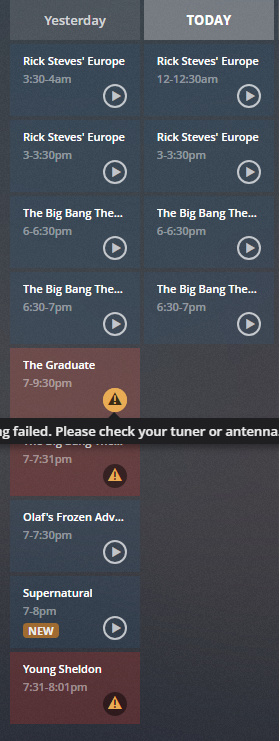
I am getting the error “Recording failed. Please check your tuner or antenna.”. I know that the signal is coming in just fine as I can watch the channel I’m attempting to record on my TV. The house has a single antenna that is sent to a signal booster before being split three ways; living room, kitchen, and Plex server. I can watch the channel I’m trying to record just fine on the living room TV.
Somewhere on the splitter, the decibel reductions are usually printed on the sticker.
Since a television is more sensitive than a video capture tuner (translation: Less fussy), it can survive with less signal strength
If you temporary run direct to the tuner input and still get the signal strength error, the splitter has been ruled out. At that point, I can only pass this forward to the DVR team (where you are now). I stepped in because of the typical electrical/signal situations often overlooked
Learn something new every day. This one is 3.5 / 7 / 7. Server was connected to a “7”. I’ve since removed the splitter and have the antenna line (with inline amplifier) connected directly to the server using a double female connector.
Makes some sense. Also, TV was connected to the “3.5” from above.
I will report back tomorrow evening after the program I’m trying to record comes back on again. If this works, I’m guessing I would need to look into an amplified splitter.
The program was supposed to be on last night but for some reason I don’t see that it even tried to record it. It’s back on again today; will see what happens.
Supermarket Sweep 2000

11/28/18—Episode 11-28

AIRED

Tonight at 20:30 on 9.3 WWORDT3 (BUZZR)

Recording failed. Please check your tuner or antenna.

VIDEO

SD

Teams compete in games involving supermarket product literacy.
Antenna is connected to an amplifier and directly connected to an internal TV tuner card.
Supermarket Sweep 2000
11/29/18—Episode 11-29
AIRED
Today at 10:30am on 9.3 WWORDT3 (BUZZR)
Recording failed. Please check your tuner or antenna.
VIDEO
SD
Teams compete in games involving supermarket product literacy.
Recording two different shows on two other different channels succeeded. The issue appears to be with this specific channel.
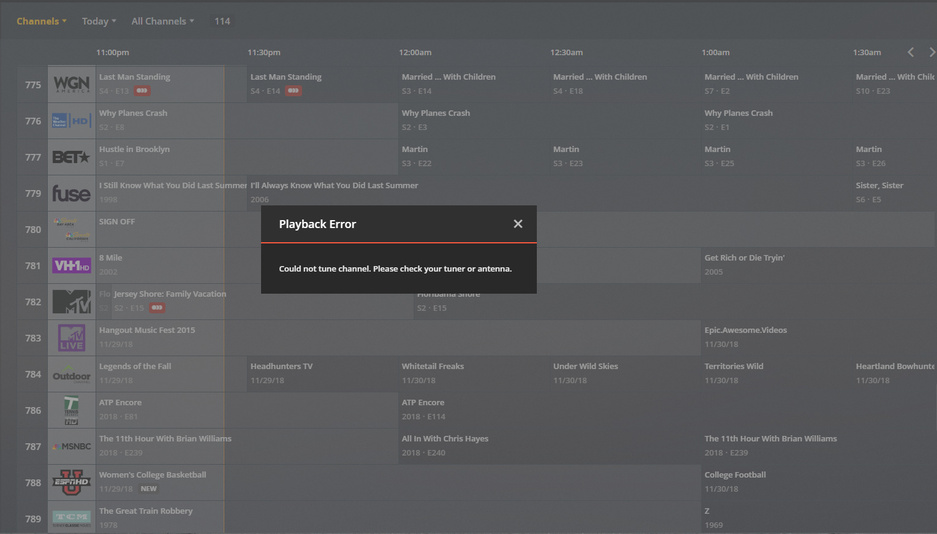
If I try to tune to that channel - I get the “check your antenna error” Particularly odd, given that it will record other shows on that channel (for example, it recorded Hardball two hours before just fine).
I’m also experiencing this. I have a dedicated server running Fedora 29 (i5, 20GB of RAM, 500GB SSD) with two tuners, a Haupaugge WinTV Dual with the included stick antenna connected directly to the server’s usb and a HD Homerun Quad connected to a ‘ONE FOR ALL HDTV antenna’ both of which should be good for 25mi range and I’m less than 3.5mi from all of the transmitters. I can tune all of the channels perfectly (no glitches) on any of the 6 tuners and can record from all of them on any of the channels. It seems like certain shows (specifically, but not limited to, 1080p broadcasts) seem to do this more often. Both antennas are actually in a window facing south, nearly line of sight to the transmitters. My server doesn’t seem to spike over 55% processor (even with 6 things recording at once) and only 1.5GB of ram is being used out of 20gb. The shows are saving to a WD EX4100 NAS over a 1GB network link (better actually, the 2 NIC’s are bonded) (the NAS is completely bored during the recording). Any ideas/thoughts? Plex server is Version 1.14.0.5470
So Family Guy recorded successfully this evening. I’ve got the same program set to record tomorrow; will report back with the results. The issue appears to be limited to one “sub” channel.
I’d had a few partial and failed recordings over the last few weeks with the check your antenna message and then at the weekend every recording failed on Saturday!
Rolled back to last version prior to 1.14 ie. 1.13.xxx and recordings have been fine since.
I’ve been having the same problem and created a thread about it here but received no response. I suspect the issue is with Plex Media Server as well. probably in the range of version 1.14.xxx but I would have to trace back the failed recordings and compare them to PMS version downloads to be sure.
In my case I am currently using:
Synology DS1815+ DSM version 6.2.1-23824 Update 1
Plex Media Server 1.14.0.5470
HDHomeRun Prime 3 tuner CableCard - Firmware: 20180817
I’ve experimented somewhat by manually tuning channels in PLex Media Server until I find a tuning failure. Once I have a failure I double check that the channel will not resolve. Once that is done I visually check the HDHomeRun Prime LEDs and I check the logs in the HDHomeRun Prime via the web interface. Lastly, when there are tuner failures I manually tune to the same channel using the SiliconDust HDHomeRun Player app to independently verify that the failing channel can indeed be tuned (no permission problems or off air issues).
Not once did I have problems tuning the failed channel independently with the HDHomeRun Player App so there are no issues with the signal or the tuner hardware.
The LED on the HDHomeRUn Prime always goes solid indicating a lock and stays that way until it turns off 5 to 10 seconds later. If there are signal quality issues it should blink rather then lock and stay solid. Lastly the HDHomeRun web interface logs show successful tuning of the given channel.
So I too suspect that there is some issue with the latest version of PMS causing this.
I’ll probably need to try falling back to an older version of PMS to try and resolve this issue.
Same Problem here, watching or recording fails on random channels with error message. I have even spun up additional virtual machines for testing and am still experiencing the issue.
Server1 (main): FreeNAS 11.1 Plex v.1.14.0.5468
Server2 (testing): CentOS7 Plex v.1.14.0.5470-9d51fdfaa
I’ve been having this issue for what it seems to be ages to! Even my remote users are experiencing issues to.
What makes me laugh is they blame antenna amps, and yet I’ve tested my server which is a i5-3330, 8Gb RAM, Nvidia GTX750ti, with 3xHauppage WinTV DuoHD tuners connected with and without the amplifier and I get the same issue.
My arguement is that Plex Devs are more interested in adding some “Cool” new features instead of fixing old ones first, especially this one that I’ve been constantly told has been fixed since 1.13.xxx and that the issue was that they had to introduce a 15 second timeout to fix the issue… Obviously Plex Devs, this hasn’t solved it, and if Plex isn’t very good at receiving 100% signal quality like other media servers are, then they really need to go back to the drawing board and sort this out quickly, or risk losing users, especially paid up members like myself and others…
I’ve posted my logs AGAIN! and I hope another Guru takes a look through them to see the error, as I don’t think the one that’s currently doing the job knows what they’re looking for, they just keep saying “I can’t see any error!”
Anyway here ends my rant, and I really really hope that this time Devs sit up and listen to users rather than adding “Useless” features that are Overpriced like Tidal…
Yeah, that is exactly what I am seeing too. Its worth pointing out that this seems to be an issue with both CableCard and ATSC OTA tuners.
I would just add that for my setup it is somewhat random but there are some channels that typically just won’t work in Plex. So for example, SyFy channel 630 is intermittent. Sometimes it works sometimes it doesn’t. MSNBC channel 652 typically just doesn’t work althouth rarely it does. Same for the Hystory channel 662 and National Geographic channel 670.
Once again these channels all can be verified as fully functional (with no signal or hardware related issues) by using a third party application.
Clearly the problem is with Plex.
I don’t know what I would be looking for in the Plex logs but I suspect it would simply log the failure to tune a given channel.
Just downgraded my Main server (FreeNAS 11.1) to Plex version 1.13.9.5439 and can confirm that all channels are once again working. Plex broke something in the 1.14 branch.