Is it possible to sync the plexamp apps on different devices?
What do you mean by syncing Pöexamp?
I have plexamp on my iPhone and iPad… but if I open the app on one device and start streaming music, the other device doesn’t sync with it so I can only control the music with one device at a time.
You cannot play music in sync on multiple devices.
You can control a player from multiple other controllers (all running Plexamp).
You can also hand over playback between devices if I recall correctly using the same function by using two downward facing arrows. Don’t know what they’re called.
Can you explain how I do this? When I use Plexamp on my iphone and then open it on my ipad I can’t seen any way to control the music from the ipad.
The only downward facing arrow I see is for downloading.
Sorry. Probably should have been more specific, when you touch the cast button, you get a number of options of devices currently playing music (or available to be airplayed to), touching a playing device gives you the ability to remote control the playback. If you touch on the extreme right of said device, you get an expanded set of options as below.

Touching the end option with the 2 downward facing arrows transfers the playback to the current device. Including the forthcoming tracks in the queue. Does that clear it up for you? Hope so. I know Spotify has somewhat similar behavior when all controls across devices are synced whether you want it or not.
Thanks for explaining that but I don’t think that deals with what I am trying to do.
Here’s the situation: when I run plexamp on my iphone and start playing some music and then I go to another room where I have my ipad and I want to change the music, I would like to be able to do that on the ipad which is also running plex amp rather than going back and finding my iphone. Does that make sense?
While music is playing on your phone, open Plexamp on your iPad and tap the button highlighted in green:
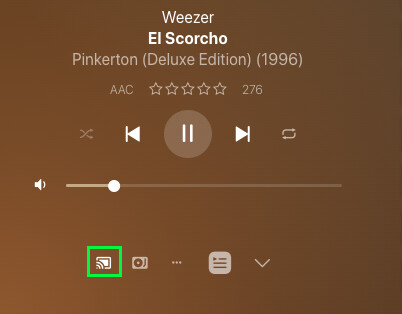
It will open a selection dialog which shows each of your Plexamp instances (and show what they’re playing; see @blackzwe’s screenshot above). Select the player you’d like to control; the iPad will then “sync” with the other player and allow you to control playback.
This is how I control my headless Plexamp (it’s more convenient than opening the web UI).
Thanks, it took a bit of fiddling but that seems to work!
You’re welcome, glad you got it working.
does this work (or i should say it doesnt work) when casting. It seems to work when i start on iphone and want to take over control on Ipad but not vice versa. My system just gets wacked and sonos has no idea what is going on.
The process was a bit buggy for me. That happened the first time then I played around with it a bit and it seemed to work both ways and even stayed connected after I had closed the app and reopened…it’s definitely not a seamless process. Needs improvement.
