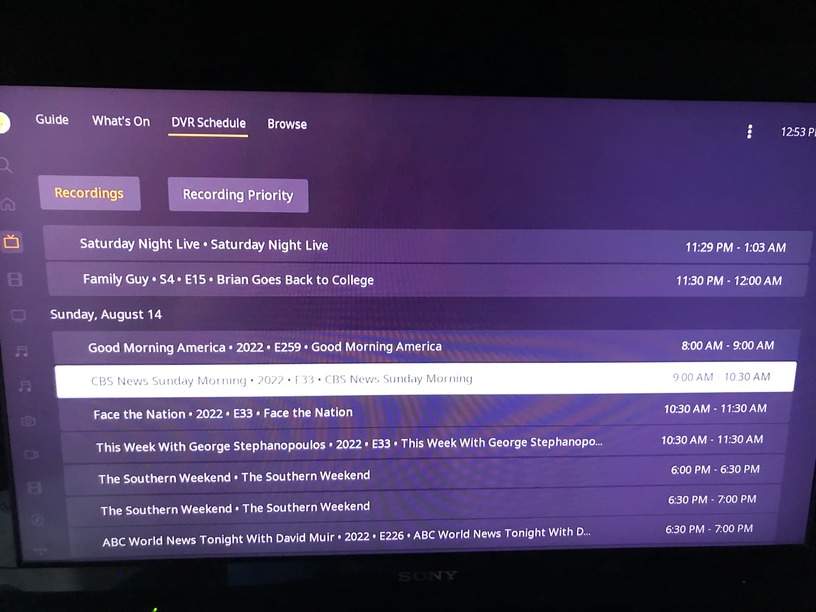
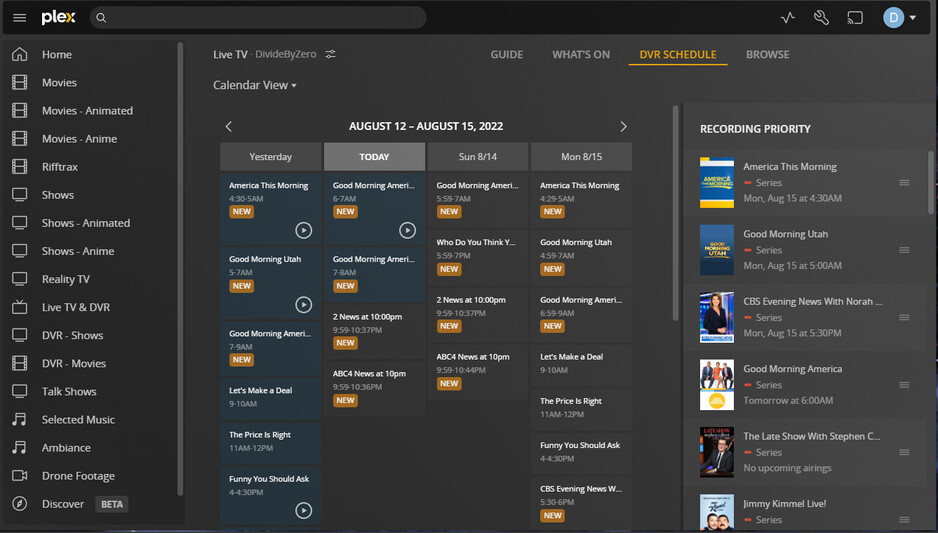
The dvr screen associated with plex pass has many user interface issues. When you click on a recorded item it takes you to the recording settings. It should just play the item you clicked on. Instead of investing time in new features that are only going to add clutter to the user interface can we fix the dvr screen? Please think about the design. This is a revenue generating feature.
There should be one click buttons to delete watched items and another to play the item. Perhaps another to change the recording settings for the show. Plex live tv and dvr settings are difficult and cumbersome to navigate.
Recordings go into a library, which has a separate menu than the DVR. So are you referring to the library view of the recordings, or the DVR menu?
If the DVR, do you mean the DVR schedule screen? It’s the only place where I can see previously recorded items. If the item no longer exists, then clicking it brings me to the show recording settings page. If the recording exists, it has a play button next to it (on the web client) which plays it directly, or I can click the item itself to go to the recorded item’s details page. So it seems to work as I expect.
What behavior are you seeing? List the steps to reproduce it so I can see where you are looking.
There should be some indication that the recording is available to watch. If you click on it it brings up the recording settings screen which makes sense for unrecorded items but doesn’t make sense for recorded items. I just want to play from here. In order to do that I have to scroll back into the guide if it is currently recording and click on the show where it pops up a dialog asking if I want to start from the beginning. If the show has just finished recording there seems to be 30 minute lag time before it is available. Not user friendly. I am using a hd homerun device to record over the air hdtv. Hd home run has a competitor dvr app but it’s user interface is even worse than plex pass. Please take care of your paying customers. Roku has a huge market share so this should be a high priority feature.
Check that those recordings still exist (I’m sure you did, but please double check for me). I agree that if the recording exists, on Roku, that that item should go to the recorded item itself for immediate selection for playback, and at least an icon that it does exist (like in web).
Easy way to check is to load up the web client as well. I believe the Roku client should act just like the web client in this aspect.
Ok. The recordings exist. Today I attempted to watch Cbs sunday morning and it just disappeared. Clearly something is wrong server side. Let me know if you need me to upload the server log. The hd home run device can access two streams at a time. I am on the 5929 version but will update today. The dvr schedule screen has always been terribly buggy. We cut the cord so I am committed to providing bug reports until it is stable. I just updated to the 5999 version. How do I debug dvr recordings? What language is this wriiten in. If I have to do it myself I am going to rewrite the damn thing.
I use the Roku app. When I go to the DVR Schedule and click on a recording that was successful it takes me to the screen to play it. If I click on a recording scheduled in the future it takes me to the recording settings page.
Always include the full version and the logs with the first post if you want to get a valid response.
The Plex DVR functions lean heavily on the CPU so if are you using a NAS or Nvidia Shield you may be less than satisfied.
When you scheduled your recordings you were presented with these advanced options:
If you set the DELETE EPISODES AFTER PLAYING to “After a Day” then when you watch more than 90% of the show it will be deleted. There is some discussion on changing this because if you watch a show being recorded and stop you may have triggered the delete status because it calculated the 90% based on the moment not the scheduled length of show.
Once a show is recorded and deleted it will automatically be deleted if you record it again.
Ok I have a valid bug to report. Today I tried to schedule a recording of snl from the guide. After scheduling it it does not show up in scheduled entries on the scheduled entries screen. What do you need from me to get this bug fixed?
You may not agree with the implementation, but that doesn’t make it a bug.
New episodes don’t begin till October 1st. If you setup a series recording (All Episodes) and you want the repeats then you need to choose (New and Repeats), then it will show in the scheduled recordings.
How the local affiliate reports the early episode int the EPG without season/episode is likely to confuse as well. If you want these episodes then set recording to this episode instead of all.
Its a bug. What a load of crap. You didn’t answer my question. What do you need to figure out why it didn’t record. You should be thanking me for testing this instead of being contrarian. I have it set up to record new and existing episodes and directly selected it in the guide.
We have a week to figure it out. Look at the data for Snl on nbc for zip 27504. If I selected it in the guide then there should be a unique identifier coming from the client. If you don’t have one then the code sucks.
Just pointing you that you’re crapping all over someone that doesn’t work for Plex and is just trying to help you. It’s not his code.
There is no doubt that the UI of the DVR feature is idiotically cumbersome to use, lacks basic features that anyone would expect in a DVR and, overall, is just badly designed. But Plex has made it clear (by lack of action) that they just don’t care. After all this time, you still can’t just record by time and channel when you can’t figure out why something won’t go in the DVR schedule.
Good luck with that. I was very active in the past trying to get Plex to pay attention to problems. Eventually, I got tired of wondering how Plex was going to fail me today when I went to the living to watch TV. So I looked for alternatives and found a great solution for someone with a Windows server and Windows/FireTV clients – and it’s completely free.
Yes, I had to accept that my lifetime Plex pass was a waste of money. But, now I can go to the living room and just enjoy watching media rather than troubleshooting crappy software all the time.
The Snl episode had already been recorded. The error message that tells you to try again is erroneous. Bad user interface design. If a specific episode is already in your library then instead of failing with a nonspecific error message the user should be told that they already have this episode. There are still many problems with the dvr user interface. Too many to list here. The solution is to get a group of software developers and user interface designers together in a room at plex and fix this disaster.