Server Version#: 4.143.0
Player Version#: Multiple, but how do I find this on Roku?
Tuner Make/Model: HD Homerun Flex Quattro
Guide/Lineup name: not sure what you’re asking
Using XMLTV?: also not sure
Channel number/Name: multiple/all
<If providing server logs please do NOT turn on verbose logging, only debug logging should be enabled>
I have scanned the forums in the past when seemingly experiencing recording problems. They were sporadic then and I didn’t have convincing evidence. Now, I have no recordings occurring for weeks - it tells me onscreen that my episodes, sorted by “last date added” - are over 3 weeks old since anything was added, and now I have the onscreen message “Cannot record airing in the past” and “Today at 6:30am” to confirm my experience.
I am currently running plex on Linux Mint Debian Edition (LMDE) 6. I previously ran it on Windows 10 when I also experienced sporadic missed recordings. I have restarted my server machine repeatedly with no impact. I am a Plex Pass holder and cord cutter, and I NEED a working DVR or Plex is useless to me!
I have seen references to this error message dating back before 2000 but little from anyone who has posted recently. Now that I know it’s not in my head, I would like some Plex support to properly resolve this problem. Thank you.
Can you show a screenshot of a scheduled recording which you believe had episodes which should have been recorded, but were not? Something like this:

Specifically I’m interested in the Airings setting.
Also, you can have a look in your DVR Schedule tab in Live TV and see if PMS thinks it has any upcoming airings to record for a show. If it shows “No upcoming airings” it means PMS doesn’t think it has anything to record.

There are various reasons why an episode might not be recorded, including that PMS thinks it’s already in your library, or that it’s a repeat and you’ve told it to only record new episodes. Ultimately debug server logs will likely be needed to troubleshoot this (from the time period covering a missed recording).
This seems like a bit of a Catch-22. I can see many upcoming items with the red and three white dots, indicating what, exactly - does that mean that it WILL record, i.e. it has already passed the new vs. repeat test, or simply that it matches the title and will be determined later? Regardless, once I realize a scheduled item didn’t record, I can’t go back and screenshot it, if you follow me.
I did consider the new vs. repeat status and I changed my schedules to allow all. Here’s one scheduled item where I have seen highlighted-for-recording episodes go by in the guide but nothing gets recorded:

This episode is in progress now, but the activity indicator doesn’t show anything recording at all. Here is the schedule for this item, which should be recording right now:
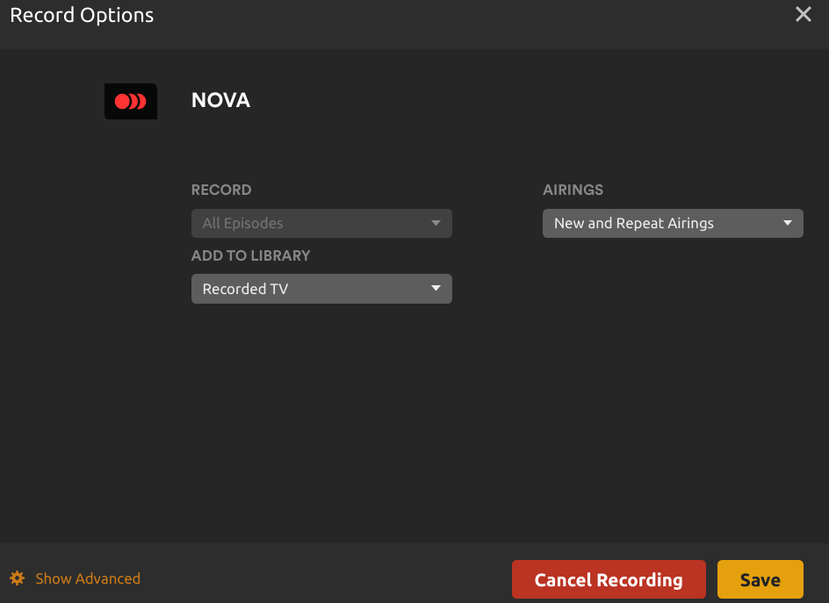
Also, back to my broader point, I currently have 31 scheduled items (sample included) that used to produce a regular flow of recorded shows.

I realize there are seasonal reruns and that they ebb and flow throughout the year, but my LATEST recorded episode of ANY show is now over a month old (another screenshot).

Finally, I have had symptoms like this, “dry periods” of some missed shows in the past, on multiple server builds on Windows and now on linux, with this being the first complete failure to function. I have restarted the server recently as well with no effect.
To help, I am retired from an IT background. Troubleshooting is my thing. Development is not my thing, and I’m not presuming to know how it all goes together at that level.
Thanks.
I forgot to emphasize that After Midnight is a daily recording schedule and is always (so far) new episode content.
And also, I had to check back here to see your message in the forum. I am set as Watching this thread, but I’m not receiving notifications. Is there anything I can check?
Thanks.
It only means that you have a scheduled recording configured for this series; no assumptions can be made based on what is shown in the guide itself as to whether anything will be recorded. That’s where the DVR Schedule tab comes in.
The DVR Schedule page shows what Plex thinks it will be recording. That is, if it’s shown there it has determined that it is actually something which should be recorded. If it doesn’t, then it’s likely some error prevented it from doing so. Typically those will be marked with some indicator (an exclamation point) which, if you hover your mouse over it, will provide additional detail.
It looks like you have something (Chicago P.D.) which should record tonight at 10pm. See if it actually records or not. If so, does it show any error on the DVR Schedule page?
Head to your forum profile and preferences. In the E-mail section, ensure you’ve enabled the option to be e-mailed if some quotes, replies, etc…


Chicago P.D. currently recording? If not, please grab and post your server logs (click the orange link for directions on how to collect them) and upload them here (you can just drag and drop the file to the editor window). Maybe they’ll show something.
No it’s not. Look what I see here (I’ve been checking while you were writing):

I’ve never seen this before, probably because it scrolls off-screen before I visit that page. Looking further I checked the server:
I lost the screenshot in transit, but the server had disconnected from my HDhomerun. I was able to check my Fing and realize that it had changed IP addresses (DHCP from T-Mobile is terrible and I haven’t installed a better solution yet). So I re-entered the new IP and it is now showing green channel dots. Hopefully there will be some overnight recording and all is well.
I thank you for your patience in that this is now likely this hardware/networking problem (assuming shows start recording again). However I would strongly suggest that Plex Server should be capable of sending notifications when something like this occurs, i.e. something it depends upon becomes unavailable. Like any good server, uptime is key, and this could have been an obvious problem and solution weeks ago, apparently, without having to be in the right place at the right time to catch the warning icon on the scheduled item when it failed. I hope you’ll pass that along.
Ah, that makes sense. If it could no longer find the tuner, there couldn’t be any recordings.
Would that I could. Unfortunately, I’m just another user, like yourself  .
.
You’re welcome!
In my opinion there could be two separate issues here… The “No upcoming airings” (known problem caused by Gracenote Plex TV guide issue), where the same show had different IDs. Plex support reported most of them, but the issue still happens occasionally.
A workaround is to schedule the same show on multiple days in the Plex TV guide. For example, if you set the 6 PM news for several days, you might notice multiple entries in the scheduled recordings. Some may show “no show” for the next day, while others correctly display the upcoming episode but that is the only way to capture the same show daily.
You can then experiment in the scheduled recordings with conditions.
The second issue is a HDHomeRun / Network issue perhaps.

@pshanew Ha! Well thank you again, I had no idea. And I still have no idea how to get actual support from Plex for a paid product, amazing. 
@triks_melb I haven’t actually experienced that problem specifically, i.e. when it is recording correctly in general I haven’t seen any problems with the daily items.
I am Windows 11 Pro (64) User and I have experimented on 3 computers.
Currently stuck on Version 1.40.5.8921, but keep trying the new versions and nothing has fixed it. Sometimes it will work, but mostly not and ends within 20 seconds to a minute or too. In the past I have seen it look like it was recording still, but in the end it wasn’t in some of those cases.
I use HDHomeruns (Extend, Quattro, Flex 4K).
Thank you.
Nick
Do you use the (experimental) feature “Convert video while recording” in your DVR configuration? I ask because there was a new capability to use hardware acceleration for this added in 1.41.0.9057 that could have affected stability.
If you do use this feature, I’d recommend turning it off for the time being (in conjunction with the latest beta server version). While it can work well, it does add another potential point of failure in the recording pipeline (transcoding). In my experience it can be a little brittle if there is any video breakup due to marginal signal quality.

This is accessed via the gear icon next to your guide listings in your Live TV & DVR settings.
That’s interesting, I’ll check. I would say that my recordings are very “brittle” in that fluctuations in signal, instead of being recorded as you’d see them on-screen (blocky etc.) completely freeze the playback, and the timeline now thinks it’s at the end of the show and sometimes that it was 8 hours in total length. (something else I’ve posted that has been played down in the past). Nice to have something else to check on.
If I remember that is a more recent function. I have been unable to record without problems other than in the version noted since sometime in mid-Fall. I think. I am changing to test though, but first leaving it on while turning off the use hardware accelerated video encoding.
See my HDHomeRun 4k Flex screen of what I am trying. Will update after testing.
Thank you!

hopefully nit too early to report, but the screen I posted worked. So thank you for pointing to the right direction.
i am recording more tonight, but confident it will continue to work.
will report more
