Cannot access view my library from Apple TV

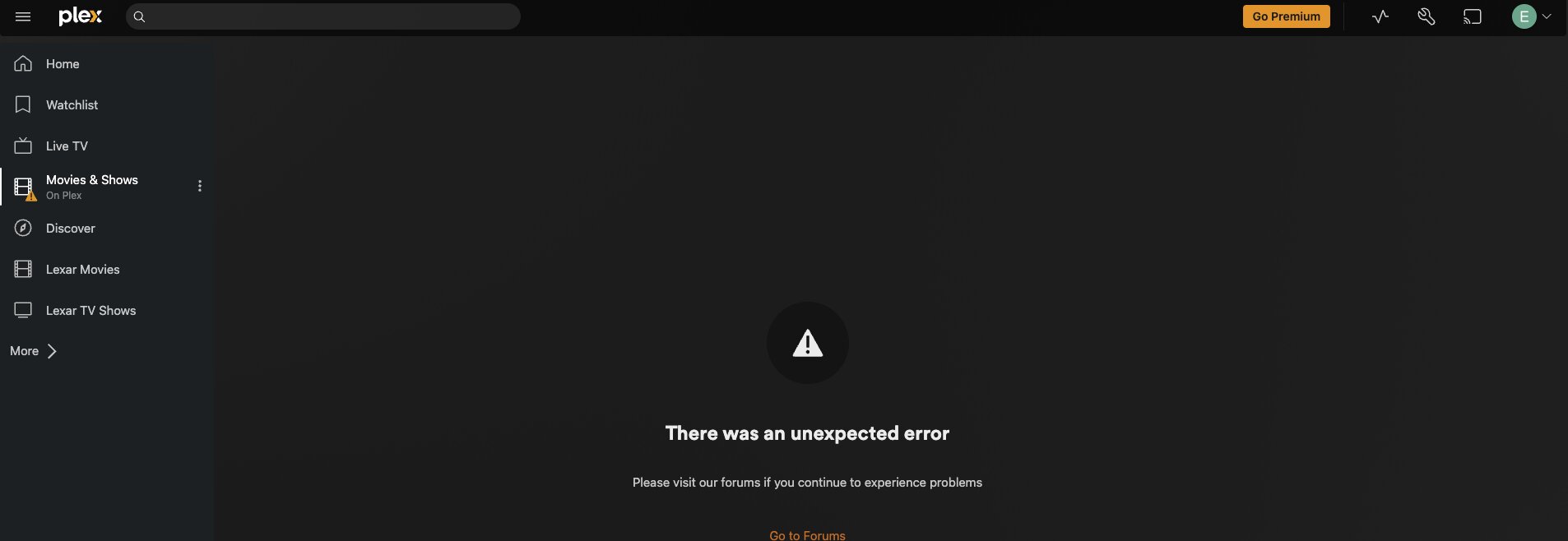
My plex server is on my mac and I acess plex via apple tv. I now cannot view libraries. I have updated this. On the plex server, this is what I see:

I have restarted both server and apple TV with no luck. It was working fine until yesterday evening. Please help

May I ask when and what you updated, from what version to what version?

  1. Let’s also check whether your Mac PMS is running and claimed.
  2. And let’s check whether you upgraded PMS but it’s busy doing maintenance.
  3. mounted?

#1 running & claimed?

  • Open safari on the Mac and surf to http://127.0.0.1:32400/identity
  • Does it say claimed="0" or does it say claimed="1"

#2 maintenance?

  • Does it reply that it’s doing database migration or maintenance?
  • Maybe try visiting http://127.0.0.1:32400/web
  • Maybe try visiting https://127.0.0.1:32400/web
<Response code="503" title="Maintenance" status="Plex Media Server is currently running database migrations."/>

.
#3 files maybe on a share not currently mounted

  • Are you accessing your media files on another computer or NAS over a share using SMB?

Thanks for prompt response:

  • Claim = 1

  • Maintaince: It does respond but the libraries has an error like I posted on my original message:


    3. I have the movies on an external HDD connected to my Mac. It has been like this even when it was working

Can you check the following?

Applications /Utilities/ Disk Utility/ External Hard drive and check it is mounted. Please.

Also Nibbles asked about what you updated, can you offer some information about this update please.

I have also noticed you have Movies and shows in one Library. By shows do you mean Tv shows? That is not good, read the following support articles and check you have naming and file structure correct. You will need to fix your library link to the storage location if you have a mixed Content Type.

https://support.plex.tv/articles/naming-and-organizing-your-tv-show-files/

https://support.plex.tv/articles/naming-and-organizing-your-movie-media-files/

Movies & Shows
on Plex

It’s my understanding that’s not a Library. That section is for Plex’s Online Media Sources enabled in Settings and pinned to the start menu. It’s the ad supported, streaming items. And it appears to be offline or unavailable or disabled (the yellow exclamation mark).

The two libraries containing the user’s personal videos are called
Lexar Movies and Lexar TV Shows

@enablyzedigitalsolutions Would you please confirm that’s how you named your personal collection?

Some questions would be:

  • What do you see when you click on Lexar Movies? Hopefully your own films.
  • What do you see when you click on Lexar TV Shows, your own TV media?
  • Do you want ad supported Movies and TV Shows that Plex wants to stream to you?

You probably can enable them if you want to see the offerings.
You can probably “unpin” that section if you don’t.

1 Like

You are probably correct, as i have turned that so long ago i have forgotten about it’s name.
My bad

Cheers

1 Like

Hi.

I check and the external HDD is Mounted.

I have movies and series in seperate libraries which are linked to seperate folders.

I upgraded Plex Media Server to; Version 1.42.2.10156-f737b826c

Hi all,

Thanks for your input. I just deleted both libraries and then added and it now seems to have resolved the problem.

FYI: Series and Movies are my own films and series

Thanks once again!!!

2 Likes