I successfully changed the account that the server is associated with to my new Lifetime Pass account, but no matter what I do, the little crown and “Admin” stay with the old account. Now, the old account doesn’t even seem to have any server attached to it.

Running on a Linux QNAP server without a frontend. The preferences.xml reflects my new account name and email.
not sure how you managed that, I would have expected signing out of the server and back in with a different to remove the home completely.
I don’t think plex expects or supports changing the home admin like that.
Your home might even get disabled when your original admin plex pass expires.
Hopefully one of the mods/team can answer.
I’ve found many walkthroughs that involve either editing the xml file and then signing in locally, or simply signing the server out of one account and into another. I’m running out of ideas.
Ditto here: Running Ubuntu (galloping gopher) and plex server is 1.18.2.2058.
Bought a lifetime plex pass, signed out of old account & in with the new one, rebooted, and the Home user/Admin is stuck on the old account while the server shows it is signed in with the new account (and the new account has settings control). Urgh.
The server is independent of the web app.
Signing out the server and back in to a different account doesn’t also change the account which the web app uses.
Server
Web app

@OttoKerner Please relook at this issue, which I think you misunderstood. Both the browser sign in and the web server login have been changed to the new login IDs (sample pictures below for me; the OP also provided images earlier) but in the Users&Sharing screen the previous login still shows as the Admin (crown symbol) for the server.
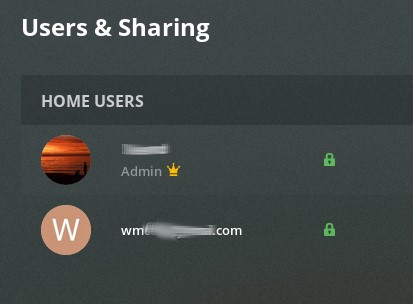

That is because the plex acoount wm…com is still a member of the Plex home which belongs to the former admin account. You must leave this Plex home by clicking on the red X at the right hand end of this screen (it appears only if you move the mouse poiinter over it).
Thank you.
For other readers: click on the Users&Sharing screen, then hover over the new ID’s name row in the Home Users section. At the right end of the row an “Edit pin” and a red “X” appear. Click the red ‘x’ and confirm that you want to leave the home group.
When I did so, the old user ID disappeared and the new ID now has the Admin crown.
The old user then appears in the Friends section of the same screen. I clicked on the remove button on that row as well, so that the old server ownership (which no longer is accessible) does not appear as a “shared” library that the new ID theoretically has access to. I think I could have left the link there so that the old ID still has access to the new server ownership, but I figure I can re-share the library back to the old ID later if desired.
Done.


