Ever since I downloaded the latest plex version, I am unable to connect to the media server at all. Is there someone that can tell me how to fix this problem please? I have windows 10 and roku 3 palyer. Thank you.
Gene
Ever since I downloaded the latest plex version, I am unable to connect to the media server at all. Is there someone that can tell me how to fix this problem please? I have windows 10 and roku 3 palyer. Thank you.
Gene
Update manually to version 1.14.1 of the server software.
https://www.plex.tv/media-server-downloads/
(If you want to install an older version of PMS, take a look into %LOCALAPPDATA%\Plex Media Server\Updates)
Hi,
I uninstalled plex and tried to use an older version because 1.14.1 did not work, but now, the older version will not work either. Do you have any other ideas? Please le me know. Thank you.
GEne
Please let this new server version run for a while. About 1 - 2 hours.
After this, restart your Roku device.
Unfortunately I don’t have access to a Roku, so cannot tell you how to do this.
Side question: is it only the Roku with this problem?
Can you access your server normally with the web app?
Hi,
Well, I let it run for a couple of hours and it still won’t connect to the plex media server. Everything else on my Roku player works fine except for Plex. I have the same problem on my laptop. I have never had this problem before; it has always shown up and worked. My server runs fine as well. I don’t have any problems connecting to any website. Let me know if there is anything else that I can do please. Thank you.
Eugene
Just for clarification: you can access your Plex server normally if you click on this link?
https://app.plex.tv/desktop
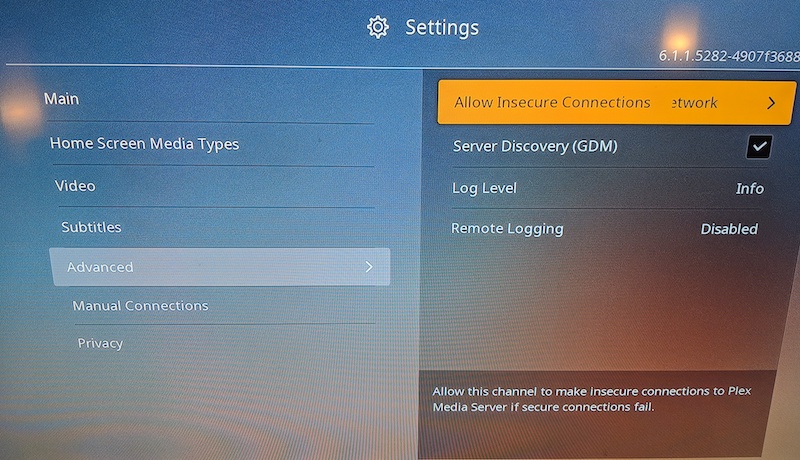
Go to your Roku settings under Advanced. Try changing “Allow insecure connections” to “on same network”
The rokus has an issue with DNS rebind but the old app could detect it and give you a warning to hit ok and change setting in popup. The new app doesn’t so you need to go in and change it.
This of course assuming DNS rebind or similar is the issue.
Hi,
I checked under the advanced settings for “allow insecure connections” and under additional headings and there was not allow insecure connections on the Roku 3 player. Any other suggestions? Please let me know. Thank you
.Gene
Hi,
I tried that earlier as well, and it did not work. Let me know if there is anything else please. Thank you.
Gene
I had the same problem, after NS 7.2 upgrade (which went well including the remote). I am new to NS, HDHoveRun Quatro and PMS. Just bought all the stuff lately to cut the cord and organize my own media. I had not investment in PMS yet (except a lot of work to initially set up) so I just uninstalled the PMS updates, reinstalled and re-provisioned PMS. The fact that it could not fins/see my initial PMS is unnerving when it come to loading a log of media on PMS and/or using it for Live TV. I added 256 GB 2.0 USB fast storage as internal storage on NS to allow internal storage for PMS use.
This topic was automatically closed 90 days after the last reply. New replies are no longer allowed.