The issue that I am having is that while attempting to manage my library and adding a folder by navigating to /media/pi, I don’t see the PLEX Media (the name for my NTFS 8TB drive) drive or any of its contents. What is wrong? The Raspbian OS has the drive mounted properly and in the folder explorer I can see the contents just fine.
I tried editing /etc/fstab by adding UUID=1A04B4DE04B4BE57 /disks/ 8 TB ntfs defaults,auto,rw,nofail,umask=002 0 1 (my information substituted for a solution that seemed to help someone else) but that just made my hard drive to not even mount.
Also, I should note that I changed the user to pi instead of plex when I edited /usr/lib/plexmediaserver/lib/plexmediaserver.default
I really don’t know where to go from here and I am completely new to Linux/Raspbian/Raspberry Pi. Any help you can offer is appreciated.
Hi brysonjack_comcast_net,
The raspberry pi somehow got some issues with drives mounted in the /home/pi directory (see: Plex Server Seeing Videos as Documents (likely a NTFS error) ). Do you know if NTFS is working? If it is, this may help you.
You just edited your post: You didn’t need to change the user in the config file, just the owner of the drive or read-only for everyone.
Afterward you should be able to follow the rest of the guide successfully.
Also, to customize the Plex Media Server service, you should create /etc/systemd/system/plexmediaserver.d/override.conf and place your modifications in there:
3:00 minutes in the instructions say to edit a file using sudo nano /etc/default/plexmediaserver to change plex to pi
All I got was a blank file. Commenter Oscar Chang had the same problem and the proposed solution was that the file I apparently should not have edited, should be edited.
I have already completely wiped out my SD card and started over twice now because I can’t find a complete set of instructions that are updated for Windows.
Could you please help me get this straightened out. As I already mentioned, I don’t really know what I am doing. Thanks.
If you could tell me how it uninstall PLEX that might be helpful and then I could start over.
BTW…I am so confused now. What file do I have to go edit and how exactly do I copy it to /etc/default/plexmediaserver? Am I supposed to copy the plexmediaserver.default that is in /usr/lib/plexmediaserver/lib/ to that location?
I went back and changed that plexmediaserver.default back to the way I had it, but I am still having the same problem. Not sure what to try now with editing that.
Then run sudo dpkg -i plexmediaserver-version.deb, replacing “plexmediaserver-version.deb” with the name of the file you downloaded. This will install Plex Media Server and add the appropriate repository.
If you’d like to change the user under which PMS runs, use the instructions I linked above. It shows an example of how to change the user. Per the post, all customizations are made to /etc/systemd/system/plexmediaserver.service.d/override.conf, on a systemd-based system (which Raspbian is).
After doing all that, you can add the mount(s) as described in the post you linked above. When you issue the commands to install NTFS support, use the install operation: sudo apt install ntfs-3g
Thanks for the assistance. Do I follow the uninstall for Linux for Debian, Ubuntu or Fedora, CentOS? When instructions say to remove a directory, how is that done exactly?
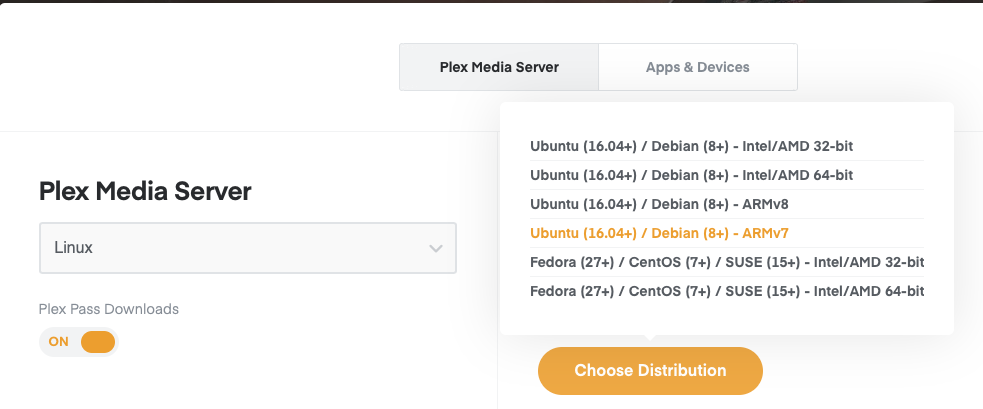
Where exactly is the ARMv7 install? I looked, but didn’t see it.
After I download that package on Windows, where can I find instructions to get it on the Raspberry Pi so that I can install it with the command you provided? I think you might be assuming that I actually know about Linux and how all this works, which I don’t. I need instructions that are step by step, like you might give your grandma, over the phone : )
Thanks.
BTW…I tried to follow section C & D of that manual and gave up…it seems written for people who have some understanding that I don’t have currently…
My assumption was that you’d use the browser on the Pi itself to download the package directly to your Pi. Showing you how to transfer files from Windows to your Pi is a bit outside the scope of what I can show you on these forums. But, in general, it would be done via a network share or a USB drive (or several other ways).
Well, since you’re using Linux, yes. I understand that you’re using a Pi and that you’re limited to Linux for this application, but it’s generally recommended that you stick with an OS you know. You’ll need some foundational knowledge to do anything beyond the simplest of tasks in Linux. Installing and managing a media server is not one of those simple tasks.