I have Plex running on a Raspberry PI. It used to run just fine, but now I cannot find the server. I can log in to my account on the web, but when I try to access my local server on the PI I keep getting cannot find server. Everything has been updated and I am running the most current version on PI (running Raspian).
Is this a Plex error message or a general error showing that your browser cannot reach/find the IP/URL?
When I try to access my local server with my web browser, I get a message saying “Looking for Server”. I am logged in to my Plex account on the Plex site, and my server is running. I am asked for my PIN which it accepts without problem. It just can’t seem to find the server, which is strange since I am connected to it through my browser.
I did a complete uninstall and reinstall of plex on my raspberry pi. When I use a remote browser to connect to the server all is fine until I attempt to access “Your Media” at the bottom of the list on the left side. When I click that all I get is a new web page advising me to “Get Plex Media Server”. Almost like it is connecting to my Plex account on the web, but not connecting to my server. So I have no way of adding media of my own.
One more thing, I can access my server with my smart TV. It finds it fine, so I know its running OK.
Thanks for any help or suggestions on this.
It sounds like you may have your old plex server instance (pre-reinstall) pinned on the web interface. Have you tried clicking the “More >” option? You may need to unpin your old libraries and pin the ones from the reinstalled server instead.
Well, thank you for your suggestion. I can’t find any “More>” option. Where would that be. How do I “unpin” my old libraries. I can’t find anything like your suggestion either on my local server or when I log on to my plex account on-line.
I was able to run command line commands to update my media on the server with no issues.
You should see it on the main web interface below where your libraries are listed.
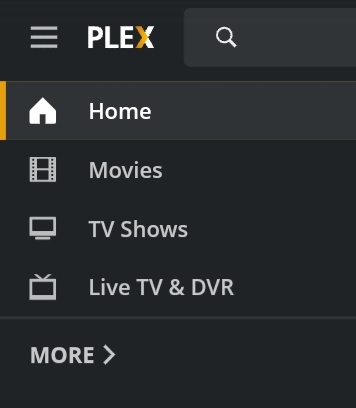
Ok, Nope nothing there. Here is the right window I have!
I have the exact same problem and it started about the same time as you - about 20 - 22 November.
I can access server from SmartTV and iOS, but when I try locally through WebUI (port 32400), it could not find server. I only looked because I noticed that my library was not being updated with new material.
I am running the server on Odroid-XU4, with OMV5 and portainer.
I have tried deleting the plex server container, deleting all appdata and reinstalling plex, but the problem still exists, in that I get on the plex setup screen and receive the message “(File removed) A problem has been detected with a core component of Plex Media Server.”
I wonder whether it is a problem with the plex server image?
Log files attached.
Have a look at:
First Question. I had an uncle named Richard Paige and a cousin by the same name. You any relation?? Second, I get no error messages when I start the Server on Raspian. So not the issue. The server is running because I can access the Server on my smart TV and play movies no issue.
Anyone have any suggestions? Is this a Plex bug for the Pi. There are a ton of how to’s on the web, so if something has happened to the new version it probably needs to be fixed!
Ok I looked at the logs and found two errors. A curl error and an SSDP error. The SSDP error is for an address I have not been able to locate. Here is the error message.
SSDP: Error parsing device schema for http://169.254.9.237:49152/wps_device.xml
I’ve done a little more research. I have a another Raspberry Pi running Kodi and it is on my wired network. It is getting Plex server just fine and I can see movies and music just fine. So is it possible that there is an issue with wireless connection that is blocking the server? I will try it on my MAC notebook later today to see if that works.
This topic was automatically closed 90 days after the last reply. New replies are no longer allowed.

