Will do, I’ll need to rip it again 'cause I didn’t want to run even the remotest chance of confusing them while following all of the suggestions above. Will have it out there by tomorrow AM. Thanks!
Well folks, I discovered Plex Media Server is not the primary problem. For those that are interested, here’s the path of my efforts to solve this problem.
OttoKerner asked for me to post the info on the movie/documentary. I’ve already posted that for the file that plays the movie in VLC, but plays the documentary in Plex. I no longer have a copy of the documentary file, so I cranked up MakeMKV and prepared to rip the DVD.
MakeMKV showed that there are 4 "Titles"on the DVD. Success has been achieved on hundreds of DVDs that I have ripped by unchecking the smaller Titles. And I usually uncheck chapters within the larger Title that I won’t be using. But, I wasn’t sure in my original rip if I had unchecked the chapters, so this time I left only the Chapter that I thought appropriate - see the image below:
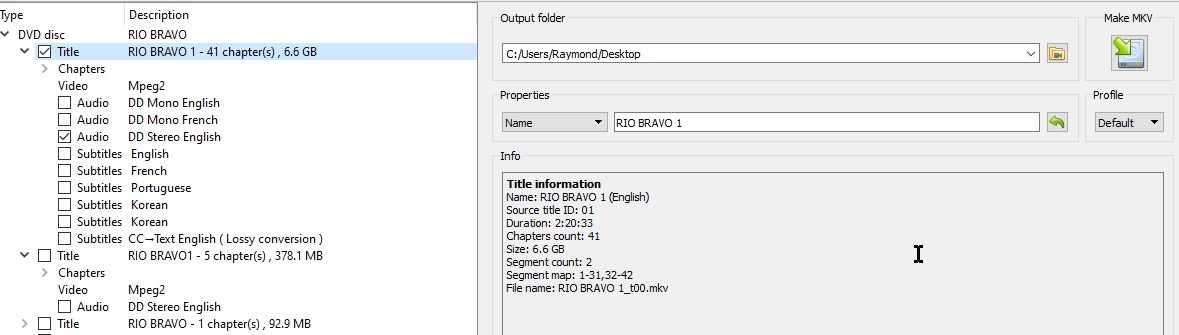
To my surprise, the file produce by this rip played the Documentary in VLC Media Player!!! So, I made a second rip with only the top Chapter checked (see the image below), and when played in VLC Media Player - it was the Movie!
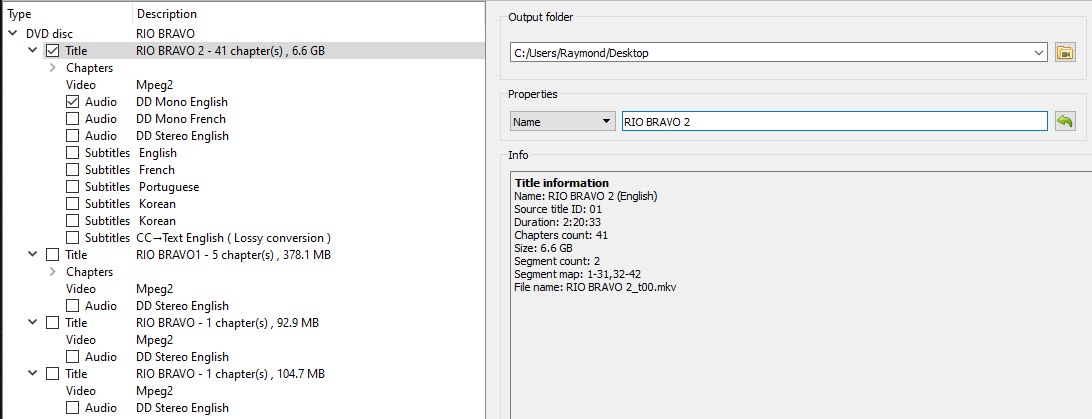
I copied that file over to my Plex Media Server - PMS created a thumbnail in my Movies Library, and behold!!! The Movie played, not the Documentary!!!
I had seen a “deal” on a 4 DVD pack of John Wayne movies that included Rio Bravo on ebay that I could not find on Amazon. That was my source for this movie. Seeing that Korean is one of the languages on the DVD, I’m now seriously wondering if the DVD is a bootleg copy!! Thus, I’m guessing that the metadata on the DVD is somehow incorrectly coded. Or maybe someone can correct me on this.
As a followup, I’m ordering the single DVD of Rio Bravo from Amazon. Once received, I’ll rip the movie from that DVD and use it to replace the one that is now playing and I’ll post the results here. That will be within the 30 days before this thread expires, so my observations will be in context with the preceding posts.
Thanks again to nydave69, FordGuy61, OttoKerner, TeknoJunky and phillipsw for providing directions and guidance that finally led me to the solution!
How about ripping the English mono audio track, instead. i.e. the first audio track in the list
Considering how old the movie is, it was very likely never made in stereo.
So the english stereo audio track you selected in the screen shot was probably made at a later date – i.e. this a ‘commentary’ audio track.
So rip the movie again with both audio tracks selected. You can then decide at the preplay screen in Plex, which audio track you want to hear.
One is the original movie audio, the other is the commentary.
Will do!
