Plex plays wrong movie on my PC - how can I fix it?
What is the solution. Please help.
Wow…
You just turned a broken car into the repair shop, saying it didn’t work, and then walked away
The mechanic is now wondering:
- is the light on the car broken
- Are the brakes failing
- Are the seatbelts malfunctioning
- do we have an engine failure
And so on…
You really need to provide some context here, like:
- What player are you using
- What server are you accessing (Or Plex provided context)
- Name of the movie
- Logs!!!
- Screen captures!!!
So in short, please help us helping you!
All was working fine until my C:/ Drive crashed on Jan 20th. Replaced with the following:
Western Digital WD_BLACK 2TB SN770 NVMe Internal Gaming SSD Solid State Drive - Gen4 PCIe, M.2 2280, Up to 5,150 MB/s - WDS200T3X0E
Everything needed to be recreated…
With that I’ll do my best to answer your questions… Sorry for the incomplete info.
- What player are you using
Answer: Plex Web - Player - What server are you using (Or Plex provided content)
Answer: All movies are mine that I’m having a problem with
Answer: I checked (Plex provided content) They play fine! - Name of the movie
Answer: All mine Approx: 1700+
All of my TV shows (750+) seem to play perfect - Blacklist, Blue Bloods, Boston Legal, Elementary. etc., etc., etc. - Logs!!!
Answer where do I upload my log files…?
Hello again
Huge thanks for the info, but sadly we need a bit more
You need to reproduce the error, and then tell us what movie you started to play as well as what movie was actually played
Also, the log you provided was the install log, but we need a zip of the entire server log directory
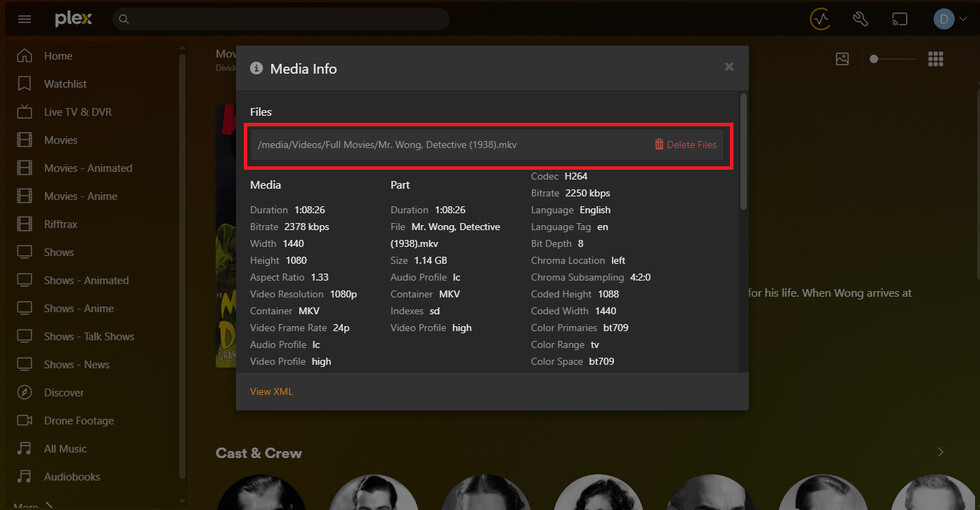
Open the Plex media info of the movie that you started to play.
Then look at the file name and folder path that is shown at the top.
Copy both the title on the poster, and the file/folder path into here, so we can advise.
- You need to reproduce the error, and then tell us what movie you started to play as well as what movie was actually played
Answer: Varies
1st Movie - 3 Days to Kill
Played-
-Assassin’s Creed
-Entrapment
-Spies in Disguise- etc., etc., etc.
- 2nd Movie - 5 Flights Up
- Played-
-Interstellar
-American Renegades- etc., etc., etc.
Plex Media Server Logs_2025-03-13_17-16-10.zip (4.4 MB)
- etc., etc., etc.


I have a file on a separate Drive where I keep my images. I usually download them from Amazon.com and save as a JPEG. I never use a URL always use an image I have saved…
All my saved images are the same name that is on the image.
This is interesting. He never mentioned the movie “Total Recall” but I keep seeing that movie displayed in his log files. Which causes me to have two questions.
Did the user maintain the same drive mapping when replacing his hard drive or is PMS just having a difficult time with his movie naming convention or both?
Here are a few examples of “Total Recall” appearance in his logs.
Example 1:
Mar 13, 2025 17:07:15.118 [9328] DEBUG - Matcher: found 1210 auxiliary files for Total Recall
Mar 13, 2025 17:07:15.118 [9328] DEBUG - [MI] Opening input file: "O:\Movies\iTunes 1\iTunes Media\Home Videos\Total Recall - Director's Cut.mp4"
Mar 13, 2025 17:07:15.118 [9328] DEBUG - [FFMPEG] - Opening 'O:\Movies\iTunes 1\iTunes Media\Home Videos\Total Recall - Director's Cut.mp4' for reading
Example 2:
Mar 13, 2025 17:05:36.084 [1688] DEBUG - Matcher: found 1107 auxiliary files for Total Recall
Mar 13, 2025 17:05:36.084 [1688] DEBUG - [MI] Opening input file: "I:\Total Recall - Director's Cut.mp4"
Mar 13, 2025 17:05:36.084 [1688] DEBUG - [FFMPEG] - Opening 'I:\Total Recall - Director's Cut.mp4' for reading
Example 3:
Mar 13, 2025 17:05:16.043 [15200] DEBUG - Matcher: found 1108 auxiliary files for Total Recall
Mar 13, 2025 17:05:16.043 [15200] DEBUG - [MI] Opening input file: "I:\Total Recall 1990.mp4"
Mar 13, 2025 17:05:16.043 [15200] DEBUG - [FFMPEG] - Opening 'I:\Total Recall 1990.mp4' for reading
File names from Plex Media Server.log
Mar 13, 2025 16:53:38.349 [10532] DEBUG - [Req#109c] Updating part with ID=32242 [I:\Terminator 1.mp4]
Mar 13, 2025 16:54:30.802 [7532] DEBUG - [Req#113d] Updating part with ID=32243 [I:\Terminator 2 - Judgement Day.mp4]
Mar 13, 2025 16:55:25.739 [8920] DEBUG - [Req#1330] Updating part with ID=32244 [I:\Terminator 3 - Rise of the Machines.mp4]
Mar 13, 2025 16:56:30.361 [8920] DEBUG - [Req#1437] Updating part with ID=20677 [O:\Movies\iTunes 1\iTunes Media\Home Videos\Terminator 5 - Genisys.mp4]
Mar 13, 2025 16:56:30.464 [8920] DEBUG - [Req#1437] Updating part with ID=32246 [I:\Terminator 5 - Genisys BD.mp4]
Mar 13, 2025 16:56:30.567 [8920] DEBUG - [Req#1437] Updating part with ID=32247 [I:\Terminator 5 - Genisys.mp4]
Mar 13, 2025 16:56:42.066 [13392] DEBUG - [Req#1467] Updating part with ID=32245 [I:\Terminator 4 - Salvation.mp4]
Mar 13, 2025 16:56:53.260 [13392] DEBUG - [Req#1481] Updating part with ID=32248 [I:\Terminator 6 - Dark Fate.mp4]
Mar 13, 2025 17:00:21.898 [7688] DEBUG - [Req#1802] Updating part with ID=32249 [I:\Thank You for Your Service.mp4]
Mar 13, 2025 17:00:54.295 [2880] DEBUG - [Req#1859] Updating part with ID=32313 [I:\Thanks for Sharing.mp4]
Mar 13, 2025 17:01:21.838 [2880] DEBUG - [Req#18b9] Updating part with ID=32317 [I:\This Means War.mp4]
Mar 13, 2025 17:02:00.306 [3760] DEBUG - [Req#1981] Updating part with ID=32318 [I:\Thomas Crown Affair - 1968.mp4]
Mar 13, 2025 17:02:38.361 [10604] DEBUG - [Req#1b1f] Updating part with ID=27107 [O:\Movies\iTunes 1\iTunes Media\Home Videos\Lara Croft\Lara Croft 3- Tomb Raider.mp4]
Mar 13, 2025 17:02:38.461 [10604] DEBUG - [Req#1b1f] Updating part with ID=33036 [I:\Lara Croft\Lara Croft 1- Tomb Raider.mp4]
Mar 13, 2025 17:02:38.560 [10604] DEBUG - [Req#1b1f] Updating part with ID=33038 [I:\Lara Croft\Lara Croft 3- Tomb Raider.mp4]
Mar 13, 2025 17:02:51.028 [17336] DEBUG - [Req#1b65] Updating part with ID=32338 [I:\Tomorrowland.mp4]
Mar 13, 2025 17:03:01.349 [15588] DEBUG - [Req#1b7c] Updating part with ID=32339 [I:\Too Young to Die.mp4]
Mar 13, 2025 17:03:08.438 [15588] DEBUG - [Req#1b9c] Updating part with ID=32340 [I:\Tooth Fairy.mp4]
Mar 13, 2025 17:03:21.777 [17336] DEBUG - [Req#1bb3] Updating part with ID=32235 [I:\TOP GUN 2 - Maverick.mp4]
Mar 13, 2025 17:03:33.885 [17336] DEBUG - [Req#1bec] Updating part with ID=21319 [O:\Movies\iTunes 1\iTunes Media\Home Videos\Total Recall 1990.mp4]
Mar 13, 2025 17:03:33.973 [17336] DEBUG - [Req#1bec] Updating part with ID=32342 [I:\Total Recall - Director's Cut.mp4]
Mar 13, 2025 17:03:34.060 [17336] DEBUG - [Req#1bec] Updating part with ID=32344 [I:\Total Recall 1990.mp4]
Mar 13, 2025 17:08:01.949 [9168] DEBUG - [Req#1dce] Updating part with ID=32822 [I:\Transformers\Transformers 1 (2007).mp4]
Mar 13, 2025 17:08:09.031 [3336] DEBUG - [Req#1de6] Updating part with ID=32823 [I:\Transformers\Transformers 2- Revenge of the Fallen (2009).mp4]
Mar 13, 2025 17:08:17.340 [3336] DEBUG - [Req#1dfd] Updating part with ID=32826 [I:\Transformers\Transformers 5 - The Last Knight (2017).mp4]
Mar 13, 2025 17:08:45.681 [9168] DEBUG - [Req#1e6a] Updating part with ID=32828 [I:\Transformers\Transformers 7 - Rise of the Beasts (2023).mp4]
Mar 13, 2025 17:08:56.536 [9168] DEBUG - [Req#1e83] Updating part with ID=32824 [I:\Transformers\Transformers 3 - Dark of the Moon (2011).mp4]
Mar 13, 2025 17:09:06.198 [8332] DEBUG - [Req#1ed3] Updating part with ID=32825 [I:\Transformers\Transformers 4- Age of Extinction (2014).mp4]
Your file naming and organization needs some serious work. It does not conform to Plex requirements. That is causing your problems.
For example, look at the Terminator movies:
I:\Terminator 1.mp4
I:\Terminator 2 - Judgement Day.mp4
I:\Terminator 3 - Rise of the Machines.mp4
O:\Movies\iTunes 1\iTunes Media\Home Videos\Terminator 5 - Genisys.mp4
I:\Terminator 5 - Genisys BD.mp4
I:\Terminator 5 - Genisys.mp4
I:\Terminator 4 - Salvation.mp4
I:\Terminator 6 - Dark Fate.mp4
First, never place files in the root directory of a drive. That will cause problems. Make a directory, such as I:\movies and place them in that folder.
Second, Terminator 1.mp4, Terminator 2.mp4, etc. does not conform to Plex naming requirements, which is movie_name (year).
I:\movies <-- folder added to Plex movie library (do not add I:\ to any Plex library).
..\The Terminator (1984)  <-- movie_name (year)
....\The Terminator (1984).mp4
..\Terminator 2 (1991)
....\Terminator 2 (1991).mp4
..\Terminator 3 (2003)
....\Terminator 3 (2003).mp4
..\Terminator Salvation (2009)
....\Terminator Salvation (2009).mp4
..\Terminator Genesis (2015)
....\Terminator Genesis (2015).mp4
Suggest you review the Plex documentation on naming and organization:
Plex Documentation → Your Media
→ Naming & Organizing Your TV Show Files
→ Naming & Organizing Your Movie Files
Then spend some time renaming/reorganizing your media files.
There are tools that can help with the process:
Here’s a shortlist.
Many people use Filebot. It is quite powerful and can rename an entire library in minutes.
Tiny Media Manager is very useful, and free.
Example TMM Renamer Patterns:
- Show Name:
${showTitle} (${showYear}) - Season:
Season ${seasonNr2} - Episode Name:
${showTitle} (${showYear}) s${seasonNr2}e${episodeNr2} ${episode.title} - Movie Name:
${title} (${year})or${title} (${year}) {imdb-${imdb}}
PowerRenamer in Microsoft Power Tools is helpful for simple renaming with pattern matches or regular expressions. It makes quick work of tasks such as adding a year to file names, removing undesirable text from multiple files, etc
Regarding FordGuy’s suggestion to rename your media, this may be the issue, and I do recommend you get your media closer to official naming schemes. Particularly, having the proper year on a file will go LOADS towards Plex identifying the correct file.
I know it can be painful if a movie series does not name itself such that the movies in the series are not in file-name order. The Fast and the Furious, Indiana Jones, and Terminator series come to mind. In this series’ case, you can (probably) leave the number in them, but be sure to include the year and they can be recognized properly. If you notice a mis-match, you can fix it then, but in the future I’d recommend that any name you know does not conform to official name schemes you can over-ride Plex’s auto-match by including the IMDB number in the filename to have it match automatically correctly the first time. So The Terminator (1984) can beTerminator 1 {imdb-tt0088247}.mp4.
However, I doubt that this is what is happening here. Playing the same library entry appears to cause a completely DIFFERENT movie to play each time. This is a strange issue, and I’d like to know what appears when the OP gets the Plex media info for the file. OttoKerner requested the info before, but it does not appear to have been provided. In particular, I want to know if Plex somehow thinks that all these random movies are the SAME movie, but a different VERSION. If so, Plex may be picking a file at random each time they play the library entry.
I’m also curious to know what the user’s Library sources are. Not, like, where you got the media, but go to Manage Library -> Edit... -> Add folders. Either take a screenshot of this panel and show us, or type out every Library source you have for us (I recommend a screenshot):

If nothing works, I’d suggest the user tear down this library and make a new one. Start with making a new one, use proper library source folders, and see if the issue persists.
Ensure that what is played is actually a movie and not a trailer for a movie.
You may understand how to read the logs better than I do, so you may be able to make sense of this.
In one log file, I’m seeing more than 40 media items being deleted.
The user gave 2 examples; “3 Days to Kill” and “5 Flights Up”.
Among the 40 deleted media items, these two where in the list.
Mar 13, 2025 00:47:43.803 [26160] DEBUG - [Req#888c3] Deleting media item 31123.
Mar 13, 2025 00:47:43.803 [26160] DEBUG - [Req#888c3] Was connected to metadata item 28591, count is now 0.
Mar 13, 2025 00:47:43.803 [26160] DEBUG - [Req#888c3] Destroying metadata item 28591 (3 Days to Kill)
Mar 13, 2025 00:47:43.804 [26160] DEBUG - [Req#888c3] Reconnecting item 28591 with item 126 in playlists.
Mar 13, 2025 00:58:43.181 [6296] DEBUG - [Req#89d49] Deleting media item 31126.
Mar 13, 2025 00:58:43.182 [6296] DEBUG - [Req#89d49] Was connected to metadata item 28599, count is now 0.
Mar 13, 2025 00:58:43.182 [6296] DEBUG - [Req#89d49] Destroying metadata item 28599 (5 Flights Up)
Mar 13, 2025 00:58:43.182 [6296] DEBUG - [Req#89d49] Reconnecting item 28599 with item 139 in playlists.
If I try to follow “5 Flights Up”, it appears that his Plex database is being rebuilt.
Mar 13, 2025 00:58:31.324 [15732] DEBUG - [Req#89d04] Added new metadata item (5 Flights Up) with ID 28599
Mar 13, 2025 00:58:31.393 [15732] DEBUG - [Req#89d04] Doing expensive tags write for '5 Flights Up' because something changed.
Mar 13, 2025 00:58:31.393 [15732] DEBUG - [Req#89d04] Doing expensive tags write for '5 Flights Up' because something changed.
Mar 13, 2025 00:58:31.394 [15732] DEBUG - [Req#89d04] Doing expensive tags write for '5 Flights Up' because something changed.
Mar 13, 2025 00:58:31.394 [15732] DEBUG - [Req#89d04] Doing expensive tags write for '5 Flights Up' because something changed.
Mar 13, 2025 00:58:31.396 [15732] DEBUG - [Req#89d04] Doing expensive tags write for '5 Flights Up' because something changed.
Mar 13, 2025 00:58:31.396 [15732] DEBUG - [Req#89d04] Doing expensive tags write for '5 Flights Up' because something changed.
Mar 13, 2025 00:58:31.396 [15732] DEBUG - [Req#89d04] Doing expensive tags write for '5 Flights Up' because something changed.
Mar 13, 2025 00:58:31.397 [15732] DEBUG - [Req#89d04] Doing expensive tags write for '5 Flights Up' because something changed.
Mar 13, 2025 00:58:31.398 [15732] DEBUG - [Req#89d04] Doing expensive tags write for '5 Flights Up' because something changed.
Mar 13, 2025 00:58:31.399 [15732] DEBUG - [Req#89d04] Doing expensive tags write for '5 Flights Up' because something changed.
Mar 13, 2025 00:58:31.399 [15732] DEBUG - [Req#89d04] Doing expensive tags write for '5 Flights Up' because something changed.
Mar 13, 2025 00:58:31.399 [15732] DEBUG - [Req#89d04] Doing expensive tags write for '5 Flights Up' because something changed.
Mar 13, 2025 00:58:31.400 [15732] DEBUG - [Req#89d04] Doing expensive tags write for '5 Flights Up' because something changed.
Mar 13, 2025 00:58:31.400 [15732] DEBUG - [Req#89d04] Updating media item 31126, size=2873642614, metadata_item_id=28599
Mar 13, 2025 00:58:31.400 [15732] DEBUG - [Req#89d04] Updating part with ID=31131 [I:\5 Flights Up.mp4]
Mar 13, 2025 00:58:31.400 [15732] DEBUG - [Req#89d04] Updating metadata item (save) (5 Flights Up) with ID 139
Mar 13, 2025 00:58:31.401 [15732] DEBUG - [Req#89d04] Updating deletion state for metadata item 139, is has a dead item count of 0.
Mar 13, 2025 00:58:31.472 [15732] DEBUG - [Req#89d04] Updating deletion state for metadata item 139, is has a dead item count of 0.
In the logs below, it seems to have "5 Flights Up’ listed as an Extra, but extra to what? When following the logs, it is hard to determine if Plex is trying to create ID 139 or is it trying to delete ID 139.
Mar 13, 2025 00:58:19.396 [15732] DEBUG - [Req#89cb6] Extras: 5 existing extras.
Mar 13, 2025 00:58:19.396 [15732] DEBUG - [Req#89cb6] Extras: Checked extra '5 Flights Up' and found matched: 1 Media matched: 1
Mar 13, 2025 00:58:19.396 [15732] DEBUG - [Req#89cb6] Extras: Checked extra 'Brooklyn' and found matched: 1 Media matched: 1
Mar 13, 2025 00:58:19.396 [15732] DEBUG - [Req#89cb6] Extras: Checked extra 'Couldn't Be Worse' and found matched: 1 Media matched: 1
Mar 13, 2025 00:58:19.396 [15732] DEBUG - [Req#89cb6] Extras: Checked extra 'The Cost Of Moving' and found matched: 1 Media matched: 1
Mar 13, 2025 00:58:19.396 [15732] DEBUG - [Req#89cb6] Extras: Checked extra 'The Woman I Want To Paint' and found matched: 1 Media matched: 1
Mar 13, 2025 00:58:19.396 [15732] DEBUG - [Req#89cb6] Loaded metadata for 5 Flights Up (ID 139) in 19ms
Mar 13, 2025 00:58:19.397 [15732] DEBUG - [Req#89cb6] Done with metadata update for 139
Just one more thing that I’ve noticed is that the user appears to have appended "Kids - " to the beginning of all his kids movies. This seems to be producing mixed results.
* WARN - Scanner [Plex Movie]: unable to find agent match for item file 'I:\Kids\Kids - A Bugs Life.mp4'
* WARN - Scanner [Plex Movie]: unable to find agent match for item file 'I:\Kids\Kids - Abominable.mp4'
* DEBUG - Scanner [Plex Movie]: found agent match for file 'I:\Kids\Kids - Adventures of Elmo in Grouchland.mp4': 'The Adventures of Elmo in Grouchland'
* WARN - Scanner [Plex Movie]: unable to find agent match for item file 'I:\Kids\Kids - Aladdin.mp4'
* DEBUG - Scanner [Plex Movie]: found agent match for file 'I:\Kids\Kids - Alice in Wonderland.mp4': 'Alice in Wonderland'
* WARN - Scanner [Plex Movie]: unable to find agent match for item file 'I:\Kids\Kids - Anastasia (1997).mp4'
* DEBUG - Scanner [Plex Movie]: found agent match for file 'I:\Kids\Kids - Angry Birds 2.mp4': 'The Angry Birds Movie 2'
* DEBUG - Scanner [Plex Movie]: found agent match for file 'I:\Kids\Kids - Ant-Man and the Wasp.mp4': 'Ant-Man and the Wasp'
* WARN - Scanner [Plex Movie]: unable to find agent match for item file 'I:\Kids\Kids - Ant-Man.mp4'
* WARN - Scanner [Plex Movie]: unable to find agent match for item file 'I:\Kids\Kids - Arthur Christmas.mp4'
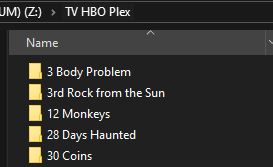
If the naming structure is so critical, why then has it been working for 8-10+ years without problems. Remember, my TV shows work perfectly, and I use the same naming structure for them. Because of that I believe it’s something else. Thanks much for the help
I’m not versed in Plex’s logs at all. When logs come up, I always have to back off and beg for someone else to scrutinize the logs for something.
In reverse order to your log snippets, I have some ideas:
The kids - prefix on media. This will cause matching issues, but the file should simply show up as a generic no-poster poster, no metadata, and the original filename. I doubt that is causing the OP’s main issue here. These kids movies weren’t specifically mentioned as a problem. I laid out some suggestions for filenames, but if the OP is fine with doing manual fixes or can lay out forced matching via the {IMDB-ttXXXXX} tag, then that’s fine, but more of a side note than a relevant issue.
The “extras” is an interesting find. I thought at first that these were movies on their own (one called 5 flights up, one called Brooklyn, etc), but no, they appear to show up in a way that Plex thinks they are “extras”. Perhaps they are, but I wouldn’t know where to being to figure out what they are extras to.
This is frustrating, without being able to sit at the folder structure, it’s hard to troubleshoot. I’ll wait for responses to my two queries in my post (the Library “Add folders” dialog, and the “get info” for one of these issue movies).
@lesliesales Your naming structure probably worked so well because you started your collection way back when, and plex software was less sophisticated and it worked out. As you migrated to newer releases, the library was carried along and updated and the pointers to the files were all intact.
Replacing a main drive where the OS is stored is always going to create issues even if you use software that allows you to “clone” the root drive. And you said your root drive crashed so I’m assuming you just plopped in the new SSD and re-installed a fresh OS, and maybe just copied the old plex data to the new location?
If you did that, I’d recommend installing plex fresh from scratch and re-building your library - but only after you rename and plexify all the files first!!
The suggestion to use FileBot - I HIGHLY RECOMMEND it. My library is decades old and tens of thousands of files and naming has been an ongoing nightmare as standards change. FileBot has literally saved my *** and hours of work. (Be sure to configure FileBot to use proper plex formatting though! It can literally rename files any way you tell it to, so have it use proper naming according to the plex recommended/required rules. You can add technical tags (bitrate, resolution, audio, language) in the file name if you want but those things will be the last parts of a properly-named plex file. Personally I just name them with the movie title and year for my sanity.
I suggest you create a “Movies” folder and inside it, create a few sub-folders for the genres of movies (I use Action, Drama, Comedy, SciFi, PG13, Horror, etc). Store your movies by what genre of movie they are. Then let FileBot name them correctly for Plex.
THEN… once all the naming is done… one more thing to do because you have a ton of files in each directory but Plex prefers each movie file be stored in it’s own directory of the same name. Use a simple script to automatically create a movie folder with the exact name of the file which then moves the file into that folder. Voila. You can google “how to automatically create a folder for a file and move the file into the folder” or something like that.
But if you can’t find a solution, copy and paste the following text into a notepad file. Name it “organize” and save it as a “.bat” file so you can run it when you click on it. It will take any file in the same folder as it is located and create a new folder and move every file it finds into a folder of the same name.
 @echo off
for %%i in (*) do (
 if not "%%~ni" == "organize" (
  md "%%~ni" && move "%%~i" "%%~ni"
 )
)
Using this method your library will be plex-perfect. Movies will be organized by loose genre. TV shows… not so much as under that directory will be tons of directories for every show - I think I’m about to create folders for the decades and organize the shows by decade (like I did with genres for movies) that way if plex struggles with all the shows I have in the TV folder.


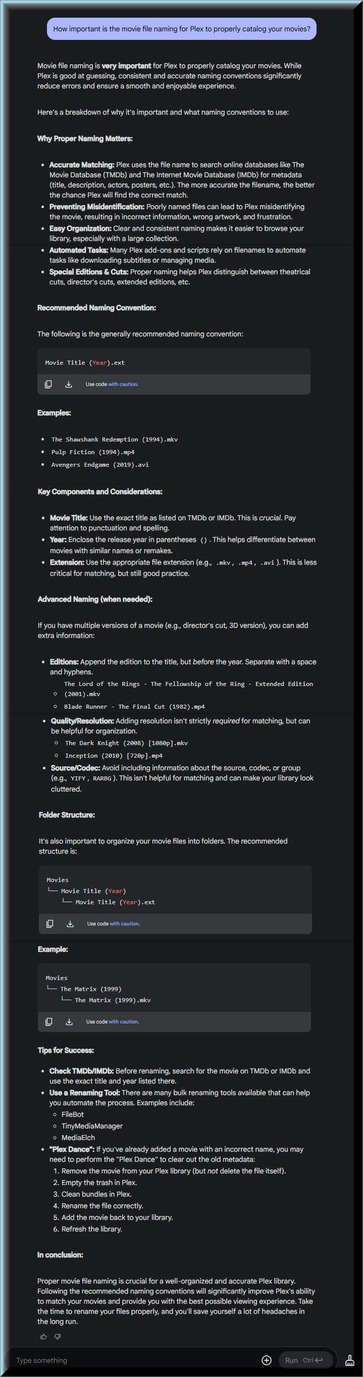
I was impressed with all the good help that the people on this forum provided you. It’s too bad that you are too stubborn to take all the good advise that has been provided.
I asked your question to Google AI and it agrees with all the advice that has been given to you on this forum.
If you know better, good luck.