Server Version#: 1.20.4.3517
I am having trouble playing certain MKV files after the update. These videos were playing fine before. I have cleared the codecs folder to force them to redownload but that has not helped. What happened?
Server Version#: 1.20.4.3517
I am having trouble playing certain MKV files after the update. These videos were playing fine before. I have cleared the codecs folder to force them to redownload but that has not helped. What happened?
can we get a sample file to test with
what do you mean a sample file? the logs?
you said “certain” files do it. Assuming it is always reproducible with those files can we get a copy of a file that does it or a short clip of one that also does it.
i’ve been trying to upload this file. Keeps giving me an error. its only 30mb
can you put it on Google Drive or similar?
Which player were you using by the way
i’ve tried using the web player, android, fire tv, Chromecast. None work.
I think it is something with the videos that use the EAC3 codec.
If I may jump in and follow up on that?
those are the web logs.
Settings - Server - Troubleshooting - Download logs
That ZIP file please.
Please do as I request?
Nov 06, 2020 19:38:48.655 [0x7fc6a2f4f700] INFO - Plex Media Server v1.20.4.3517-ab5e1197c - Docker Docker Container x86_64 - build: linux-x86_64 debian - GMT -06:00
Nov 06, 2020 19:38:48.656 [0x7fc6a2f4f700] INFO - Linux version: 5.4.0-52-generic, language: C
Nov 06, 2020 19:38:48.657 [0x7fc6a2f4f700] INFO - Processor       Intel(R) Core(TM) i3-3120ME CPU @ 2.40GHz
Nov 06, 2020 19:38:48.657 [0x7fc6a2f4f700] INFO - /usr/lib/plexmediaserver/Plex Media Server
Nov 06, 2020 19:38:50.413 [0x7fc6a1f4d700] WARN - Crash: Crash reporting disabled
Nov 06, 2020 19:38:51.157 [0x7fc6abee9780] WARN - [FFMPEG] - Incompatible FFmpeg versions: '1.6-5f603a2168-2' vs. '1.6-02cff92dbb-1'.
Nov 06, 2020 19:38:51.157 [0x7fc6abee9780] WARN - [FFMPEG] - Failed to initialize library.
Nov 06, 2020 19:38:51.167 [0x7fc6abee9780] WARN - [FFMPEG] - Incompatible FFmpeg versions: '1.6-5f603a2168-2' vs. '1.6-02cff92dbb-1'.
Nov 06, 2020 19:38:51.168 [0x7fc6abee9780] WARN - [FFMPEG] - Failed to initialize library.
Nov 06, 2020 19:38:51.226 [0x7fc6abee9780] WARN - [FFMPEG] - Incompatible FFmpeg versions: '1.6-5f603a2168-2' vs. '1.6-02cff92dbb-1'.
Nov 06, 2020 19:38:51.226 [0x7fc6abee9780] WARN - [FFMPEG] - Failed to initialize library.
Nov 06, 2020 19:38:51.229 [0x7fc6abee9780] WARN - [FFMPEG] - Incompatible FFmpeg versions: '1.6-5f603a2168-2' vs. '1.6-02cff92dbb-1'.
Nov 06, 2020 19:38:51.229 [0x7fc6abee9780] WARN - [FFMPEG] - Failed to initialize library.
Nov 06, 2020 19:38:51.231 [0x7fc6abee9780] WARN - [FFMPEG] - Incompatible FFmpeg versions: '1.6-5f603a2168-2' vs. '1.6-02cff92dbb-1'.
Nov 06, 2020 19:38:51.231 [0x7fc6abee9780] WARN - [FFMPEG] - Failed to initialize library.
Nov 06, 2020 19:38:51.378 [0x7fc6abee9780] INFO - [CERT/OCSP] Successfully retrieved response from cache.
Nov 06, 2020 19:38:56.961 [0x7fc6797fa700] WARN - MyPlex: attempted a reachability check but we're not yet online.
Nov 06, 2020 19:38:57.141 [0x7fc65dffb700] WARN - [Preferences] No update channels loaded, so showing the previously-selected channel, labelled 'unknown' since we don't really know the name.
Nov 06, 2020 19:38:57.713 [0x7fc678ff9700] INFO - AutoUpdate: no updates available
Nov 06, 2020 19:38:58.092 [0x7fc6797fa700] WARN - MyPlex: attempted a reachability check but we're not yet online.
Nov 06, 2020 19:38:58.290 [0x7fc6337fe700] ERROR - Error issuing curl_easy_perform(handle): 6
Nov 06, 2020 19:38:58.802 [0x7fc65dffb700] INFO - AutoUpdate: no updates available
Nov 06, 2020 19:39:00.370 [0x7fc690bd7700] INFO - Sync: downloaded 0 sync list(s) with 0 sync items(s): 0 new, 0 updated, 0 deleted
Nov 06, 2020 19:39:01.007 [0x7fc693fff700] ERROR - Error issuing curl_easy_perform(handle): 6
Nov 06, 2020 19:39:01.719 [0x7fc6a13ff700] WARN - MyPlex: attempted a reachability check but we're not yet mapped.
Nov 06, 2020 19:39:02.113 [0x7fc65dffb700] WARN - MyPlex: attempted a reachability chec
You turned it off thinking you’re saving space. There is no savings because size is fixed and now I am unable to help when only showing INFO & ERROR
You will need repeat the restart sequence after enableing DEBUG logs
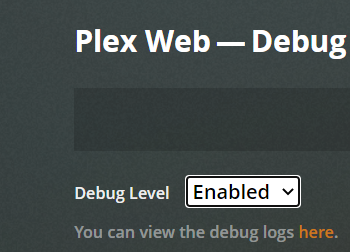
i do have it enabled
SETTINGS - SERVER - GENERAL - SHOW ADVANCED please
The web client includes settings for both the player (which you show above)
and for the server.
We’re interested in seeing what the server is doing not the player.
Yes, that’s what we needed to see.
My concern, when someone says EAE isn’t working is that all the Notify slots are full.
The transcoder / EAE needs two slots.
This usually happens when there are more than 8192 directories to monitor on a Linux system which hasn’t been tuned.
Nov 06, 2020 20:03:47.629 [0x7f5bcdffb700] DEBUG - [Notify] Now watching "/data/Videos/The Matrix (1999)/Plex Versions"
Nov 06, 2020 20:03:47.630 [0x7f5bcdffb700] DEBUG - [Notify] Now watching "/data/Videos/The Matrix 4 (2022)"
Nov 06, 2020 20:03:47.631 [0x7f5bcdffb700] DEBUG - [Notify] Now watching "/data/Videos/The Matrix Reloaded (2003)"
Nov 06, 2020 20:03:47.631 [0x7f5bcdffb700] DEBUG - [Notify] Now watching "/data/Videos/The Matrix Reloaded (2003)/Plex Versions"
Nov 06, 2020 20:03:47.632 [0x7f5bcdffb700] DEBUG - [Notify] Now watching "/data/Videos/The Matrix Revolutions (2003)"
Nov 06, 2020 20:03:47.633 [0x7f5bcdffb700] DEBUG - [Notify] Now watching "/data/Videos/The Mechanic"
Nov 06, 2020 20:03:47.634 [0x7f5bcdffb700] DEBUG - [Notify] Now watching "/data/Videos/The Mechanic Resurrection 2016"
Nov 06, 2020 20:03:48.277 [0x7f5c111c6700] DEBUG - HTTP requesting GET https://plex.tv/api/v2/shared_sources/owned?machineIdentifier=af60a9c36f127afddbed7c8887fee22222823641
Nov 06, 2020 20:03:48.881 [0x7f5c111c6700] DEBUG - HTTP 200 response from GET https://plex.tv/api/v2/shared_sources/owned?machineIdentifier=af60a9c36f127afddbed7c8887fee22222823641
Nov 06, 2020 20:03:48.882 [0x7f5c111c6700] DEBUG - HTTP requesting GET https://plex.tv/api/v2/server/access_tokens?auth_token=xxxxxxxxxxxxxxxxxxxx
Nov 06, 2020 20:03:48.946 [0x7f5be17fa700] DEBUG - Request: [127.0.0.1:57660 (Loopback)] GET /identity (13 live) Signed-in
Nov 06, 2020 20:03:48.946 [0x7f5c137fe700] DEBUG - Completed: [127.0.0.1:57660] 200 GET /identity (13 live) 0ms 398 bytes (pipelined: 1)
Nov 06, 2020 20:03:49.636 [0x7f5c111c6700] DEBUG - HTTP 200 response from GET https://plex.tv/api/v2/server/access_tokens?auth_token=xxxxxxxxxxxxxxxxxxxx
Nov 06, 2020 20:03:49.655 [0x7f5c111c6700] DEBUG - MyPlex: updating with 15 access tokens
Nov 06, 2020 20:03:49.656 [0x7f5c111c6700] DEBUG - HTTP requesting GET https://plex.tv/api/v2/server/users?auth_token=xxxxxxxxxxxxxxxxxxxx
Nov 06, 2020 20:03:49.656 [0x7f5ba5ffb700] DEBUG - HTTP requesting GET https://plex.tv/media/providers?X-Plex-Token=xxxxxxxxxxxxxxxxxxxx
Nov 06, 2020 20:03:50.360 [0x7f5ba5ffb700] DEBUG - HTTP 200 response from GET https://plex.tv/media/providers?X-Plex-Token=xxxxxxxxxxxxxxxxxxxx
Now, with it setup to capture.
please play something which fails
let it sit 30 seconds after failure.
download and attach another set of the ZIP files.
You are free to drag & drop the whole set. There is no harm. There’s no need to filter it.
logs after error
(File removed)
thank you for that. a number of problems were revealed.
It’s complaining of an incompatible FFMPEG version installed. Did you install your own FFMPEG in the container?
It can’t get the HEVC codec (likely a ownership problem in all of /var/lib/plexmediaserver tree blocking it from downloading)
You can’t really play HEVC on an i3-3120 CPU unless you have a fast CPU or a Nvidia card (neither of which you have here)
, 2020 20:09:32.488 [0x7f5be17fa700] DEBUG - [Now] Adding 1 sessions.
Nov 06, 2020 20:09:32.488 [0x7f5c137fe700] DEBUG - Completed: [192.168.2.22:37116] 200 GET /status/sessions (14 live) GZIP 1ms 1701 bytes (pipelined: 1)
Nov 06, 2020 20:09:32.529 [0x7f5c109c5700] DEBUG - [Transcode] MDE: Selected protocol dash; container: mp4
Nov 06, 2020 20:09:32.529 [0x7f5c109c5700] DEBUG - [Transcode] MDE: analyzing media item 51827
Nov 06, 2020 20:09:32.529 [0x7f5c109c5700] DEBUG - [Transcode] MDE: E20 - Djibouti Call: Direct Play is disabled
Nov 06, 2020 20:09:32.529 [0x7f5c109c5700] DEBUG - [Transcode] MDE: E20 - Djibouti Call: media must be transcoded in order to use the dash protocol
Nov 06, 2020 20:09:32.529 [0x7f5c109c5700] DEBUG - [Transcode] MDE: E20 - Djibouti Call: no direct play video profile exists for http/mkv/hevc
Nov 06, 2020 20:09:32.529 [0x7f5c109c5700] DEBUG - [Transcode] MDE: E20 - Djibouti Call: no direct play video profile exists for http/mkv/hevc/eac3
Nov 06, 2020 20:09:32.529 [0x7f5c109c5700] DEBUG - [Transcode] MDE: E20 - Djibouti Call: Direct Streaming is disabled, so video stream will be transcoded
Nov 06, 2020 20:09:32.529 [0x7f5c109c5700] DEBUG - [Transcode] MDE: E20 - Djibouti Call: no remuxable profile found, so video stream will be transcoded
Nov 06, 2020 20:09:32.529 [0x7f5c109c5700] DEBUG - [Transcode] Codecs: testing h264_nvenc (encoder)
Nov 06, 2020 20:09:32.529 [0x7f5c109c5700] DEBUG - [Transcode] Codecs: hardware transcoding: testing API nvenc
Nov 06, 2020 20:09:51.992 [0x7f5be0ff9700] ERROR - [Transcode] [FFMPEG] - Could not dynamically load CUDA
Nov 06, 2020 20:09:51.992 [0x7f5be0ff9700] DEBUG - [Transcode] Codecs: hardware transcoding: opening hw device failed - probably not supported by this system, error: Unknown error occurred
Nov 06, 2020 20:09:51.993 [0x7f5be0ff9700] DEBUG - [Transcode] MDE: Cannot direct stream video stream due to profile or setting limitations
Nov 06, 2020 20:09:51.994 [0x7f5be0ff9700] DEBUG - [Transcode] Codecs: testing h264 (decoder) with hwdevice vaapi
Nov 06, 2020 20:09:51.994 [0x7f5be0ff9700] WARN - [Transcode] Failed to find decoder 'h264'
Nov 06, 2020 20:09:51.995 [0x7f5be0ff9700] DEBUG - [Transcode] Codecs: testing h264 (decoder) with hwdevice nvdec
Nov 06, 2020 20:09:51.995 [0x7f5ba5ffb700] DEBUG - [Now] Profile is Web
Nov 06, 2020 20:09:51.995 [0x7f5ba5ffb700] DEBUG - [Now] Updated play state for /library/metadata/15513.
Nov 06, 2020 20:09:51.995 [0x7f5be0ff9700] WARN - [Transcode] Failed to find decoder 'h264'
Nov 06, 2020 20:09:51.995 [0x7f5be0ff9700] DEBUG - [Transcode] Scaled up video bitrate to 4542Kbps based on 1.500000x fudge factor.
Nov 06, 2020 20:09:51.995 [0x7f5be0ff9700] DEBUG - [Transcode] MDE: E7 - Burrito: Audio Direct Streaming is disabled, so video's audio stream will be transcoded
Nov 06, 2020 20:09:51.995 [0x7f5ba5ffb700] DEBUG - Statistics: (5z5ve64den5lupw52qtjxk46) Reporting active playback in state 0 of type 4 (scrobble: 0) for account 1
Nov 06, 2020 20:09:51.998 [0x7f5be0ff9700] DEBUG - [Transcode] MDE: Cannot direct stream audio stream due to profile or setting limitations
Nov 06, 2020 20:09:51.999 [0x7f5be0ff9700] DEBUG - [Transcode] MDE: We Bare Bears - S1 E7 - Burrito: selected media 0 / 16549
Nov 06, 2020 20:09:51.999 [0x7f5ba6ffd700] ERROR - Error issuing curl_easy_perform(handle): 6
Nov 06, 2020 20:09:52.000 [0x7f5be0ff9700] DEBUG - [Transcode] Streaming Resource: Adding session 0x7f5bd008c8f0:r8js8d37e59m4ukhf24k4o2o which is using transcoder slot.  Used slots is now 1
Nov 06, 2020 20:09:52.000 [0x7f5be0ff9700] DEBUG - [Transcode] Streaming Resource: Added session 0x7f5bd008c8
At this point, to remedy the basic no-playback problem, you’ll need to get into the container and fix all the permissions -or- start over if you’re not inclined to do that.
It might be easier to fix from the Linux command line depending on where you’ve mapped /config to on the native host file system
I use docker to run this server. so I assume FFMPEG is part of the docker container, but i will look into this.
When I clear the codec folder, it does download the other codec without issue so this confuses me as well. Does it not download to the same folder as the others?
I can play other HVEC files without issue, so that error confuses me.
According to your logs, you have no HEVC or H264 codecs in this container s0 no nothing is going to play.
If this is a dedicated host, is there anything blocking making it a native app?
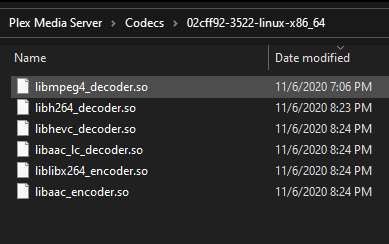
i just deleted all the codecs in this folder. tried to play the videos that give an error. it downloaded the codecs and still gives the error.

