Server Version#: Version 1.14.1.5488
Player Version#:6.2.7.5442-b6554798a-Plex
When accessing the Plex-Server on Windows 10 through Firefox65, I cannot record a series, but can record a single show. If I try to record “All Episodes” and click “SAVE”, nothing appears in the Guide or in Recordings. If instead I click “This Episode”, it works and the show has the red record button lit up in Guide and the show is listed in recordings. About 1 week ago I had to completely reinstall Plex-Server because nothing on it worked. Since then things have been just a bit dicey.
2 Likes
I am encountering the same issue myself. This started somewhere around 3 weeks ago, all my series recordings just stopped recording episodes. The ‘recording priority’ would show they are to be recorded, but when the time comes to perform the recording, it just simply doesn’t happen.
Here’s an example of this behavior. The first screenshot shows the priority, where you’ll see the list indicates the next episode is to run tomorrow at their scheduled times:
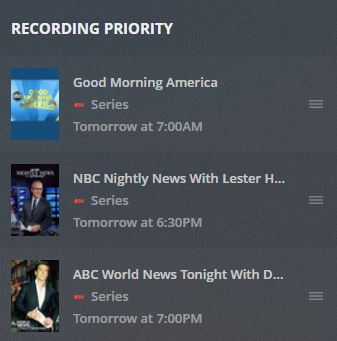
Here you’ll see the schedule with these shows and recording times. You’ll also notice there’s no recordings from today’s episodes:

I’ve removed and re-scheduled shows multiple times to resolve this, unfortunately as the OP stated, it appears only one-time/single recordings are working at this time. The HDHomeRun tuner appears to be working just fine and I haven’t experienced much (if any) signal loss issues that might factor in.
Plex support, please chime in on this if you would, thanks in advance.
@tomd51 are you also running 1.14.1.5488
For both of you is it only in the web app this is happening, or all that you can record from? (if you use any other)
Hi BigWheel,
Thx for the quick response. I’m currently running Version 1.14.1.5488 as well and almost always use the web client (via browser) for scheduling/Plex related purposes. I haven’t attempted using any other clients, but can try scheduling using an iOS client as well.
1 Like
Also can you try to do a manual refresh of guide. Wondering if it has to do with outage a couple days ago
oh i see you said it started 3 weeks ago. probably not outage related
I’m pretty sure I did a couple guide refreshes, but I’ll try again. In my case, this has been going on for several weeks. I had these same series recordings working as expected for months with little to no local changes as far as my server is concerned.
Yep, been happening for a bit, not sure what to chalk it up to at this point… ¯_(ツ)_/¯
For me, it’s both the server program and the web app. Both run thru Firefox 65 on Windows 10 machines. I also cannot get a series to record using the PLEX app on ROKU. In all cases, I can get a single show to record, but not all episodes.
BTW, it was 2/13/19 when I had to reinstall the PLEX Server software. Ever since then I have had issues with recording a series and keeping that data in the Recordings section.
Thanks for your very prompt reply.
Fred Harth
OK!!! I’m not sure exactly what corrected the problem, but all works as it should now! On the Server I refreshed the Guide. On the Media Player, I updated the software to v.3.83.1. Both work correctly now. Amazingly, the Recordings section on both the Player
and Server now show programs that I had tried to “record all episodes” before, but it never showed them as scheduled. Now they are. Even the PLEX app on ROKU works! One thing I noticed when trying to record a series before (on ROKU), when I hit the SAVE button
before, it would immediatly jump back to the previous page. Now, when I hit the SAVE button, the little chasing circle shows up like its actually doing something before it jumps back to the previous page.
Thanks for your help and I hope Tom gets his to work as well.
Fred
2 Likes
Thanks for the update. Let us know if it same issue creeps up.
Thanks Fred! 
Big thanks to BigWheel as well, after performing another guide refresh, deleting the existing sheduled shows, I re-added series recordings for the three shows I noted earlier and so far, I’ve had two record as expected.
Hopefully I’ll get the same results from the third. Will (try to) remember to follow up in a week with an update, fingers crossed and thanks again to you both!
1 Like
This topic was automatically closed 90 days after the last reply. New replies are no longer allowed.
