nop. just install it via the available section of the gui.
Also, there are no user neither group such as plex. there is a group and user media, but is there a way to see if they are link to the jail… ?
nop. just install it via the available section of the gui.
Also, there are no user neither group such as plex. there is a group and user media, but is there a way to see if they are link to the jail… ?
Just to confirm, you are not seeing user plex and group plex when connected to the Plex iocage?
From FreeNAS Shell what does the following command return?
ps aux | grep plex
Okay, so this at least confirms user ‘plex’ was created when Plex was installed. You can check groups using the following command:
pw groupshow -a
Let’s try the following:
Open a shell and switch to your Plex iocage. Run command ‘pw usershow -a’ and note first number listed after user ‘plex’. This is the ‘plex’ user’s UID. E.g., the UID for ‘plex:*:1221:1001::0:0:User &:/nonexistent:/usr/sbin/nologin’ is 1221.
From the FreeNAS web GUI make a ‘plex’ user with the UID from previous step and make sure they have permission for your media volume.
Stop the Plex iocage from running and verify your media volume as a mount point inside the Plex iocage.
Restart the Plex iocage and it should have access to the mounted volume.
Now, all plex is unaccesible. it is started, but management refuse to connect.
ok… update.
have to clean iocage after a fresh install( iocage clean -a ).
Then, I was able to install plex, but have the same issue with permission.
I then try your solution:
I now have access to my share.
Thank a lot !!!
Great! I’m glad you got it sorted out.
Hi all 
I’ve just found a pretty fast solution for the ‘grey-out’ problem.
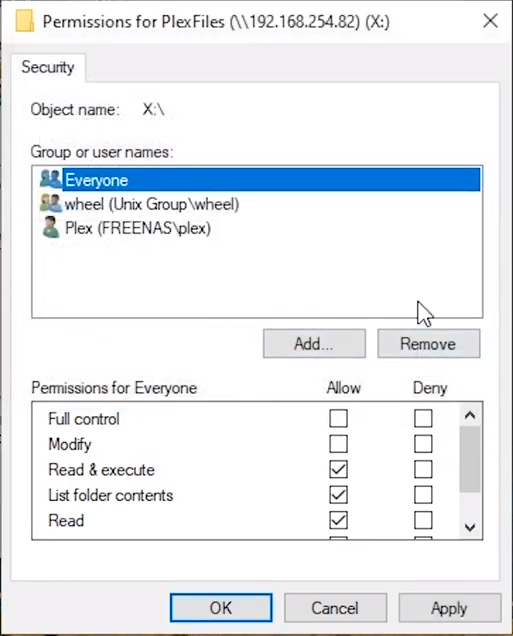
Via Windows > right click on the folder containing the media which you want to be available in PLEX > Properties > Security > Select Everyone
Give Everyone ‘Read & execute’ permissions. That it!
This topic was automatically closed 90 days after the last reply. New replies are no longer allowed.

