I have been researching this issue all over the web.
I just can’t seem to get my Plex to find the media in the folders I have mounted.
I use plex-plexpass 11.2-RELEASE-p14 (version says N/A) for FreeNAS-11.2-U6. I have tried the “non-plexpass” version as well, and it didn’t make a difference.
I have created a user (Petter) and that user has got access to all pools, from “Hovedvolum” down to the folder named “Filmer”. See the screenshot named “Storage pool.png”. The root user also has access to most of the pools,
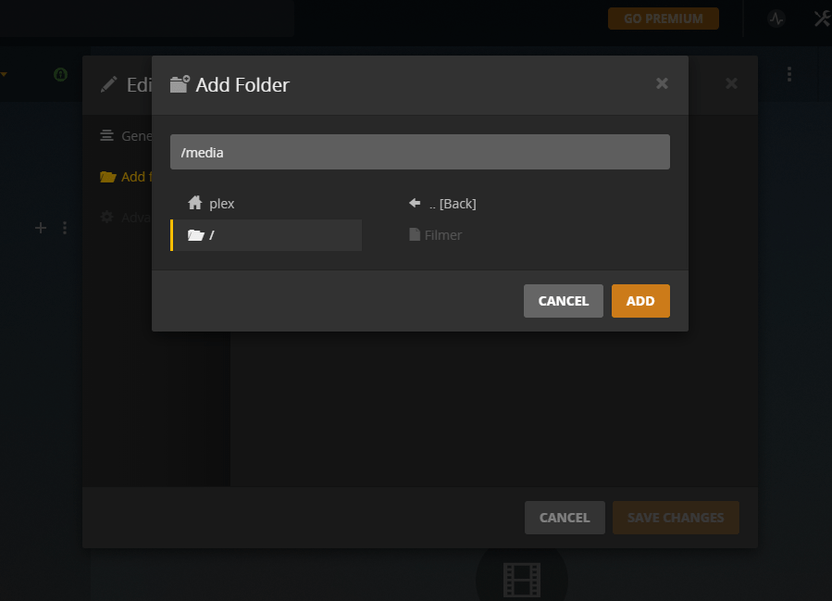
I have tried to add both “/media/Filmer” and simply “/media/” in the Plex web GUI. As you can see from “Folder greyed out.PNG” the “Filmer” folder is not available for selection through the GUI. When I added the folder manually (by simply typing “/media/Filmer/”, I was able to add it, but Plex still didn’t localize any files. I have tried to add the video file without the containing folder, much to the same result.
I am running out of ideas, and have run through post after post on this forum, and videos on YouTube.
I followed instructions on how to create users and add permissions via this video: https://youtu.be/sMZ-s8wHkHw
I then followed instructions on how to add Plex and install it, from this video: https://youtu.be/LLS8l_RAxAU
I hope some of the good folks on this forum can help me, as I am almost about to give up on this project.
Any and all help would be appreciated. I can add more screenshots and details on request.
Hi, @mikec_pt . Thank you so much for your reply.
I am not sure I follow.
"PMS process runs with user “plex” ". Where does that user recide? I can’t find it. And how do I allow that user to see the files?
The owner of the pms is set to root as of now.
The user “plex” only exists within the jail right now, one way to tie that into the “real world” (the actual FreeNAS system) would be to make a new user account on FreeNAS with the same user ID (number) as the Plex user in the jail. But this is not really needed. Plex only needs to be able to read the files. When you map the external (source) directory to the internal (destination) mount point, that should give the in-jail Plex user access to the files if their permissions are set properly. I don’t even give Plex write access. I have it set to read only so if it goes crazy some day it can’t delete all my files. I manage them other ways.
My files are created by default in the library directories with permissions -rwxrwxr-x, which means Plex can read them even though the owner and group of the files is not the user “plex”.
Yeah that’s one way to do it, but then all “other” users can read the files…
This is a OS level thing not specific to plex in it self, in practice you need to figure how you want to set permissions, for any app(user/group) that needs to access this files, I mean as long as you don’t set chmod 777 and you’re ok with everyone reading the files it should be ok.
The one think I can help clarify is that in FreeBSD when you define those mountpoints in the jail, its is using “nullfs” in the system, so whatever permissions and ownerhsip are set in the original filesystem are the same in the nullfs mountpoint. This ofc creates some limitations, because the user plex will only exit in the jail, not the host.
However, if you get the user id from the jail (say in example plex uid is 972) you could set ownershipt to that uid IN the host and the jail will see it as plex user owns the files…
So I guess the question is how do you want to have this?
Do you want plex to own it all and have read/write access? or do you prefer to keep WRITE access to root/another user, and everyone else can read?
There’s also ACLs if you want to do this in a more “windows like” way, but this requires using the cmd line with the setfacl cmd.
I am struggling with this on FreeNAS as well.
Every time I set the destination to something different in an attempt to make it work, the mount point I set is greyed out in Plex and I am unable to connect to the library.
I am new to FreeNAS but have been running Plex very successfully for a long time on several windows machines.
Ihave the latest (as of today) freeNAS stable version and a fresh pluginn for Plex installed. and (I thought) configured. I am still unable to see my files in the library as I cannot select the mount points in Plex.
Why are these things so complicated?
So, as @mikec_pt said, it’s a problem with ownership of mounted files
At first I added plex user in my freenas web UI. Make sure that uid of that user is equal to uid of plex user in jail (run id plex in jail’s shell, was 972 for me, but your mileage may vary)
After that - chown -R plex:plex /path/to/your/mounted/media, again, in jail’s shell
And finally - restart jail or run service plexmediaserver restart
@HarvestNide can you, pleasssseee, elaborate a little bit the second to last command? im’ using the username madalin.vladescu id 1000. mount points: source: /mnt/BACKUP/MEDIA-SHARE to destination /mnt/BACKUP/iocage/jails/plex/root/media. thanks a lot! PS: madalin.vladescu user belongs to “wheel” group
LE: nevermind. i’ve done it. thanks a milion for this, bro! you saved me. i’ve been reinstalling this server 5 times now
Well, for me problems started when I was trying to create separate group. PMS isn’t the only app, which should get access to my media folder and each app runs from different jails (At least I think that’s the way to go with freenas). Gonna dig deeper at weekends and I’ll post follow-up here, if succeeded.
Unix based systems don’t have permissions like Windows, however you could indeed try to use “ACLS”, look up FreeBSD setfacl and getfacl, zfs should support this.
Thanks for sharing the video. While it does work, to set permissions securely you should do this instead:
Under your main freenas, create a user with the username plex with the same uid as the plex user that is in your plex jail. (you can check this by opening a shell into your jail and then typing “pw usershow -P -a”)
Modify the permissions in Windows like he did in the video, but instead give the user plex read & execute, list contents, and read permission on “this folder, subfolders and files”
Giving full control allows everyone to modify permissions on your share, which could be used to lock you out of your own share. It’s like leaving the front door of your house open and giving thieves tools to re-key your locks with.
There’s no need to create the user in the Host, you can just set the perms to uid 972 as stated above.
As for the rest that is very good advice, it is not a good idea to allow access to “everyone” (or Other in Unix; aka chmod 777) you leave all exposed to read write and change permissions.
Just: chown -R 972:972 /path/to/media/ is enough for plex to own the files, you could also have the group be something else that would allow other users of said group to see the files too…
First you need to ask the question “Who needs access to this files” if that is “just plex” then that chown cmd above is ok, and than also a proper chmod (which will depend if you also want just read or write)
@HarvestNide, maybe you can tell us exactly what you want to achieve and we can suggest the proper comands?
I’m jumping in with what is hopefully an easy question, on topic. I understand basic users and groups and ownership and shell commands. I was having the same “gray” issue as well, ran the chown -R plex:plex /path and it fixed my issue.
However, when I now mount the drive via my network to add media from my computer, any folder that is identified as a mount point in the jail is NOT visible.
I believe, similar to the OPs post, they have a separate pool that they’re wanting to show up in plex. For instance, my jail running plex is on my SSD pool, and all my movies are on my HDD pool.
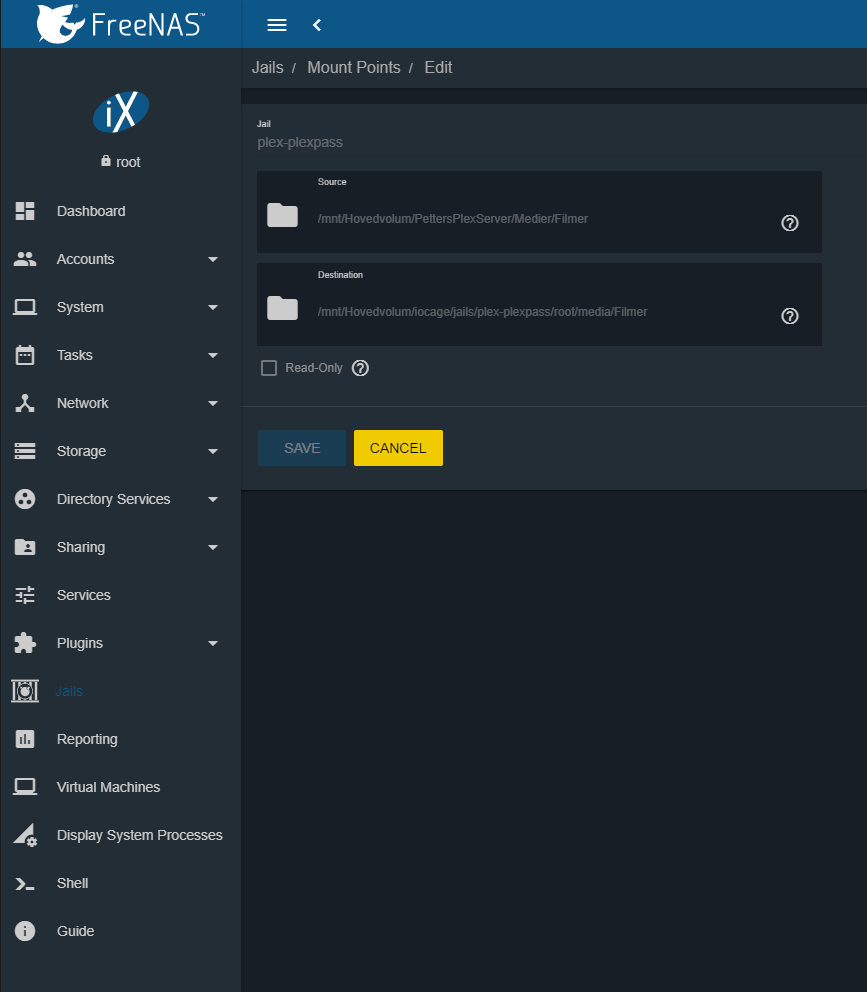
So, go into jails, stop the plugin. Go to edit mount points under the x3 dot, and add the source files (where the content is located) to a folder located in the plex jail. I used media. In my instance, it’s linking all the files from my HDD pool to the media folder in my SSD jail folder, which is /mnt/[pool name]/iocage/jails/plex/root/media.
Now, when you browse to /mnt/[pool name]/iocage/jails/plex/root/media in the plex GUI, it shows as a FILE, and you cannot open it. Run “chown -R 972:972 /mnt/[pool name]/iocage/jails/plex/root/media” and now relaunch your plex GUI. That “file” that you couldn’t access is now open and plex can read it!
I spent 3-4 hours trying to symlink, mount point, and jail share with no success. Using the edit mount point, and chown -r 972:972 [mount point] method worked for me, and now my plex share that’s running in my SSD jails is able to see the content located in my HDD shares.