All though I can SSH into my plex server. Media is there, the ‘/usr/lib/plexmediaserver/’
is there. I enter my ip address for my plex server from my browser (10.0.1.18:32400/web/index.html) I can enter my password, and ‘login’ verifying my plex pass, but nothing is actually there. Nothing besides ‘Live TV’ and ‘add Media’ which if clicked bring me to the download page to download and install a media server, even though I am on my media server ip address.
From the command line when I ssh into the server I get these lovely messages:
/usr/lib/plexmediaserver/Plex\ Media\ Scanner --list
terminate called after throwing an instance of 'soci::soci_error'
/usr/lib/plexmediaserver/Plex\ Media\ Scanner --info
Error: Cannot get information for a section yet..
Now you might be asking, what did I do to create this lovely scenario on a server that has been running smoothly for year. I changed my password. In the setting on my plex server on my local network, I hit edit password, and typed in the new password, confirmed the password, and included the old password, and selected logout the reset credential.
I then realized that the password manager did not update the password and was pretty much locked out of my server. So from the email that I received telling me my password has changed on my plex server, I click the reset link to reset it back to the old password. Did that successfully, and when I tried to re-log into my local server I got what I described above; a local plex window with only ‘Live TV’ and add media options to install a plex server.
I know my media is safe, and that and I could re-install the plex server, but the getting all metadata again would SUCK big time, so I would love to get this fixed. Not to mention the shear craziness that this all happened because I tried to change my password.
That would have also unclaimed your server. So you should be able to just claim the server. If you can access the local Plex Web, then PMs is running. If you go to settings, can you see the sever there?
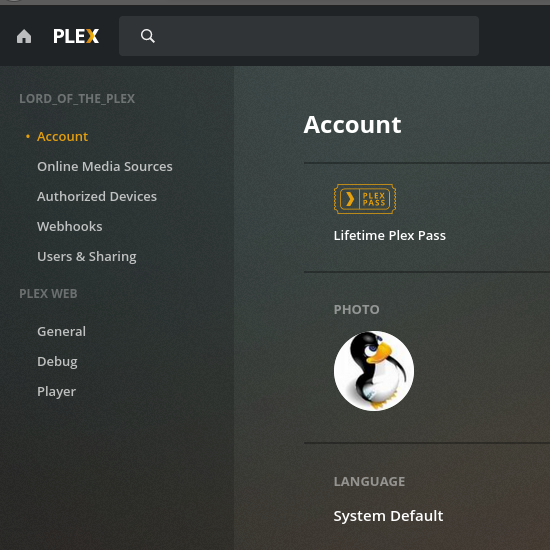
I like what you are saying, but I am not sure where you are referring to though because as you can see from the screenshot there is nothing there. So if you wouldn’t mind clarifying I would be truly grateful.
sudo systemctl stop plexmediaserver
cd /usr/lib/plexmediaserver
sudo touch ./Preferences.xml       # Since file did not exist in the first place, made a blank one.
sudo chmod a+x ./Preferences.xml     #To give it the same  r/w/x privileges as everything else
sudo systemctl start plexmediaserver
Then from my remote laptop I typed into my browser (http://10.0.1.18:32400/web/index.html), again because the server is headless. Signed out, cleared my cache, logged back in.
Still with no success. And by that I mean, I could login, but there was no difference. So no actual “claiming” took place. So I was wondering, if I was to copy/paste the token into the newly created Preferences.xml would that make a difference.
I don’t know much about Linux but the “Preferences.xml” file should be there. It might be in another location. The one you made won’t help. You seem to be looking into the folder with the program files, that’s wrong. You need to look where the Plex’s user data is stored. Where you find logs and all the downloaded metadata.
Not intending to be rude, this might come accross as “mansplaining” or whatever but it is not, you mention you know nothing nothing about linux which fair.
The reason I put the "find . -iname “Preferences.xml”, it is a very powerful command that will start where you tell it, and dig down to the very bottom of any file system to find the ‘pattern’ provided in this case “Preferences.xml”. Let put it this way if you want to find a needle in a haystack you want to use the find command. Problem is my start point “.”, I started it in the ‘program file’ if you will “/usr/lib/plexmediaserver/” the folder that hold the running server files. “usr” = User “lib”=library
So yes you are right. I ran the find command on the root file system “/”, “C:/” for windows users and got
find / -iname "Preferences.xml"
/var/lib/plexmediaserver/Library/Application Support/Plex Media Server/Preferences.xml
“var” = variable “lib”=library
So all that again, to say you are right. And yes that “Preferences.xml” had data in it.
I will go, and redo what was suggested, and will post my results.
I moved the Preferences.xml to Preferences.xml.bak
Made a new blank file named “Preferences.xml” to insure it was blank with no residual data.
Check its permissions for read/write/execute
Started up the server again.
Logged in from a separate computer through a browser and logged in with my credentials. Saw no change in the browser window.
Check the Preferences.xml, and the new file now has data in it.
– MachineIdentifier
– ProcessedMachineIdentifier
Have different values to the backup copy. It also does not have ANY other variables that the backup has, like :
– FriendlyName
– PublishServerOnPlexOnlineKey
– PlexOnlineToken
– PlexOnlineUsername
– PlexOnlineMail
And for the record the “PlexOnlineToken” was blank in the backup. So I again I ask, could I copy/paste the token from https://plex.tv/claim into the Preferences.xml file under “PlexOnlineToken” and get it working. The backup file has all the other settings as well.
There’s a very major piece of this puzzle most are missing.
When manipulating Preferences.xml, do not alter or remove
MachineIdentifier
ProcessedMachineIdentifier
AnonymousMachineIdentifer
These three values are what tie the server to Plex.tv
Plex/web is looking for a server with those ID numbers – UNLESS you “REMOVE” the server in “Authorized Devices”.
My recommended sequence is very straight forward albeit detailed and I’m writing this for everyone’s possible case here.
Upper right corner of your Plex/web browser
Sign out
Continuing at the command line
Using the original (existing) Preferences.xml
With PMS stopped
Make a backup copy (just in case you fat finger it and PMS resets it)
Edit Prefrences.xml and remove the following Preference="Value" pairs
a. PlexOnlineUsername
b. PlexOnlineEmail
c. PlexOnlineToken
d. PlexOnlineHome (won’t exist if you don’t use Plex Home – no worry if not)
After saving , check user plex:plex (or the user you run as) still owns the file.
Start PMS
Open http://ip.addr.of.server:32400/web (if local) or http://127.0.0.1:32400/web
It will want you to sign in – do it
It may / may not give you the “Got It” (click if it does)
If the setup wizard starts (it means you touched something else – and likely broke it – STOP and check Preferences.xml. You’ll likely find it blank.
I followed all the step to the letter. Wrote a novel with ALL the steps and results. It all seems to not work. Wrote all my findings, made suggestions as to where I though changes could be made. Made some, reported back, made others. Tinkered for a good twenty minutes. Did a “sudo reboot” nothing seems to work. Checked a few other settings. installed another browsers. Just as I was getting completely enamored. Refresh the page for the umpteenth time and finally got a button that saying “Claim …” I was so happy I smashed that button so hard my mouse seem to let out a crack sound.
So it seems to be working. I even played a song for a victory lap and to make sure it would actually play.
So thank you all for your time and efforts, and for putting up with me.
I am now going to make a full backup of my setting and metadata so if something like this happens again, I can just say screw it re-install. Maybe I will even look at running it on Dockers.
What browser were you using? Note most browsers have a hard refresh option that will remove any cached information for a page. This can be useful at times when things don’t look right.
My daily driver, and the one I was using is Firefox. I install Vivaldy. But I have Opera, Chome, Chromium. All have their own and different settings and tweeks. The life of a web designer. :o)
Truth be told, I would start with the simplest… clear you cache. (CTRL + Shift + Delete on Firefox)
After that I would install a browser, that you never installed before, in case there is a setting or configuration that might be conflicting. For instance I have NoScript on my Firefox that even though I allow all scripts, there was a conflict. A fresh install, no add-ons, and you will be sure there is no conflicts. Afterward, uninstall…
Otherwise i will be happy to assist, if I can, but I would need some more information.
Tried that fresh install chrome using as guest. I’ve tried firefox, safari and chrome. All private without logins. In my Preferences.xml there is no PlexOnlineHome="1" PlexOnlineMail="plex_usr@plex_server.com" PlexOnlineToken="RanDoMHexIDecIALtoKeNheRE" PlexOnlineUsername="lord_of_the_plex" On my old machine it is there but the Online Token is blank. I tried to copy it and add the claim token but it reverts to blank. The token isnt getting passed for some reason.