Server Version#:4.116.1
Player Version#:?
When I try to add more seasons to an existing TV show group, it adds them then after a few seconds the 2 I’ve added get a trash can in the icon and disappear. I’ve checked many times and all the file names and titles follow the criteria exactly the same. Any suggestions? I can play all the videos individually right from the folders in the pc without any problem. Should probably add all my files are .mp4’s.
We need to know how you are naming you files on disk and your folder organization. Including what folder paths you add to the Library settings where the media is located.
Make sure you are following this guide. https://support.plex.tv/articles/naming-and-organizing-your-tv-show-files/
It’s the tv show Bosch. So all the episodes are put into a sub directory on my movie drive named Bosch TV. Then the episodes are put into individual sub-directories by season (Season 1, Season 2, etc.) and named “Bosch S2E1 ‘episode name’.mp4”. This is the format through all the different seasons. It works through Season 3 & 4, but like I mentioned Season 2&3 only show up momentarily then get a trash can on the season icon and disappear. I’ve done many TV shows the exact same way (unless I’m missing something) and they all seem to work. One such TV show directory has 17 seasons in it and work perfectly. I’m thinking those 2 directories may have initially downloaded as .mkv and I converted them over to .mp4 to make all my movies the same format. But like I also mentioned earlier, I can go to the individual movies in their unique directories and play them through VLC media player without any problem too. As a last resort I may try eliminating Season 2 and completely re-download the whole season (or at least a couple episodes to see if it changes anything). It’s got me confused to say the least.
Update: I just downloaded a complete season 1 of Bosch from a backup drive and as soon as it was done downloading Plex added it to the TV Show library in Plex without me doing anything else. Soooo maybe re-downloading those 2 other directories is the key.
Also, I went back over my existing working seasons 3-4 and found 3 episodes in the 3rd season that were still .mkv, so having mkv and mp4 files together doesn’t make a difference.
It sounds like you’ve created a dedicated folder for this show and probably linked that folder to your library. Make sure to link your library to a library-level folder… not to individual shows. It’s also recommended to separate series vs. movie based content in their own top level folders, e.g.
…
  Movies  <- linked to the movie library
    Movie 1 (year)
      Movie 1 (year).ext
    …

  TV Shows  <- linked to the tv show library
    Bosch
      Season 01
        Bosch - s01e01 - optional episode title.ext
        Bosch - s01e02.ext
        …
Your talking to a newbie here. Not sure what you mean. I didn’t create the Bosch any different than any other series in the TV shows library, so not sure what you mean. Like I mentioned I have 14 total TV series in the TV shows library. Only 2 of them have their own ‘library’ designation. Bosch isn’t one. They’re both existing TV series that are working fine. The rest are just in a directory on my Plex drive for each show (Bosch, All Creatures Great and Small, Brokenwood, Madame Blanc, Miss Scarlet and the Duke, Death in Paradise, etc.) then I goto the TV shows in the Home menu, click manage library, click edit, and add their folder and click OK. If there’s more than 1 season I just click on the folder and not the individual season. It then looks at what’s there or new and installs accordingly. Some even add new seasons all by themselves. Got me totally baffled.
Just because you didn’t do anything different doesn’t mean you are not doing something incorrectly. It is like shooting a gun straight up in the air and assuming because a bullet has not come down and landed on your head yet it is the right thing to do.
These are wrong things to do. and why I asked my question. As mentioned by @tom80H
This should only be a main tv folder and not individual shows. Nor should it just be a drive letter like D:/

Can you take a screenshot of your files and your folder structure?

Then I click on Add Folders and go to my specific directory with the mp4 fiiles.


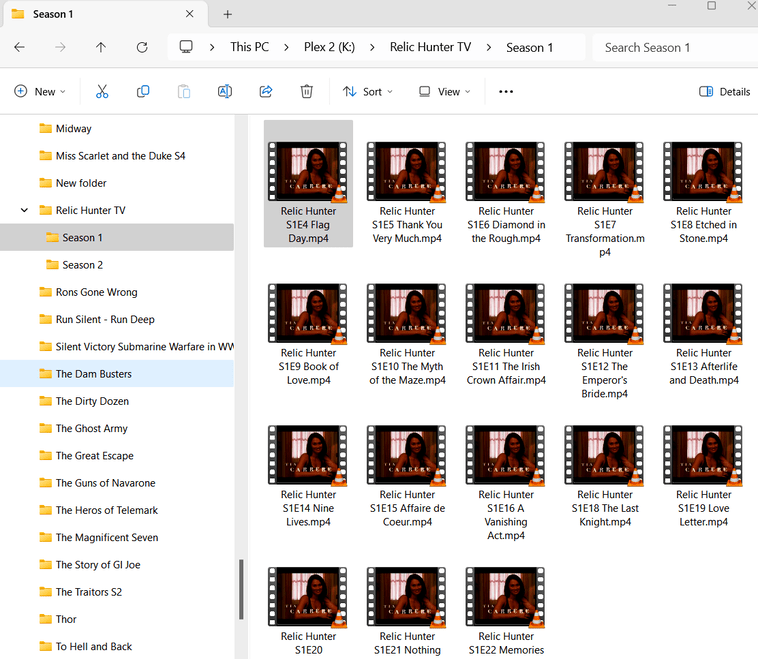
Looks like the ‘teacher’ I had to get me started on this may have left out some steps. You got the time to step by step me ? No trouble with just movie files just the tv series stuff (so far).
stop doing that
- You need a folder called TV or whatever. and all your show folders like Bosch should be in that. such as
K:\TV\Bosch
K:\Bosch is incorrect
- The only thing that should be added to the Add Folders section of settings should be
K:\TVas described above in the diagram
the step by steps are in the link I provided in my first reply.
if done correctly you don’t ever touch the library settings and only just add the new files in the correct show folder then select Scan Library files


So I should create a Folder (directory on my K;/ drive) called TV and put all my TV show folders into it with their respective mp4 files in them. So in the case of Bosch, I’d Add a subfolder called Bosch and put all the individual seasons into it containing the mp4 files?
Please read this link that @BigWheel linked in their first post:
https://support.plex.tv/articles/naming-and-organizing-your-tv-show-files/
That has how you should organize your files and gives examples.
-Shark2k
Bingo! Works like a champ. What made it even easier is I had made a duplicate drive as an external 2tb drive and I just copy the shows from it to the new TV directory on the K drive, then delete the old files from the Plex drive location. Thanks soooooo much!
This topic was automatically closed 90 days after the last reply. New replies are no longer allowed.
