Can't disable Verbose/Debug logging

Server Version 1.30.2.6563

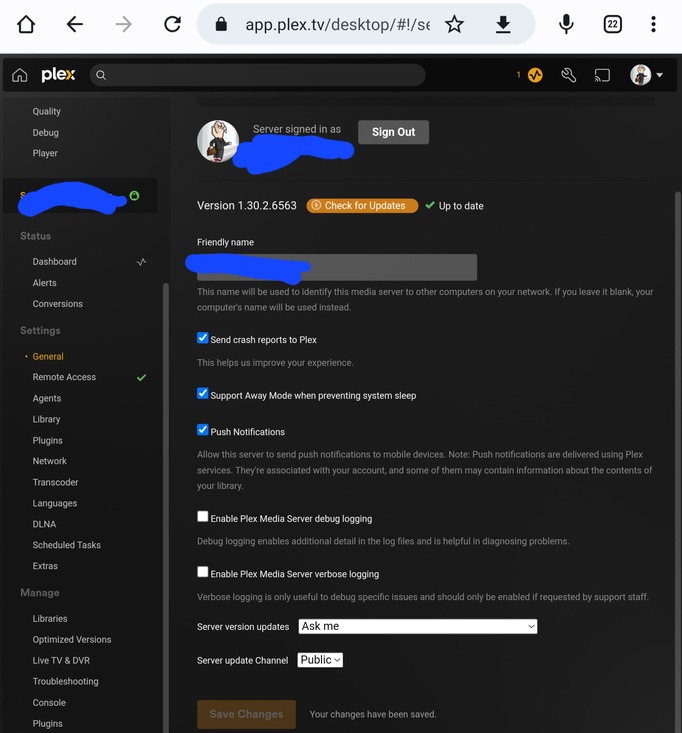
I had enabled all logging to diagnose an issue last week, and since then cannot disable verbose/debug logging. Both are disabled in Settings. I’ve re-enabled. saved, disabled and saved again in case something was “stuck.” I’m not sure what to do.

In the screenshots you can see the settings are disabled, and then immediately after the console is still returning verbose/debug. The physical logs are, too, but I didn’t screenshot them. I’m not including any logs because there’s so much and i don’t know what would be relevant.

I’m actually hopeful that I’m just being an idiot and it’s something simple.


Lowering the logging level requires a reboot for security.

Well, hell, does it say that somewhere and I missed it? And here I was proud of my uptime. Let me give it a shot.

Yeah, that did it. I guess I did wish for it to be something simple.

A prompt that it requires a server bounce would be nice. Thank you for the quick reply.

You only need to restart Plex

Bad choice of words on my part. It was in the release notes about a year back.

Yeah, that’s all I did. I meant that usually I have some sort of crash every other day that would have resulted in the server app being restarted. The one time it’s stayed up for a while is the time it causes another issue for me.
Thanks again.

Leave Debug on. It’s on by default.
Leave Verbose off. It’s off by default.

Plex rotates the logs based on size, so it doesn’t save any space to turn Debug off.

Debug logging is vital if there are any issues.

2 Likes

This topic was automatically closed 90 days after the last reply. New replies are no longer allowed.
