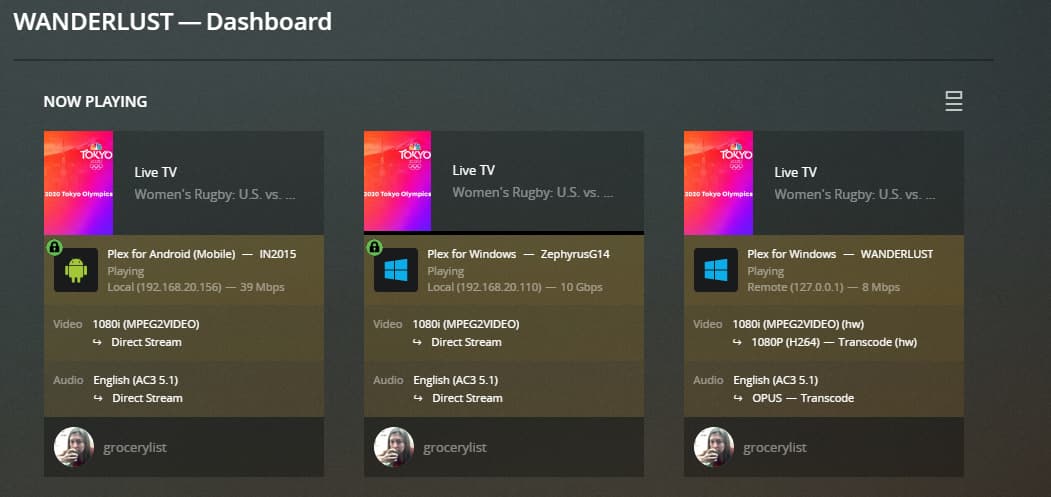
Can't figure out why PMS(127.0.0.1) is transcoding with Plex for Windows and Plex Web

Server Version#: 1.23.6.4881
Player Version#: 1.33.0.2444-a220eae4 and Plex Web

I’ve got a network with multiple VLANs. I’ve added the subnets I want to have access to PMS to the ‘LAN Networks’ field as well as ‘List of IP addresses and networks that are allowed without auth’.

PMS is on 192.168.70.0/24 and for some reason 127.0.0.1 shows “Remote” and transcodes Live TV and Movies. However Live TV and Movies played from my 192.168.20.0/24 subnet show Direct Play or Direct Stream.

Appreciate any help!


Screenshot 2021-07-29 155305
Plex Media Server.log (2.0 MB)
Screenshot 2021-07-29 160054

Remove the 70.0 subnet. Do not list the server’s own subnet.

Make sure there is no space after the comma between subnets/addresses.

Thanks for the tip. I removed the 70 subnet from LAN Networks but I’m still having 127.0.0.1 show Remote and Transcoding.

127.0.0.1 is a loopback IP so I am assuming you are playing that video in a browser on the PC that the server is operating on. The WebApp(in a browser) always transcodes no matter what. Browsers cannot direct play a lot of formats so the transcoder puts it in a format that can play. If you open the Windows app on the PC that has the server running I am willing to bet it will Direct Play.

Transcoding for the Web app makes sense but my last screenshot (far right stream) shows the Plex for Windows app as 127.0.0.1 (remote) and transcoding on my PMS server. I can’t understand how my server is somehow remote to itself.

I haven’t experimented with this. I know that by default, when nothing is entered, the server’s attached subnets are considered local.

I’ve assumed that when entering anything in LAN Networks, then ALL desired subnets should be listed. The language seems to imply that:

…If set, all other IP addresses will be considered to be on the external network and will be subject to external network bandwidth restrictions…

So I’d try this:

127.0.0.0/8,192.168.20.0/24,192.168.70.0/24,192.168.107.51

1 Like

Thanks so much! I input 127.0.0.0/8,192.168.20.0/24,192.168.70.0/24,192.168.107.51 for my LAN Networks and now I’m no longer getting any transcoding.

This topic was automatically closed 90 days after the last reply. New replies are no longer allowed.