Server Version#: 1.24.5.5173 (running on Synology NAS)
Player Version#: Plex Web 4.83.2
I’m having difficulties getting forced subtitles to work on my Plex web player. For instance, I’m trying to get Hunt for Red October to show the subtitles for when they are speaking Russian but not otherwise. I’ve done the following already:
Settings->Languages set to Prefer audio tracks in English, Subtitle mode shown with foreign audio, Prefer subtitles in English
Agents checked Local Media Assets (Movies) - if I click the gear icon it asks for a local music video path which is blank. I’m assuming this is correct.
I have a the video named: Jack Ryan 1 - Hunt for Red October (1990).mkv
I downloaded a subtitle from subtitles.org which is marked for forced english & opened it to verify that the subtitle times & texts are accurate for my video
I placed the subtitle file in the same folder as the video and named it: Jack Ryan 1 - Hunt for Red October (1990).en.forced.srt (also tried .srt, .en.srt, and .forced.srt)
I rescanned the library files for that folder
I refreshed the metadata for the video on Plex Web
I stopped the movie, force-refreshed the page (Ctrl-F5), and resumed it
When I’m playing the video I have subtitles set to off. I’m assuming that’s okay because we sometimes like to play the regular english subtitles if it’s a movie that’s hard to hear the dialog, but 90% of the time they are off. I can’t think of anything else I’m missing. Any advice?
Did you at some point actively set the subtitle selection to None? Manually setting/selecting a subtitle/audio track for a specific movie overrides the account preferences. Adding another subtitle (e.g. your forced one), does not reset that.
Does the subtitle show in the subtitle selection for the movie?
Yes I set the subtitles to none at one point while testing as I had first tried to use the auto-subtitles but that showed subtitles all the time. Not sure how to reset it to the default as the only options are the various subtitles, search, and upload.
I did notice that if I click playback settings in the player, the only options on subtitles are the various VOBSUBs that it already retrieved, I don’t see anything else in there.
Please try the Analyze option in the context menu of that movie.
This should identify updated tracks incl. sidecar subtitles – otherwise Plex will usually pick those newly added subtitles up during maintenance as part of one of its scheduled tasks.
Still no luck. I appreciate your trying to help. I ran analyze and then rescanned the files for that library & refreshed the metadata just to be thorough. Still not appeared in the subtitles dropdown or playing automatically.
I also found some settings in Manage Library->Advanced that I set thinking that might help. I checked “use local assets” and “prefer local metadata” and “localized subtitles” but that’s not helping either. Let me know if I should uncheck any of those.
I did just find one thing that worked. On the subtitles I clicked upload and dragged the srt file in there and it now shows up on the dropdown. I don’t see it on the server though so doubting that will work on all devices.
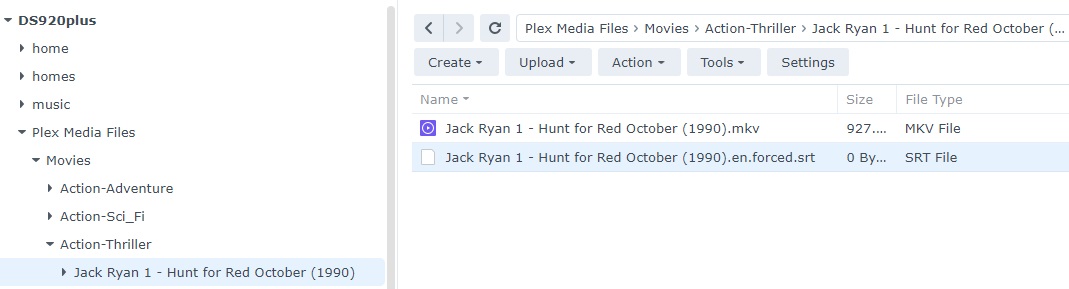
I have the files in the following on the Synology NAS:
DS920Plus>Plex Media Files>Movies>Action-Thriller>Jack Ryan 1 - Hunt for Red October (1990).mkv
DS920Plus>Plex Media Files>Movies>Action-Thriller>Jack Ryan 1 - Hunt for Red October (1990).en.forced.srt
Actually, I just tried it on my phone and it did actually still show the subtitles. I guess that might be a workaround if I can’t get it to work by putting the files in the folder
Move your movie including the subtitles in a dedicated folder, e.g.
Plex Media Files
   Movies
      Action-Thriller    <- I suppose your library points to this folder
         Jack Ryan 1 - Hunt for Red October (1990)
            Jack Ryan 1 - Hunt for Red October (1990).mkv
            Jack Ryan 1 - Hunt for Red October (1990).en.forced.mkv
(personally I would drop the Jack Ryan 1 - prefix. This won’t get in the way with the subtitles but could get in the way of matching your files)
Rats, I really thought that was going to work and I was going to curse myself as an idiot as I forgot Plex likes movies in their own folders. The subtitles automatically went back to none as it lost the upload I had done, but the srt is not showing in the dropdown and the subtitles are not showing automatically. Here’s what the dropdown looks like.
FYI: I did a scan library files, analyze, and refresh metadata after I redid the folders
And here’s the file menu just to verify. I’m assuming the subtitles file should still have the srt suffix rather than the mkv like in your example.
The naming convention is just to help keep things organized, so I can find Hunt for Red October next to Patriot Games for instance rather than scanning the whole library. I do have to manually match the metadata when I upload them as you said though.
Fixed it - I was an idiot after all. The srt file hadn’t uploaded properly. Once I re-uploaded it everything shows up correctly. Thanks again for your efforts!