Hi,
I’m not sure what had happened but it seems that I couldn’t purchase the IOS app. It says only the home admin can subscribe to plex pass or purchase the app activation.
Checking the previous topics people opened and it seems that I dont have the crown thing at plex home? Not sure what had happened though.
Can anyone guide on how to enable the crown thing back so I can purchase the app? Thanks in advance.
I’m not sure if I’m looking at it correctly but there’s no one else in my plex home for me to leave their home.
You have joined the Plex Home of a user whose name starts with “N”.
Leave that Home again. https://support.plex.tv/articles/203888038-how-do-i-leave-a-plex-home/
Thanks for checking. I’ve checked with that friend, there’s no one else in his home menu too so I can’t technically leave his home.
So basically:
- I’m not an admin in my own home
- Cant leave friend’s home as I’m not visibly there
Would it be possible if I can have a plex home reset or something?
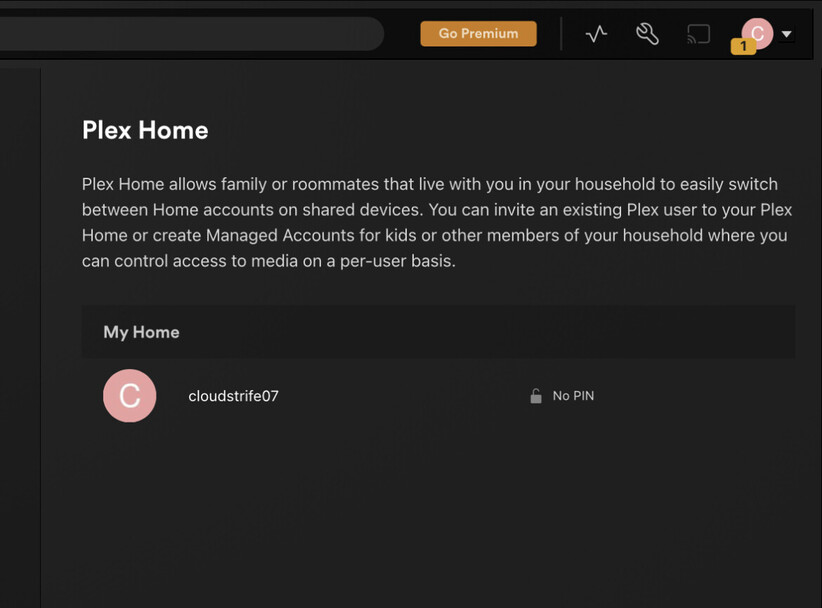
Your screenshot shows that there is nobody but you in your Plex Home. The “Plex Home” heading is a little misleading in this instance, because, as the Help page says, the Plex Home is created when you either create a managed user or invite a Plex user to join your home. Since you’ve done neither, the “Plex Home” hasn’t even been created.
If you want to confirm that, create a managed user (you can always delete it when you’re done). You should see that user in the list, and the crown should appear. If it’s just you, you are the admin, and there’s no need for the crown.
So now we’re back to why it’s not allowing you to purchase the IOS app. Am I correct, @OttoKerner ?
Still, you are. It is shown that way on the plex.tv side.
I will enquire a backend developer and ask for the reason of the differing display.
In the meantime, you can go to https://app.plex.tv/desktop/#!/settings/plex-home
and look for your user name in there.
If you find it, follow the support article I’ve linked above to leave this Home.
Thanks @OttoKerner for the advise. However there’s no “X” icon when I hover the mouse for me to leave the home, nor there’s any other menu apart from set pin/edit pin.
On another note, when I open plex home or manage library access menu in the IOS app it’ll crash and terminated and I’m back on the phone main screen.
I’m told that the Home has now been removed from your account.
Shut down and restart your Plex client(s),
then try again.
I’m now able to purchase the IOS app, and have bought it just now. Thank you very much @OttoKerner and @beckfield for your assistance.