Hi all,
as my internet was down for 3 days I realized that with Plex Home enabled I need internet access to authorize with Plex and watch a movie. (event though it is disabled for local access)
- You need an active internet connection to be able to do Fast User Switching between members of a Plex Home.
Now that internet is back I wanted to leave/destory Plex Home as I/we (our family) do not share with anyone… its just a single account and I guess there is no need for Plex Home then… (particular when an active internet connection is needed and my/our local provider is not that stable)
I found this article: https://support.plex.tv/articles/203888038-how-do-i-leave-a-plex-home/ and tried to follow but I can’t find the button to leave Plex Home (My account is the Home Admin):
Am I missing something? The support article just states:
The admin of a Plex Home can’t technically “leave” the Home in the sense that the Home will still continue. Instead, if the admin leaves, it will destroy the Plex Home entirely
I am aware of that but at least the remove/leave button should exist - shouldn’t it? I don’t think deleting the account is the right way - especialy I am afraif of lossing my lifetime plex pass then.
Thanks in advance for helping on this.
m.
Your Plex Home is already disabled.
No, you don’t with a bit of preparation.
Most important: if you use the web browser to access your server, tell it to NOT delete the cookies of plex.tv when it is closed.
That keeps the browser logged in to the account and you won’t need to create a new login session every time you open the browser.
Thanks @OttoKerner
But how do you know it is disabled? I can’t see that … shouldn’t it state something like disabled and give the option to enable it again?
I am mostly not using any browser - server is running on shield tv and we mostly use also a client running on shield tv or sometimes that from the tv (samsung). I would prefer destroying it and have no authorization on local network… it’s our only use-case… no need to have access from internet or anything else - so just want to keep the complexity small. (for wife and kids also…)
As you might alrerady firgured out - I am no pro in plex configuration settings  so I would feel better also.
Cheers, m.
Plex is no longer usable without authorization.
If you take some precautions, you can usually “survive” a few days without internet access, even if you don’t disable authentication.
(except if you use Plex clients which are actually not installed on the device but are loaded from the web each time you open them. some Smart TV Plex apps are like this.)
See this post [HowTo] Use Plex with No Internet
The Guest account is disabled.
There are no other users listed there, except you.
The red X at the end of the line is missing, which is used to leave/destroy the Home .
Thanks again
Plex is no longer usable without authorization.
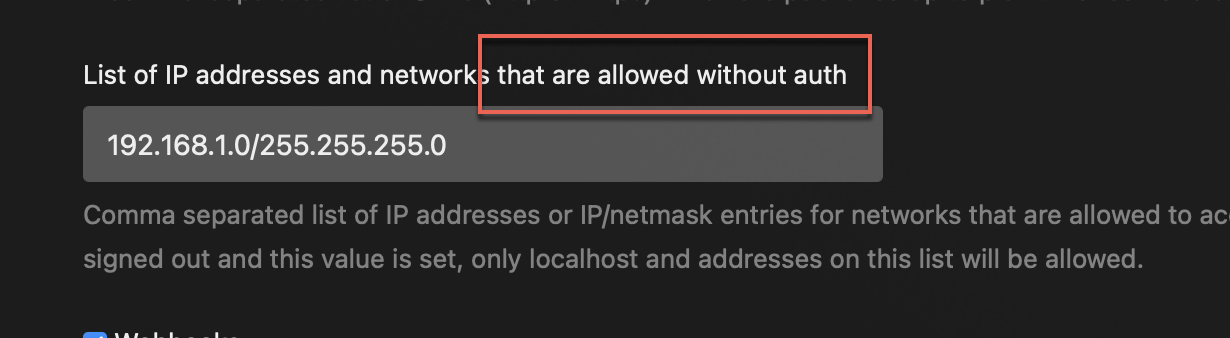
hm - and why is there still a settings stating: List of IP addresses and networks that are allowed without auth
What I meant was this:
You are free to fill in this setting after you have connected your server with your plex account.
But you won’t get far if you never connect a freshly set up server with an account.
Plex REQUIRES an internet connection to connect to your server, even in your home network. It uses this to make sure that local devices are who they say they are and are allowed to see the server.
If you wish to connect to the server anyway (without authorization), there is some setup, which Otto has explained. However, since Plex cannot verify each device that connects to your server, it cannot use “Managed user” accounts, and just “logs” you in as the server admin itself.
But how do you know it is disabled?
All accounts are in a home. The ability to leave a home is only for when you intentionally left your home and joined someone else’s. You can then leave their home, to return to your account’s own home.
Connecting to Plex without authorization is… difficult and you lose “managed users” functionality. In fact, even if you have a separate account for each user, connecting to a server without authorization connects you to that server as the server account itself. This means that everyone connecting will share the same movie “watched” states, and the “Continue Watching”. There is no way to use Managed Users like this.