Can't Remove Unavailable Plex Server

Server Version#: 1.25.5.5492
Player Version#: 4.74.2
Running in a FreeBSD Jail under TrueNAS.

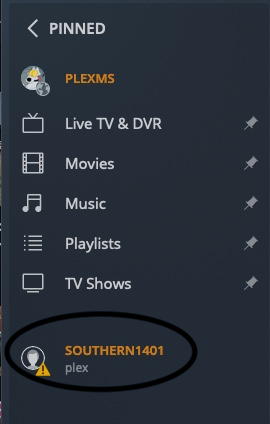
I have a friends server that was shared with me sometime ago but he has since stopped using it and I’d like to remove it from my account to stop the server from trying to reach out to it anymore. I’ve tried to go into my server and to Settings → Authorized Devices but the server is not shown in the list at all. The only server present is mine. Everything I find online says to go here to remove it but I can’t find it there to remove it. When I look at the server all I get is the triangle orange exclamation mark and a button that says retry connection. That’s it. No remove, no nothing. It just sits there trying to reconnect over and over again and I can’t do anything about it.

any help would be appreciated.

1 Like

Go to Settings → Home & Library Access, where you share your server with others.

You should see the server/libraries your friend shares with you and be able to remove them.


From an account with which I share a library. Selecting the X will remove the share.

Thanks for the tip. I don’t want to remove the user as I share my libraries with him still but I do want to remove his server from sharing with me. When I clicked edit on the user as you suggested I got an option to leave his server which I selected and it processed my leaving but his server still shows up when on my main menu I select More.

image

This will go away by itself in a few weeks.

Thanks everyone, @FordGuy61 and @OttoKerner are correct and I’ve marked it as the solution.

This topic was automatically closed 90 days after the last reply. New replies are no longer allowed.