Solution - don’t runt Plex through TV app, use a secondary device, my Xbox One is able to play through no problem.
Server Version#: 1.32.8.7639
Having issues with mostly 4k movies and some 1080p, not all but most. Running server on Beelink U59, Win 11, only running PMS, TeamViewer and an external hard drive. Main playback devices are Samsung Smart TVs through the built in app (I know not ideal, could be the main issue).
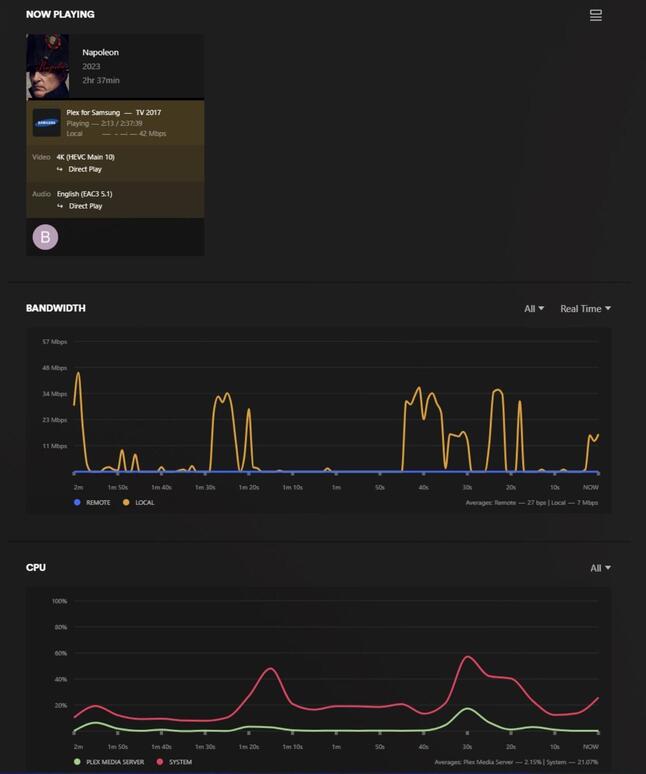
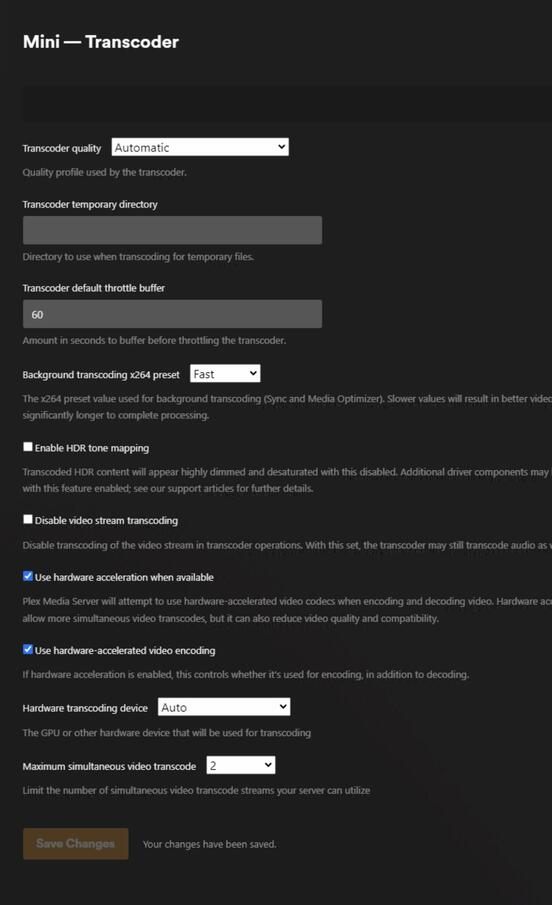
Direct Play & Stream enabled see pictures for settings and dashboard during 4k playback.
I don’t see the CPU usage spike during playback, I’m still unsure if this is a transcoding issue but from what I’ve gathered that’s all it seems it could be (even though it says it’s direct playing!?)
Please help, I’ve been researching for days with no fix.
Debugging logs will help, how is everything connected (wired, wireless)?
What are the specs of your server?
Is it that you can’t play period or you get a ton of buffering?
If the dashboard says it’s direct playing there’s no transcoding happening.
How is the external drive mounted/connected to your server?
If some 1080p won’t work either then it could be a USB speed issue or something similar.
Not enough detail in what you’ve posted.
Thanks for the reply. I get a ton of buffering, some skipping and pixelated scenes, it is unwatchable. I was able to get one 4k movie to play seamlessly last night but I tried two others with the above issues. I’ve gotten the “not enough CPU to convert” message a few times as well.
It’s running on a Beelink U59 Mini PC:
Win 11 Pro
Intel Celeron N5105
16GB RAM
500GB SSD
WiFi Connected to my home network (940up/940down)
WD easystore 18TB USB 3.0
Fairly new to Plex, debug logs don’t seem to show much, should I get a screencap of the logs when the 4k fails to play? If it’s direct playing why is it buffering like crazy?
Thanks
Wi-Fi is going to be your main bottleneck here, especially for 4K video - high bitrate 1080p likely too as you’ve noticed.
Screenshots don’t do any good really, check here for how to obtain logs.
https://support.plex.tv/articles/200250417-plex-media-server-log-files/
The error you showed about CPU could be an indication of something, but it’s hard to say without seeing what was playing at the time of the error.
This could be a few things, have you checked to see in the forums or elsewhere if anyone else is having issues with the Samsung TV Plex app?
In my personal experience, it was due to not having the right HDMI cable going from my Shield to the TV but you’re using the TV app, so that doesn’t track here.
I will try using a wired connection, I’m leaning towards that and the Samsung TV app being the issues. Everything I’ve read has said the TV apps suck for playback but it’s all I have at the moment, will likely get a Shield eventually but I’ve only had Plex for a month or two now and wanted to make sure it was worth it before investing more. My brother was having similar issues on his Chromecast even with speeds between 300-400 down, so I was worried it was a transcoding issue, but direct play was enabled and showing.
I’ve linked the log zip file, please let me know if there is anything I can look for or you can find. I appreciate your help with this.
Plex Media Server Logs_2024-01-10_08-46-32.zip (4.3 MB)
Just an FWIW, a 5Ghz WiFi connection is going to have a far superior connection than a wired one as every tv I’m aware of has a a 100Mbps limit for wired.
Yes I’m aware TVs are limited , I have one TV wired and one wireless both speed tests were under 100Mbps, I think I may have better luck with the buffering on 4k if I run wired to the Mini PC running the server. I honestly don’t know why I hadn’t just plugged it into another ethernet jack in my house but will be trying it out after work.
It was meant more as an observation to the prior post recommending you switch to a wired connection. Personally I suspect your USB3.0 WD EasyStore is more likely to be a potential culprit for high bitrate 4K.
Interesting, I didn’t think that would cause issues. I’ve looked into it a bit and USB 3.0 should be fast enough for streaming and has a decent drive inside it similar to 5400rpms/256MB/s or possibly 7200rpm/269MB/s.
USB 3.0 has transmission speeds of up to 5 Gbit/s or 5000 Mbit/s, I don’t think your issue is your EasyStore. I suggested wired for a more stable connection, yes TV’s are typically limited to 100mb connections, but Wi-Fi instability/interference could cause stuttering for video playback.
Fixed! Running Plex through my Xbox, no issues with 4k. Also moved the server to an ethernet port.
Awesome! Glad you got it working, this would have been my suggestion as well.
I’m glad that TV manufacturer’s are adding the Plex app to their TV’s, but I feel like Plex’s own profile system for clients shoots them in the foot for compatibility. They try to use a “one size fits all” profile last I checked for TV’s which does no good when they’re all capable of different things.