I can watch Live TV but if I choose a movie it only lets me watch the trailer. I’ve gone into settings->debug and disabled Direct Play and Direct Stream but that didn’t help. I also went here (C:\Users\Dad\AppData\Local\Plex Media Server\Codecs) and deleted what was in the folder but that didn’t help. I also went into settings->quality and changed it to Maximum, but that didn’t help.
Plex Media Server.1.log (474.0 KB)
What should I do?
Edit: When I try to watch a movie, I get Playback Error: An error occurred trying to play “Mirror Mirror”.
Error code: s3016 (Media)
Don’t do that.
Please post the last log or simply the whole zip archive.
The log you’ve posted doesn’t contain any playback attempts.
Ensure that you have NOT checked
Settings - Server - ‘Show Advanced’ - Transcoder - “Disable video stream transcoding”
Side note (NOT related to the above): go to C:\Users\Dad\AppData\Local\Plex Media Server\Plug-ins and remove the folders which bear the name of long-defunct plugins.
I have not checked Disable video stream transcoding under Settings->Transcoder
Plex Media Server Logs_2024-09-01_10-56-49.zip (5.3 MB)
“remove the folders which bear the name of long-defunct plugins”
When I go to C:\Users\Dad\AppData\Local\Plex Media Server\Plug-ins I see five folders. How do I know which ones can be deleted?
Was wondering if anyone on this forum could take a look at my logs and tell me why I can’t play any movies on my TV or computer–see first post. (I can watch Live TV, and I can play the movies that I’ve shot with my camera.)
Sorry, this thread slipped my attention!
I have inspected your logs. It seems that there was not a single playback from your server since July. Is this correct?
Are you actually trying to play media that are stored on your server? Or are you browsing through the metadata collection of the Discover library?
HGTV.bundle
National Geographic.bundle
TVLand.bundle
Vimeo.bundle
Thanks, I deleted those old plug-ins.
I can play my media that I’ve added to Plex (music and home movies) on my PC and TV with no issues. But I can’t play any of the hundreds of movies that I see on Plex when I click “Movies & Shows.” On my PC, when I click on a title, I get a background image and the spinning orange circle for several minutes and then the playback error message. When I try on my TV, I basically get the same result. (It doesn’t matter if I use the Roku Plex app or the Plex app on my LG TV. )
I don’t believe I’ve ever been able to watch these movies through Plex, but my understanding is that I should be able to watch all of these movies even though I’m not a Plex Pass member.
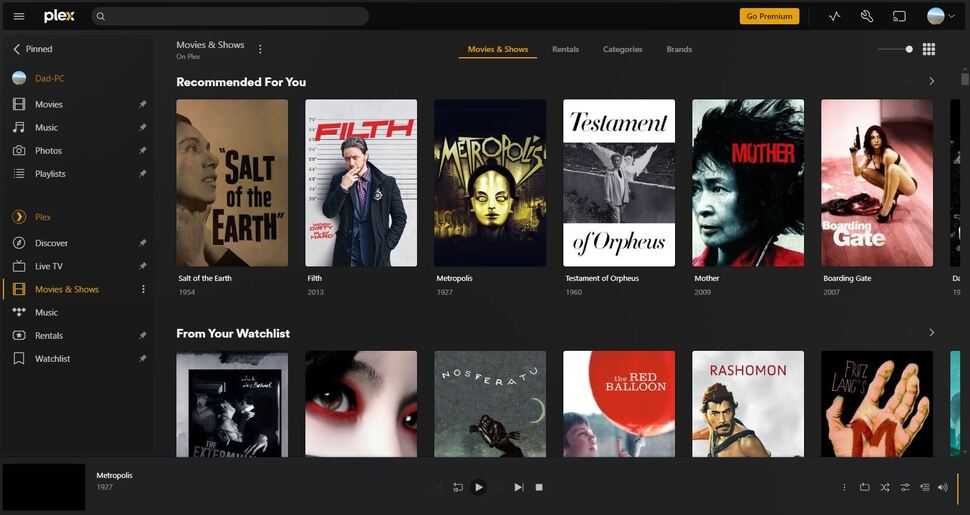
*I just confirmed that the problem still exists.
Playing these movies requires you to have:
- a working HDCP connection between the graphics adapter and your screen (when playing directly on the computer)
- a working implementation of Digital Rights Management in your web browser , https://support.brave.com/hc/en-us/articles/360023851591-How-do-I-view-DRM-protected-content Watch DRM content on Firefox | Firefox Help
- no ad-blocker, neither in your web browser, nor in your local network/router
- no other browser add-in which can interfere with advertisements, or communication from your browser back to plex.tv about the successful playback of said ads
On which Plex client types have you tried to watch?
- Because I can watch the movies I’ve created through Plex on my PC and TV, I must have a working HDCP connection, right?
- Since I can stream Netflix movies on my PC and TV, it’s not a DRM issue, right?
- I just tried again using two different browsers–Brave and Google Chrome. I disabled all browser add-ins and pop-up blockers but still no success.
On my PC, I’m using the latest Plex version on Windows 10, and I made sure the app versions of Plex on my TV are up to date.
No, these are your own videos and don’t require a working DRM chain of trust.
Furthermore, they are being streamed from your own server, while the videos in Movies & TV Shows are being streamed directly from plex.tv.
The best way forward is to fetch log files from your players.
It has to be the players, because your server is not involved with free on-demand streaming.
Reproduce the issue, then fetch the logs.
Here is how to do it on the plex web app: https://support.plex.tv/articles/201611836-plex-web-app-logs/
(please copy the log into notepad.exe, then save it as .txt file and zip it before uploading)
The support articles tell you how to get the logs on other player platforms: https://support.plex.tv/articles/categories/player-apps-platforms/
Here’s the first thing you asked for. I’m attaching two debug logs: debug 1.txt (Brave browser) & debug 2.txt (Google Chrome browser). I tried watching a movie on each browser and watched the circle spin for 10 min before stopping it. There were no error messages but I’m guessing if I hadn’t hit stop, the circle would have just spun all day.
debug 2.zip (3.3 KB)
debug 1.zip (3.5 KB)
Edit 1: Unfortunately, after reading several articles and messing with Roku settings and Plex app settings, I cannot figure out how to get log files from my TV.
Edit 2: I did enable Remote & Local Logging on my Roku Plex app at 5:25pm EST, so maybe you have a way to access the remote log?
Thanks for the logs. Would you be able to grab the Console Logs too as described in the article @OttoKerner linked? I believe the errors suggest though that your browsers are unable to decrypt the content. Do you still have playback issues if you play in an incognito tab? Do you have any software installed on your computer that would prevent playback of DRM content?
I think you all for your help!
Turns out it was Cleanbrowsing that was blocking Plex. I changed the DNS servers and it now works. 
1 Like
This topic was automatically closed 90 days after the last reply. New replies are no longer allowed.
